How to move the "C:\users\username\AppData" folder to another drive from C:\ drive?

Anonymous
2022-02-12T05:23:39+00:00

I have installed the windows 11 OS to a SSD drive having 100GB capacity. Its 70GB already filled up and the maximum space is taken by the Program Files, Program Files (x86) and the Users folder.
I already moved the C:\users\username(Downloads, Documents, Pictures, Music, 3D Objects, Videos) folders to a HDD of 1TB capacity, the E:\ drive. But I could not move the AppData folder there.
I want to migrate them to the E:\ drive from the source C:\ drive, so that in future whatever app I will install, every AppData will be stored by them to the E drive.

How can I do this? Please suggest me some ways.

Windows for home | Windows 11 | Files, folders, and storage

Locked Question. This question was migrated from the Microsoft Support Community. You can vote on whether it's helpful, but you can't add comments or replies or follow the question.

0 comments No comments
{count} votes

7 answers

Sort by: Most helpful
  1. Anonymous
    2022-02-12T07:53:45+00:00

    Can I do this only to the AppData/Roaming?
    not to the AppData/Local and AppData/LocalLow?

    Hi

    Thanks for your reply.

    As shown in the figure below, each key-value corresponds to a different folder, for example, the green box above represents the roaming folder, and the one below represents the Appdatalocal folder, you can select the one you need to move and backup.

    Feel free to post back if you need more assistance. ^.^

    Best regards

    Derrick Qian | Microsoft Community Support Specialist


    * If your problem is not solved, you could reply to the post again and we would continue to provide technical support for you.

    * Please check and vote this answer if it helps as it will be beneficial to more community members reading here.

    25 people found this answer helpful.
    0 comments No comments
  2. Anonymous
    2022-02-12T06:06:38+00:00

    Hi GourabSMondal,

    Sorry to hear that you're experiencing this issue!

    I am Bhavik, a Microsoft user like you. Please note, I am not a Microsoft employee and don’t have direct access to your account, but I will do everything I can to help you with your queries. :)

    Unfortunately, the AppData folder is one of the important system folders and should not be moved just like that from the OS drive. It can cause some serious issues in your installed OS. Program Files and Program Files (x86) do fall under the same category, they should also not be moved.

    In order to increase the space on C Drive, I would recommend extending the volume by adding some extra space to it from another volume.

    Thanks

    Bhavik

    18 people found this answer helpful.
    0 comments No comments
  3. Anonymous
    2022-02-12T06:07:40+00:00

    Hi

    Welcome to the Microsoft community.

    You can follow the steps below to transfer the AppData folder.

    Open the registry, then locate to

    HKEY_CURRENT_USER\Software\Microsoft\Windows\CurrentVersion\Explorer\Shell Folders

    and

    HKEY_CURRENT_USER\Software\Microsoft\Windows\CurrentVersion\Explorer\User Shell Folders
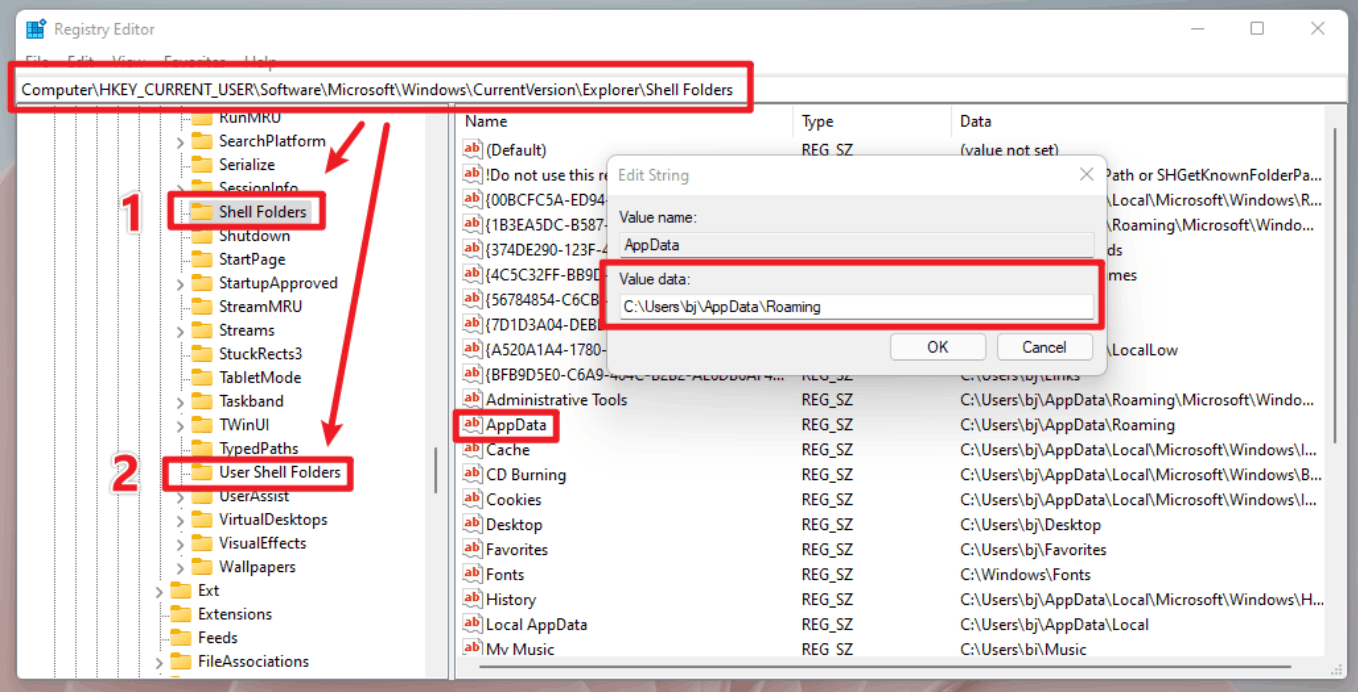
    Image

    Double-click AppData in the 1 and 2 directories and change the path to the folder directory you want to transfer in the pop-up box.

    Then copy all the data in the original AppData directory to whichever directory you modified, and finally restart your computer.

    You could try to delete the AppData directory of the original disk, some software may be affected.

    Disclaimer: Generally, modifying registry subkeys or work group is intended for advanced users, administrators, and IT Professionals. It can help fix some problems, however, serious problems might occur if you modify the registry incorrectly. Therefore, make sure that you follow these steps carefully. For further protection, back up the registry before you modify it. Then, you can restore the registry if a problem occurs. For more information about how to back up and restore the registry, click here to view the article.https://support.microsoft.com/en-us/topic/how-to-back-up-and-restore-the-registry-in-windows-855140ad-e318-2a13-2829-d428a2ab0692

    You are welcome to reply to this topic at any time, and sincerely thank you for your support of Microsoft products and services.

    Feel free to post back if you need more assistance. ^.^

    Best regards

    Derrick Qian | Microsoft Community Support Specialist


    * If your problem is not solved, you could reply to the post again and we would continue to provide technical support for you.

    * Please check and vote this answer if it helps as it will be beneficial to more community members reading here.

    178 people found this answer helpful.
    0 comments No comments
  4. Anonymous
    2022-02-12T06:27:24+00:00

    Can I do this only to the AppData/Roaming?
    not to the AppData/Local and AppData/LocalLow?

    10 people found this answer helpful.
    0 comments No comments
  5. Anonymous
    2022-02-12T08:11:21+00:00

    I did this for the Local appdata, but when I rebooted the system after copying the contents in %USERPROFILE%\AppData\Local to the desired D:\ folder, bt after rebooting, every keyboard shortcuts with windows key became disappeared, like as I pressed WinKey+I to open settings, WinKey+E to open explores, but they just fetched nothing but an error sound. Also, the taskbar icons didn't appear and remained blank for the whole time. Pressing winkey didn't open the start menu, but responded with an error sound. Then I again went to the Regedit opening from file manager backup copy and there imported the untouched backup which I did at first, and reverted the all changes and restarted. Then everything became normal after rebooting. Afterwards I changed the Roaming appdata Regedit key as you mentioned above, that is OK. Changing the Roaming AppData folder location completed smoothly and produced no problem.

    What should I do?
    Again try on changing the folder location of Local AppData?

    8 people found this answer helpful.
    0 comments No comments
