Microsoft 365 and Office | SharePoint | For business | Windows
A group of Microsoft Products and technologies used for sharing and managing content, knowledge, and applications.

This browser is no longer supported.
Upgrade to Microsoft Edge to take advantage of the latest features, security updates, and technical support.
' cx='32' cy='32' r='32' /%3E%3Ctext x='50%25' y='55%25' dominant-baseline='middle' text-anchor='middle' fill='%23FFF' %3EMG%3C/text%3E%3C/svg%3E)
Hey :)
So i scanned the forums for an answer to this, of which there are a couple but they still dont answer my question.
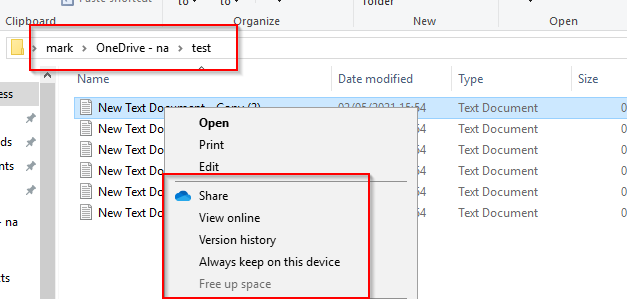
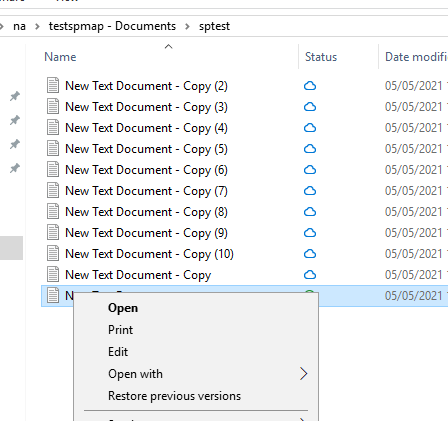
When using SharePoint the FOD works (I get the symbols) but what i dont get is the right click menu with "Share, View Online, Version History, Always Keep On This Device and Free Up Space" like i get in OneDrive basically making SharePoint FOD useless as any user that looks at a file cant then return it to the cloud so it doesn't use local space, the reason for FOD, any ideas as to why this is?
This is OneDrive options
This is the SharePoint Options:
' cx='32' cy='32' r='32' /%3E%3Ctext x='50%25' y='55%25' dominant-baseline='middle' text-anchor='middle' fill='%23FFF' %3ECM%3C/text%3E%3C/svg%3E)
Hi @Mark Gray
Have you tried to reinstall OneDrive? You can reinstall OneDrive and restart the OneDrive sync client.
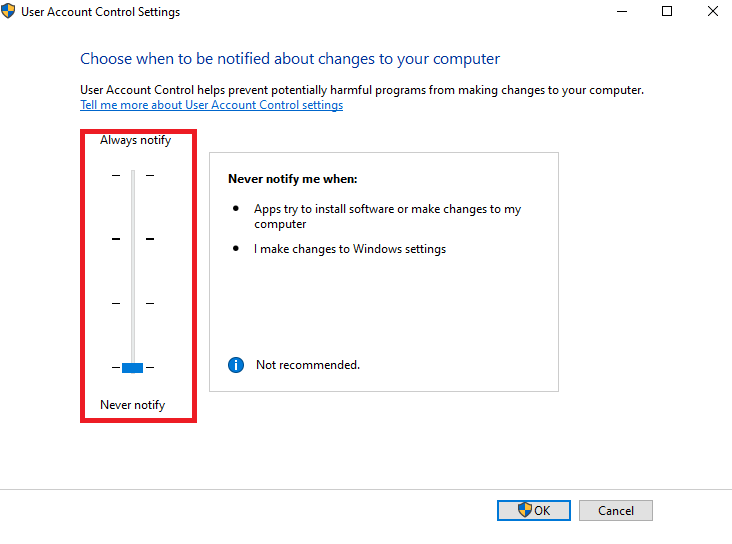
And remember to turn off the User Account Control: Open UAC settings -> Drag the slider down to Never notify -> Ok.
References:
https://community.spiceworks.com/topic/2257369-onedrive-for-business-missing-right-click-options
https://answers.microsoft.com/en-us/msoffice/forum/msoffice_onedrivefb-mso_win10-mso_o365b/missing-share-button/22ea3512-a927-452a-b8ff-deae55d96f0c
Note: Microsoft is providing this information as a convenience to you. The sites are not controlled by Microsoft. Microsoft cannot make any representations regarding the quality, safety, or suitability of any software or information found there. Please make sure that you completely understand the risk before retrieving any suggestions from the above link.
If an Answer is helpful, please click "Accept Answer" and upvote it.
Note: Please follow the steps in our documentation to enable e-mail notifications if you want to receive the related email notification for this thread.
Hi @Mark Gray
I'm checking how the things are going on about this issue. Whether the answer helps you?