Can't undo System Restore

Anonymous
2022-02-04T08:06:39+00:00

Dear community,

I hope you can help me out.

My ASUS was working just fine, but I realized that my hard disk stopped showing up on my PC. I have an SSD installed, so most of my software was installed in the missing hard disk. After researching a bit online, I decided to give it a go to the most recommended option which was to do a System restore to a previous restore point.

After doing the restore, I realized that the situation was worse and I wanted to undo the system restore.

Now, I tried both ways, and I have checked online for other options without success:

  1. by doing an advanced startup - repair - advanced options - system restore.
  2. by going to System Properties - System Restore - Selecting C - system restore

But whatever I do, I always land on the following error (see image). I don't have an "undo the system restore" option. It is driving me crazy, as the restore was a huge mistake and I regret it so much, having lost a lot of important data.
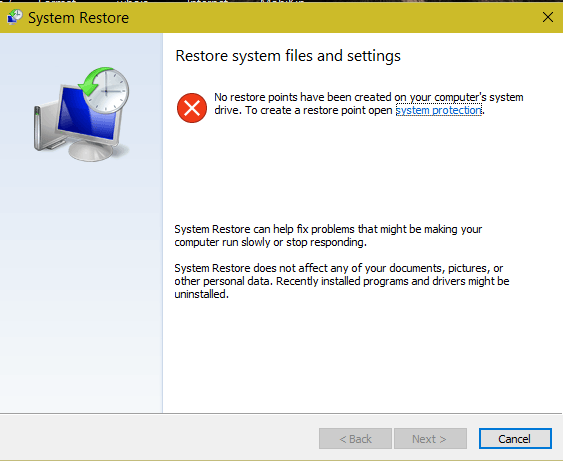
Please, a bit of help would be greatly appreciated!

Thank you,

Mario

Windows for home | Windows 10 | Windows update

Locked Question. This question was migrated from the Microsoft Support Community. You can vote on whether it's helpful, but you can't add comments or replies or follow the question.

0 comments No comments
{count} votes

20 answers

Sort by: Most helpful
  1. DaveM121 816.5K Reputation points Independent Advisor
    2022-02-04T08:40:57+00:00

    Hi Mario,

    I am Dave, I will help you with this.

    A System Restore cannot be undone, there is no mechanism in Windows to do that.

    You indicate you have lost a lot of files, where were those files stored, was that on the System drive or the secondary drive, and can you now see that secondary drive?

    0 comments No comments
  2. Anonymous
    2022-02-04T08:42:02+00:00

    A restore will have no impact on a HW problem

    Presumably the ssd is the win drive, is the HD an internal drive or an external?

    If you start the PC, Disk Management (create/format Partitions) is this HD shown?

    If its an external disconnect it and plug it back in, any change?

    If not its failed

    0 comments No comments
  3. Neil D 30,270 Reputation points Volunteer Moderator
    2022-02-04T08:47:26+00:00

    What does Disk Management show regarding the HDD. Right click Start and select Disk Management, post a screenshot of the result. Also check in Device Manager to see if the second drive is detected.

    If it is not visible in either of those locates boot to the bios and check there to see if the second drive is detected.

    0 comments No comments
  4. Anonymous
    2022-02-04T09:00:49+00:00

    Hi Dave,

    Thank you for your response. Undoing the system restore is an option that should appear, like in the following image (google). That's why I don't understand why it isn't the case for me!

    0 comments No comments
  5. DaveM121 816.5K Reputation points Independent Advisor
    2022-02-04T09:04:24+00:00

    Hi Mario90cn

    If you have no other restore points, as indicated in your original screenshot, there will be no way to undo the System restore, because there is no other point in time to set your system to.

    Where were the files you have lost, it is unusual for a System Restore to affect users files, that normally only restores system files, system settings and the registry.

    0 comments No comments

