Why I get upgrade messages when trying to deploy?

mq 6 Reputation points
2021-05-06T09:10:13.807+00:00

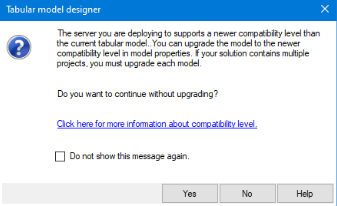
I wasn’t able to deploy a cube, because I received the next message:

94358-image.png

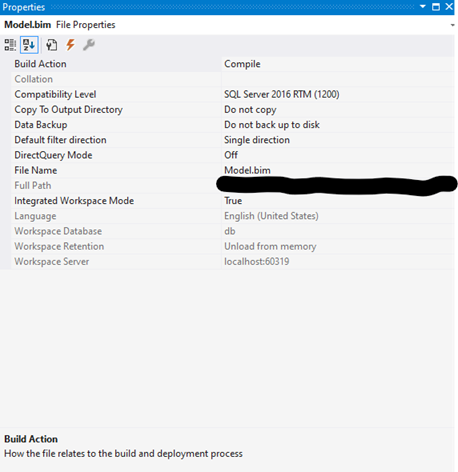
In my cube I have compatibility level 1200:
94310-image.png

The server is:
94413-image.png

I always clicked ‘no’ because I didn’t know the implications of the upgrade… On one occasion I pressed the cross ‘X’ and it went through…

My questions are:

  • Why it deployed even though I clicked X?
  • Should I upgrade my tabular model to 1500, what are potential issues I shall face?
  • How do I upgrade my model to 1500, do I just right-click on the properties of the model.bim??
SQL Server Analysis Services
A Microsoft online analytical data engine used in decision support and business analytics, providing the analytical data for business reports and client applications such as Power BI, Excel, Reporting Services reports, and other data visualization tools.
0 comments No comments
{count} votes

1 answer

Sort by: Most helpful
  1. Lukas Yu -MSFT 5,826 Reputation points
    2021-05-07T06:18:58.28+00:00

    Hi,

    • Why it deployed even though I clicked X?

    This may due to Visual Studio UI design. When you clikc X, you need to in the following deployment window click "stop" deployment.

    • Should I upgrade my tabular model to 1500, what are potential issues I shall face?

    Normally I would suggest so. 1500 has a lot of new features such as support for various datasource. Also since 1500 is the default model of your server , the action is suggested. Not much issue is expected, but it depends on the complexity of your project. Normally the transistion should be smoothly

    • How do I upgrade my model to 1500, do I just right-click on the properties of the model.bim??

    Yes, in the property, choose and change for 1500 compatibility level.

    Regards,
    Lukas


Your answer

Answers can be marked as 'Accepted' by the question author and 'Recommended' by moderators, which helps users know the answer solved the author's problem.