Microsoft Teams | Microsoft Teams for business | Other
Additional features, settings, or issues not covered by specific Microsoft Teams categories

This browser is no longer supported.
Upgrade to Microsoft Edge to take advantage of the latest features, security updates, and technical support.
' cx='32' cy='32' r='32' /%3E%3Ctext x='50%25' y='55%25' dominant-baseline='middle' text-anchor='middle' fill='%23FFF' %3EJ%3C/text%3E%3C/svg%3E)
Here is the scenario. I have an existing recurring/monthly channel meeting setup in a Microsoft Team. (20 people). Every now and then I add a new person to the Team and attempt to also add them to the recurring channel meeting. However, when I do that and "Send Update", it sends a new notification to everyone on the team regarding a change to the meeting...and then they all accept the meeting again. Is there a way to have that notification only go out to the new added person? Thanks. By the way, as a work-around, I tried just forwarding he meeting from Outlook. However, when you do that it adds them as an Optional attendee. I didn't see how you can forward as a Required attendee. (I assume I'm making this more difficult than it is...so thought I would reach out.) Thanks for any help.
Additional features, settings, or issues not covered by specific Microsoft Teams categories
' cx='32' cy='32' r='32' /%3E%3Ctext x='50%25' y='55%25' dominant-baseline='middle' text-anchor='middle' fill='%23FFF' %3ELZ%3C/text%3E%3C/svg%3E)
I have a follow-up question there: for a recurring meeting (e.g. Monday morning team meeting throughout the whole year), how can I add a new participant to the meeting and make it show in her/his calendar only from the date s/he joined, say May instead of the entire 2023? Sometimes even though I added someone to the recurring meeting (assuming it will go out as ONE notification), it appears the person receives multiple invites.. how to avoid that?

@ jason4tl,
It recommends you update the meeting in Outlook. When you send the update, it will popup a message as below. “Send updates only to added or deleted attendees” option is a suitable choice.
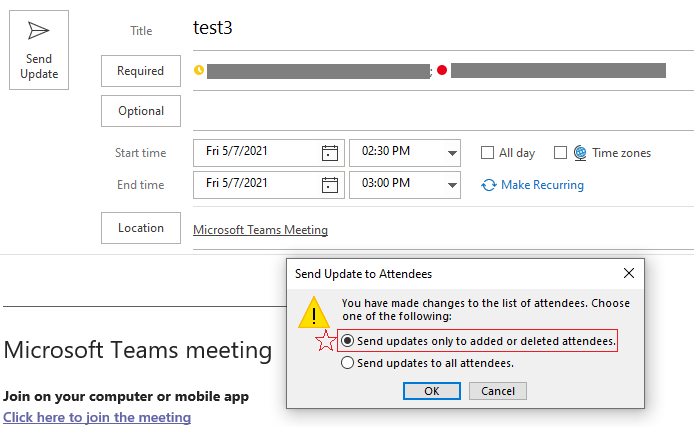
If the response is helpful, please click "Accept Answer" and upvote it.
Note: Please follow the steps in our documentation to enable e-mail notifications if you want to receive the related email notification for this thread.
Thanks for the response but I don't get an option to edit the recurring channel meeting from Outlook. You might want to try to setup your example as a recurring channel meeting in Teams. Then see if you're able to do that.
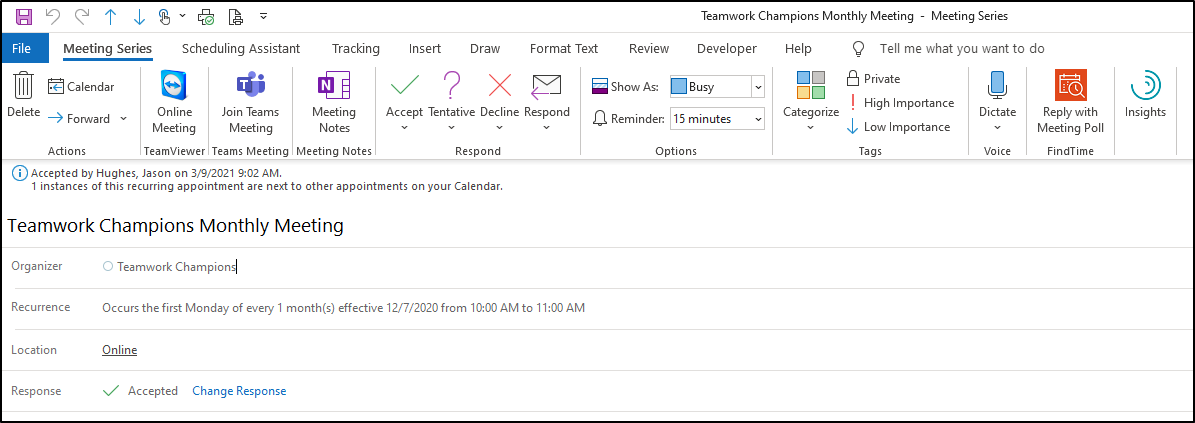
Only the one who schedules this meeting can edit it.
According to your image, you are only the attendee.
You can see from Teams that I am the organizer...but remember this is a channel meeting...not a private meeting.

Sorry for the mistake.
About channel meeting, it can only be edited in Teams client. So, we could not get an option to edit the recurring channel meeting from Outlook. I didn't find other good methods to realize your request now.
I created a feedback in Teams UserVoice. You could vote for it here.
Microsoft will always focus on customer’s feedback and experience. Some new features would be added to the services based on customers' feedback in the future, and your good ideas will be very helpful for them to improve the service.
Your time, understanding and cooperation will be highly appreciated.
' cx='32' cy='32' r='32' /%3E%3Ctext x='50%25' y='55%25' dominant-baseline='middle' text-anchor='middle' fill='%23FFF' %3EEV%3C/text%3E%3C/svg%3E)
As @jason4tl describes - can you add the whole group to Outlook invitation and get the message you refer to, ?