Adding more info, whilst in a game in valorant i went into my sound menu thing, and it says that my headset has audio (it does not) even when going to configure it I i went to do the stereo speaker thing just for no audio to be present, another thing, when i disabled sound enhancements I had sound for one (1) valorant game, after which the next valorant game had no sound once more.
Audio issues in-game
hi, so for the life of me i cannot get my sound to work in any game, let's use valorant for example, i turn on my pc, i connect my headphones, i load into the game (the sound being fine in the menu) and as soon as i hit the character selection screen i am met with great silence, same happening in r.e.p.o. my mic still works fine as far as I'm aware but sound just disappears, i have checked the drivers, i have checked the headset (same issue w a pair of bluetooth earbuds) I have restarted windows sound thingies like three times now, my latest grasp at straws was that my "base system device" (whatever that means) has no drivers installed? but when i tell windows to search for them nothing is found, if you have any ideas or suggestions how can I go about and fix this please do let me know, I am also fine with providing any extra information.
Windows for home | Windows 10 | Devices and drivers
Locked Question. This question was migrated from the Microsoft Support Community. You can vote on whether it's helpful, but you can't add comments or replies or follow the question.
12 answers
Sort by: Most helpful
-
Anonymous
2025-04-01T15:32:34+00:00 -
Siva Shankar 10,820 Reputation points
2025-04-01T18:29:51+00:00 Hello ,
I’m here to help you in resolving your issue
Update or Reinstall Audio Drivers :
Since you mentioned a "Base System Device" missing drivers, let's fix that:
1: Press Win + X > Device Manager.
2: Expand Sound, Video, and Game Controllers.
3: Right-click your audio device (Realtek, NVIDIA, or Bluetooth Audio) > Update Driver.
4: Choose Search automatically for drivers.
5: If this doesn’t work, uninstall the driver and restart your PC.
6: If your motherboard has Realtek Audio, download the latest driver from the manufacturer’s website.
For missing "Base System Device" drivers:
1: Check Device Manager > Other Devices.
2: If Base System Device is listed there, it may be missing a chipset driver.
3: Download chipset drivers from your laptop/motherboard manufacturer’s website
After trying above steps, please reach out to me if you have any doubts or issues
Help others by sharing your experience! Click “Yes” if this solution worked for you or “No” if it didn’t.
-
Anonymous
2025-04-02T17:21:19+00:00 hi, so i uninstalled both of my bluetooth's headset drivers, went to msi's website and downloaded the newest drivers (my motherboard appears to be an msi H310 gaming plus, didn't find the exact model on msi's website so i downloaded the drivers made for the H310m gaming plus and hoped for the best) then reset the pc, new drivers did show up, audio issue still present, as soon as i hit the character select screen in val the great silence begins, I'm not quite sure how/where am i supposed to look for a chipset driver though...
My newest grasp at straws is that maybe it's a hardware failure on my xbox headset (the official xbox wireless headset) and that it's the chatmixing trying to chatmix and just muting all game audio, although, this theory has quite a few holes the main one being this headset used to work fine before and the fact same issue happens with bluetooth earbuds that don't feature chatmixing, this really does stink of software issue imo, but alas, if the chipset driver thing doesn't fix this, I'll get a new headset before continuing fixing this through software
hi, edit chris here, so i tried a different headset (skullcandy rail bluetooth earbuds) and the same issue persists, i tried activating the steelseries gg sonar thingie so that all audio would go through that first, and even it says it's outputting audio (it is not) the mic seems to be picking up well though, and the earbuds work flawlessly whilst just watching youtube without a game open, when i went through sound settings i told windows to update the rail's drivers but it found nothing (there's also two rail's, one doesn't work in game (works great in firefox yt, one that works everywhere but it sounds like I'm listening to the audio behind a wood wall)
okay, final notes, I believe the pc is killing all audio because of something associated with audio mixing, I'd assume it's for some reason set to 100% chat and 0% game but I should be able to hear my teammates in valorant then no? Well, idk, I'm actually going insane trying to troubleshoot this
-
Siva Shankar 10,820 Reputation points
2025-04-02T18:49:53+00:00 It really sounds like Windows or Valorant is redirecting audio incorrectly, possibly due to chat/game mix settings or conflicts between Windows, MSI drivers, and your Bluetooth headset profiles.
Disable Hands-Free Mode (Bluetooth Issue)
1: Go to Sound Settings (Win + I > System> Sound).
2: Scroll down to Advanced sound options > App volume and device preferences.
3: Locate Valorant and see what output it's using.
4: If your headset is listed twice (one as "Stereo" and one as "Hands-Free"), make sure it’s using the Stereo version, NOT "Hands-Free."
5: Go to Control Panel > Sound> Recording tab.
6: Right-click the Hands-Free headset > Disable it (this prevents Windows from forcing chat mode).
Manually Set Bluetooth Codec & Profile
1: Right-click the Sound icon > Sound settings.
2: Click "More sound settings".
3: Select your Bluetooth headset > Click Properties.
4: Go to the "Advanced" tab and change format to 24-bit, 48000 Hz.
5: Disable exclusive mode (uncheck both boxes).
6: Test in Valorant.
-
Anonymous
2025-04-02T20:36:24+00:00 Okay, here's how it went:
got out of a discord call, launched val, no sound in the menu
reset my pc
launched val, opened firefox, there's sound in val menu, val was using the defuault options for both input & output
start a custom game, as soon as i hit the character selection screen - silence
went into my my control panel, then the recording tab and disabled my "headset microphone Xbox wireless headset hands-free ag audio" sound returned, clear sound at that
but now my mic is dissabled :(
quit val
right click my sound icon and press "open sound settings"
fail to find "more sound settings"
go back to my control panel, find my headset ("Xbox wireless headset stereo") click it, click properties > advanced and the option to change format is greyed out
i uncheck exlusive mode, take the snippit (provided below) and exit everything except settings
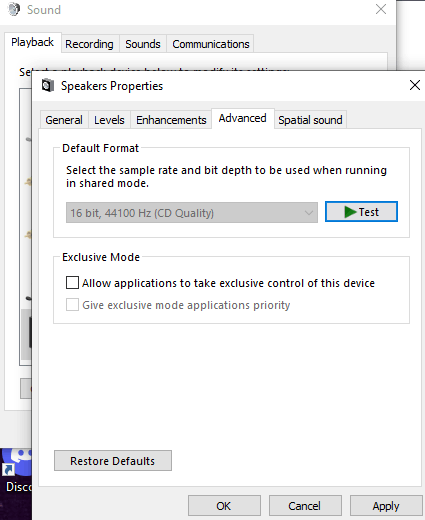
launch val
launch a custom game, sound works fine, mic is silent
quit val
go online into some sort of mic testing website, no mic detected
So, whilst the sound issue is now fixed, a new issue arose, my mic is now disabled, and I'm afraid that re-enabling it will just bring back the sound issue
me feeling brave starts here
then, control panel, re-enable headset mic , go to properties, listen and select "Playback through this device" to be the "speakers(Xbox wireless headset stereo)"
test in val, sound is fine, mic is silent
test mic online, website sees the mic but says it failed to capture any audio (I was producing audio at that time)
cry
okay but serious talk, sound works perfectly fine now even when in a custom match, beyond the character selection screen, but the price for that was my mic working, which is not the best compromise, I'd like to both have sound and a mic
Thank you so far for thy assistance, not sure if you can help me with my new mic issue, although I do definitely need some help
