Hello,
I'm using Windows 11 Pro 24H2 (x64) and recently installed the June 2025 Cumulative Update (KB5063060). Since then, I'm experiencing higher RAM usage immediately after system startup — without opening any applications. After installing the 2025‑06 Cumulative Update (KB5063060) on Windows 11 Version 24H2 (x64), the Search and Antimalware Service Executable processes now consume significantly more RAM at idle—causing overall memory usage to jump from ~16 % to ~19 %.
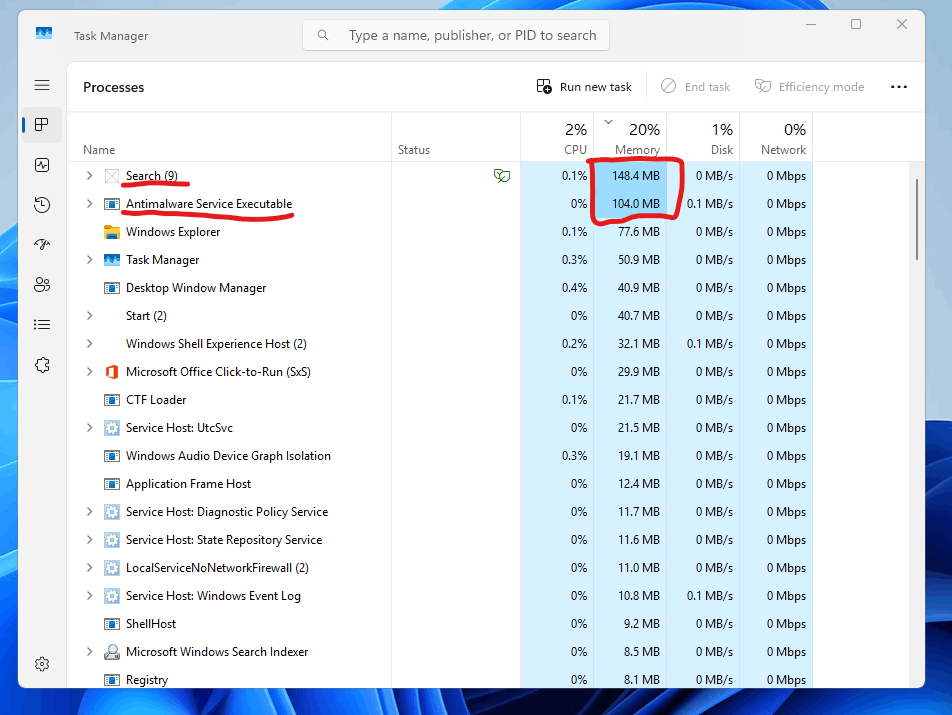
🔍 What I noticed:
- Before update: Idle RAM usage was around 16%
- After update: Idle RAM usage is ~19%, consistently
- The ‘Search’ process is using about 142MB RAM, which is significantly more than before
- ‘Antimalware Service Executable’ is also taking ~120MB RAM on average
These processes were previously lighter and didn’t affect performance. Now, they feel bloated right after a clean boot. I keep my PC clean and don't use third-party antivirus. Only default Windows Defender is active.
💻 My System Specs:
- CPU: AMD Ryzen 5 5600G
- Motherboard: ASUS TUF Gaming B450M Pro II
- RAM: 16GB Corsair Vengeance LPX DDR4 3200MHz
- SSD: HP EX900 120GB (C Drive)
- HDD: Toshiba P300 1TB
- GPU: Integrated Vega 7
- OS: Windows 11 Pro, fully updated (KB5063060)
Has anyone else experienced this after the recent update?
Is this a known issue, or is there any fix or workaround to bring background RAM usage back to normal?
Thanks in advance for any help!
' cx='32' cy='32' r='32' /%3E%3Ctext x='50%25' y='55%25' dominant-baseline='middle' text-anchor='middle' fill='%23FFF' %3EA%3C/text%3E%3C/svg%3E)
