Hello,
My friend has replaced his motherboard, RAM, GPU and CPU in his PC and is now crashing when it is playing gamed. I am pretty certain the crash is related to GPU. His new motherboard is a gigabyte z790 gaming plus AX and his new GPU is 5070ti. He also upgraded from windows 10 to windows 11.
It is also worth noting he bought the new motherboard, RAM and CPU *FIRST* and tried his old GPU, but it did not work with Oblivion (crashed often) so he upgraded that using DDU to uninstall previous GPU drivers first.
His PC will crash or restart only when playing games, and games he used to be able to play now crash as well.
I can't go through and check his system logs at all as he is receiving "WHEA-Logger" events constantly and it is drowning out all other events. I'd like to fix this event (and I mean, maybe if that fixes the whole problem) and then go from there.
I've reached the end of what I can do without help.
We have tried:
- Updating every driver under the sun (particularly motherboard manufacturer drivers & nvidia drivers)
- Changing power settings (windows & nvidia)
- We can't find any sort of PCI settings in BIOS so we can't change any settings for the PCIe port itself, as other posts have suggested
Description of issues occurring:
- Suddenly the game would crash and I wouldn’t be able to tab out forcing me to hard shutdown my pc, sometimes the freeze is accompanied by an awful noise (loud 'errr' noise through speaker)
- Sometimes during the big crashes the screen will go black, sometimes it comes back before the full crash and sometimes it doesn’t :S sometimes it seems that my monitor disconnects entirely
- Other crashes are quite standard where the game just crashes and I’m brought back to desktop
- PC randomly restarted itself once
Event:
Log Name: System
Source: Microsoft-Windows-WHEA-Logger
Date: 28/04/2025 9:31:47 PM
Event ID: 17
Task Category: None
Level: Warning
Keywords:
User: LOCAL SERVICE
Computer: Matts-Computer
Description:
A corrected hardware error has occurred.
Component: PCI Express Root Port
Error Source: Advanced Error Reporting (PCI Express)
Primary Bus:Device:Function: 0x0:0x1:0x0
Secondary Bus:Device:Function: 0x0:0x0:0x0
Primary Device Name:PCI\VEN_8086&DEV_A70D&SUBSYS_50001458&REV_01
Secondary Device Name:
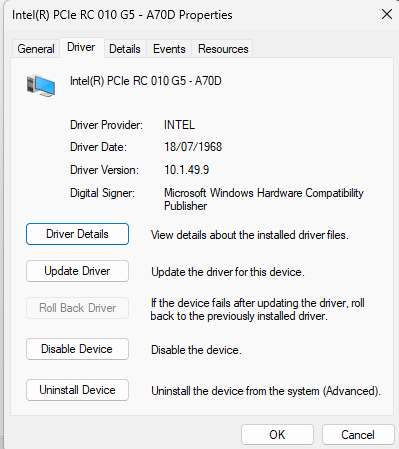


Thankyou in advance!!!
' cx='32' cy='32' r='32' /%3E%3Ctext x='50%25' y='55%25' dominant-baseline='middle' text-anchor='middle' fill='%23FFF' %3EA%3C/text%3E%3C/svg%3E)
