Azure Data Factory
An Azure service for ingesting, preparing, and transforming data at scale.
This browser is no longer supported.
Upgrade to Microsoft Edge to take advantage of the latest features, security updates, and technical support.
' cx='32' cy='32' r='32' /%3E%3Ctext x='50%25' y='55%25' dominant-baseline='middle' text-anchor='middle' fill='%23FFF' %3ETG%3C/text%3E%3C/svg%3E)
Hi when I use web activity using authorization as Header, I am getting below error
Error calling the endpoint 'https://******************/rest/v1/activities/types.json?access_token='. Response status code: ''. More details:Exception message: 'The format of value 'e71d047d-348d-49c5-a088-480ac11849ab:sn' is invalid.'. No response from the endpoint. Possible causes: network connectivity, DNS failure, server certificate validation or timeout
When I use the access_token manually in the api ,It is working fine, but when i pass the Authorization from previous web activity, it is giving the above error.
Any help why it is causing an error
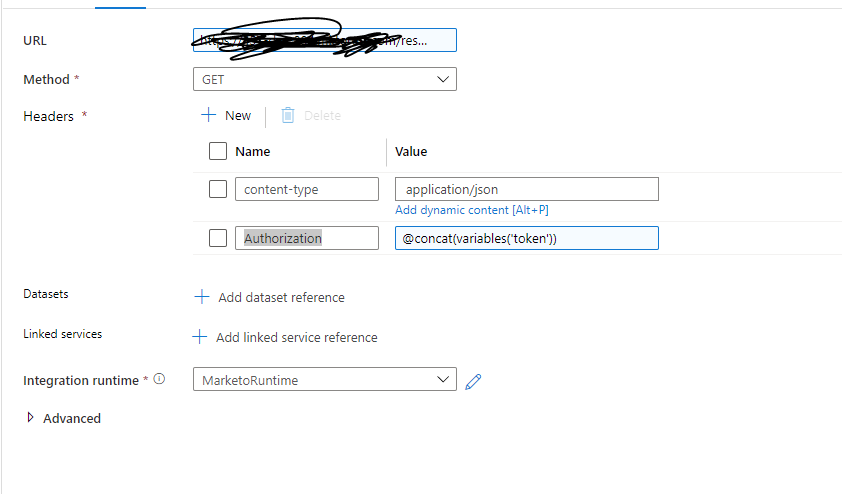
here is the url as an example : https://*************8/rest/v1/activities/types.json?access_token=
An Azure service for ingesting, preparing, and transforming data at scale.
Answer accepted by question author
' cx='32' cy='32' r='32' /%3E%3Ctext x='50%25' y='55%25' dominant-baseline='middle' text-anchor='middle' fill='%23FFF' %3EH%3C/text%3E%3C/svg%3E)
Hello @,
Thanks for the ask and using the Microsoft Q&A platform .
I am not sure how you have constructed the variable token , but just wanted you to know that it should have "Bearer[Space} thetoeknGHuid"
So can I request you to try the expression for Authrization header
to
@markus.bohland@hotmail.de ( 'Bearer ',variables('token'))
and then send the request .
Please do let me know how it goes .
Thanks
Himanshu
Please do consider to click on "Accept Answer" and "Up-vote" on the post that helps you, as it can be beneficial to other community members
Thanks for your response, it worked.