
Try logging on DSRM mode
--please don't forget to Accept as answer if the reply is helpful--
This browser is no longer supported.
Upgrade to Microsoft Edge to take advantage of the latest features, security updates, and technical support.
' cx='32' cy='32' r='32' /%3E%3Ctext x='50%25' y='55%25' dominant-baseline='middle' text-anchor='middle' fill='%23FFF' %3EB%3C/text%3E%3C/svg%3E)
I have one Domain Controller running Windows Server 2016
While adding a group of users to the Active Directory somehow the administrator account password got changed (or maybe even the account got deleted altogether?). I can no longer log onto the server. I tried logging onto the server as one of the users I had created and those accounts are all disabled.
I tried booting the server off of the boot disk and changing the password by typing the following in the command line:
f:
cd windows\system32
ren Utilman.exe Utilman.exe.old
copy cmd.exe Utilman.exe
net user Visioneer password
(where Visioneer is my username and password is my new password). However, I get an error saying the user name could not be found. Thus it leads me to believe maybe the account was deleted? When I try to log in as Administrator it says that the account is disabled.
I cant login to my server anymore. How do I regain access?
' cx='32' cy='32' r='32' /%3E%3Ctext x='50%25' y='55%25' dominant-baseline='middle' text-anchor='middle' fill='%23FFF' %3EA%3C/text%3E%3C/svg%3E)
Try logging on DSRM mode
--please don't forget to Accept as answer if the reply is helpful--
I tried logging on DSRM mode and get an error saying "There are currently no logon servers available to service the logon request".
Doesn't sound right, DSRM does not use domain authentication, it is a unique local logon specific to each domain controller.
Hello @Braden ,
Thank you for posting here.
How many DCs are there in your AD forest?
If you only have one DC and there is recent backup of this DC, we can try to restore this DC from the recent backup.
1)Start or restart the DC, press F8 to enter the safe mode and then select “Directory Services Restore Mode”.
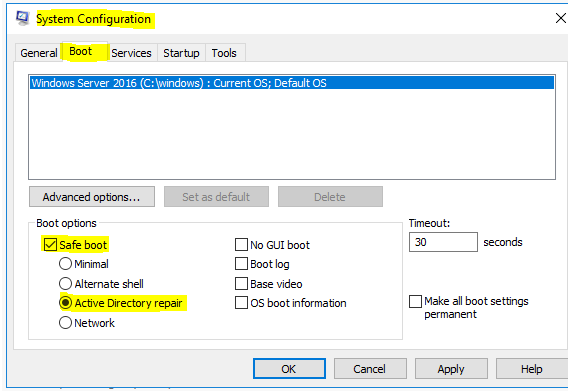
2) Logon the DC with DSRM Administrator account (ComputerName\Administrator or .\Administrator) and password.
3) Perform the AD DS standard recovery procedure, that is an unauthoritative restore.
4) Start-> Server Manager->tools-> Windows Server Backup->Recover
5) Select the location where the backup is stored: This server or A back stored on another location
6) Select the backup date which should not before the system Tombstone Lifetime, and the default value is 180 days.
7) Select “System state” in the Select Recovery Type.
8) Select location for system state recovery:
Original location with the option “Perform an authoritative restore of Active Directory files”. By default, we do not select this check box.
Alternate location
9) Click “Next”, please DO NOT select the check box “Automatically reboot the server to complete the recovery process”.
10) After the restore process is completed successfully, you can click the restart button. Because if you only have one DC, you do not need to use ntdsutil.exe tool to mark objects as authoritative.
By the way, would you please tell us how you did it (add a group of users to the Active Directory)?
Hope the information above is helpful.
Should you have any question or concern, please feel free to let us know.
Best Regards,
Daisy Zhou
============================================
If the Answer is helpful, please click "Accept Answer" and upvote it.
I booted the server in DSRM but cannot log in as an administrator. I tried logging in with both ComputerName\Administrator and .\Administrator (with passwords) but each one says the password is incorrect.
Make sure you're using the correct password. The DSRM password is different than the windows admin password and can also be unique or different per domain controller. If you have a second domain controller life get's much simpler. Another option for a single DC is to simply restore a known good backup.
--please don't forget to Accept as answer if the reply is helpful--
Ok, I was able to log in using the safe mode. However, I do not have a recent backup (the server was only up for a week or so and was never backed up). To answer your first question, there is only one DC.
So now you can logon as domain admin Safe Mode?
Correct. I logged on using the .\Administrator username and password.
That doesn't make sense. When booting Safe Mode you would need to use a domain account because there is no local accounts database on a domain controller.
By the way "When I try to log in as Administrator it says that the account is disabled" there may be no good solution to this. Time may be better spent standing up a new one and move on.
I am able to log into the server using the safe mode. However, there are no backups to restore to (like number 4 in the list above).
Safe Mode or DSRM mode?
I booted into DSRM mode.
Ok, there's really not much you can do here other than restore an AD database (which you don' have?) AD is not loaded so you cannot get to the domain accounts to edit or add anything.
You mentioned "When I try to log in as Administrator it says that the account is disabled" there may be no good solution to this. Time may be better spent standing up a new one and move on.
I ended up tearing out the hard drives and salvaged what I could off of them. I then just did a fresh install of Windows Server and started over again. Thanks for your help.
Glad to hear, you're welcome. For future its always recommended to have at least two domain controller for high availability and for disaster mitigation.
--please don't forget to Accept as answer if the reply is helpful--
Just checking if there's any progress or updates?
--please don't forget to Accept as answer if the reply is helpful--
Hello @Braden ,
Thank you for your update.
I am so glad to hear that "I ended up tearing out the hard drives and salvaged what I could off of them.".
As always, if there is any question in future, we warmly welcome you to post in this forum again. We are happy to assist you!
Best Regards,
Daisy Zhou
============================================
If the Answer is helpful, please click "Accept Answer" and upvote it.