Azure SQL Database
An Azure relational database service.
This browser is no longer supported.
Upgrade to Microsoft Edge to take advantage of the latest features, security updates, and technical support.
' cx='32' cy='32' r='32' /%3E%3Ctext x='50%25' y='55%25' dominant-baseline='middle' text-anchor='middle' fill='%23FFF' %3ER4%3C/text%3E%3C/svg%3E)
Hi Experts,
I have strange issue. I have AD group and user added to the group. The user is successfully connected until yesterday.
He has connected to azure sql db through SSMS.
But suddenly he is getting error today. "Network related or instance specific error...."
We never added any firewall settings in Azure. We have private end points setup.
I don't know why is it. Nothing changed from database level.
What could be the issue?
Could you please advise what has caused the issue?
Regards

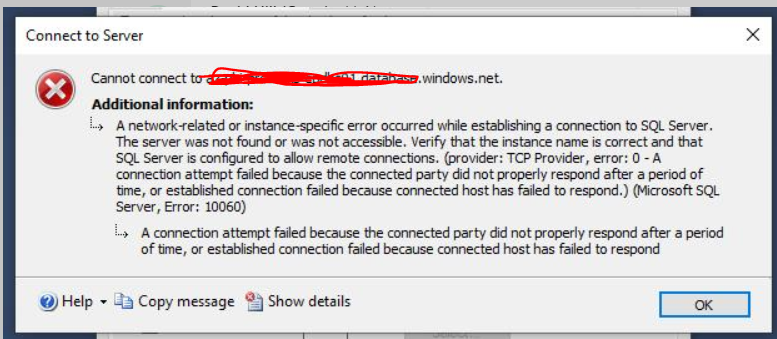
Please give us the complete error message. After this message "A network related or instance specific error occurred while establishing" comes further explanation, please share that explanation with us.
Are you able to get connected using other tools?
Hi AlbertoMorillo,
Please see the error message below
' cx='32' cy='32' r='32' /%3E%3Ctext x='50%25' y='55%25' dominant-baseline='middle' text-anchor='middle' fill='%23FFF' %3EA%3C/text%3E%3C/svg%3E)
@rajanisqldev-42 Please convey if you need any further help.
Let's try a few things to help determine the cause of the issue.
Let start by making sure you are using the current IP of your Azure SQL Database server. Let's ping the name of the Azure SQL server. The ping will fail but it should also return the current IP of the SQL Azure Server if DNS resolution is working.
C:\>ping <myserver>.database.windows.net

Pinging data.sn1-1.database.windows.net [65.55.74.144] with 32 bytes of data:
Request timed out.
Request timed out.
Request timed out.
Request timed out.
Ping statistics for 65.55.74.144:
Packets: Sent = 4, Received = 0, Lost = 4 (100% loss)
Now try to telnet to port 1433 using the IP address returned above. This article shows you how to enable Telnet on Windows.
C:\>telnet 65.55.74.144 1433

Connecting To 65.55.74.144...
If Telnet is successful, the window will change to a completely blank screen. Try connecting with that IP using SSMS again. If telenet is not successful, try tracert to identify at what step it fails to reach the Azure SQL Database server.
C:\>tracert 65.55.74.144

Tracing route to 65.55.74.144 over a maximum of 30 hops
1 2 ms 1 ms 1 ms 192.168.0.1
2 6 ms 5 ms 5 ms 10.33.34.50
3 5 ms 4 ms 5 ms 4-1-753.DLLSTX-LCR-07.verizon-gni.net [130.81.107.26]
4 8 ms 5 ms 5 ms so-6-2-0-0.DFW01-BB-RTR1.verizon-gni.net [130.81.28.208]
5 44 ms 43 ms 44 ms so-11-0-0-0.LCC1-RES-BB-RTR1-RE1.verizon-gni.net [130.81.17.40]
6 49 ms 44 ms 44 ms so-6-0-0-0.ASH-PEER-RTR1-re1.verizon-gni.net [130.81.10.90]