Azure Data Factory
An Azure service for ingesting, preparing, and transforming data at scale.
This browser is no longer supported.
Upgrade to Microsoft Edge to take advantage of the latest features, security updates, and technical support.
' cx='32' cy='32' r='32' /%3E%3Ctext x='50%25' y='55%25' dominant-baseline='middle' text-anchor='middle' fill='%23FFF' %3EN%3C/text%3E%3C/svg%3E)
Hello All,
I have a weird situation. I am trying to run a USP (which writes into the local temporary table and drops the temp table at end of stored procedure), therefore there is no output table the stored procedure writes to. When we run the Stored procedure EXEC dbo.test @Param1 =1 , it gives data in SSMS window. Now I am trying to load this data ( by passing the same parameters above and trying to run the stored procedure) from one SQL on prem server to another Azure SQL server.
I do not have permissions to modify or change the USP. The number of rows output from the stored procedure is about 8k.
I tried couple of solutions and nothing worked.
When I just try using copy activity and use Stored procedure as input and pass parameters, I get errors saying it cannot find the local temporary table while running
"
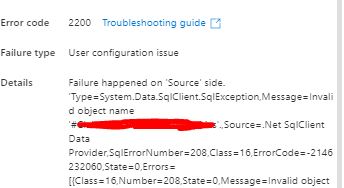
Failure happened on 'Source' side. 'Type=System.Data.SqlClient.SqlException,Message=Invalid object name '#outputtable'.,Source=.Net SqlClient Data Provider,SqlErrorNumber=208,Class=16,ErrorCode=-2146232060,State=0,Errors=[{Class=16,Number=208,State=0,Message=Invalid object name '#outputtable'.,},],'"
When I try using lookup activity and pass it to an array with set variable, it is not able to handle 8k rows and says the number of rows exceeds the limitation of Lookup activity.
If anyone has a better solution pls help or if I should use a different activity also, pls let me know. Can I use data flow to run USP as source and write it to a SQL table? Would that work?
Thanks for all your help
' cx='32' cy='32' r='32' /%3E%3Ctext x='50%25' y='55%25' dominant-baseline='middle' text-anchor='middle' fill='%23FFF' %3EH%3C/text%3E%3C/svg%3E)
Hello @N2120 ,
Thanks for the ask and using the Microsoft Q&A platform .
I wanted to repro the issue , but then thinks just worked fine for me , I am sharing what I did , may be you tell me how your scenario is different .
My proc looks like this .
CREATE proc testproc @id int
as
IF OBJECT_ID('tempdb..#Results') IS NOT NULL DROP TABLE #Results
BEGIN
CREATE TABLE #Results ( id int , name varchar(100) )
END
INSERT INTO #Results select PersonID,Name from [dbo].[customer_table]
Where PersonID = @id
SELECT * from #Results
drop table #Results
exec testproc 3

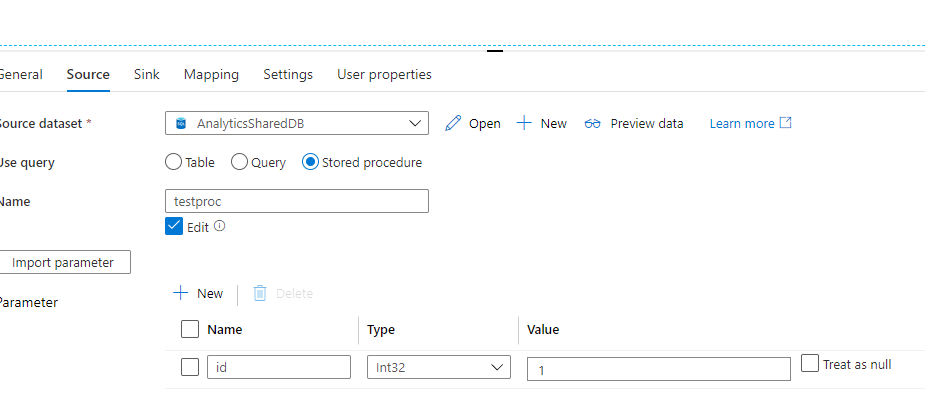
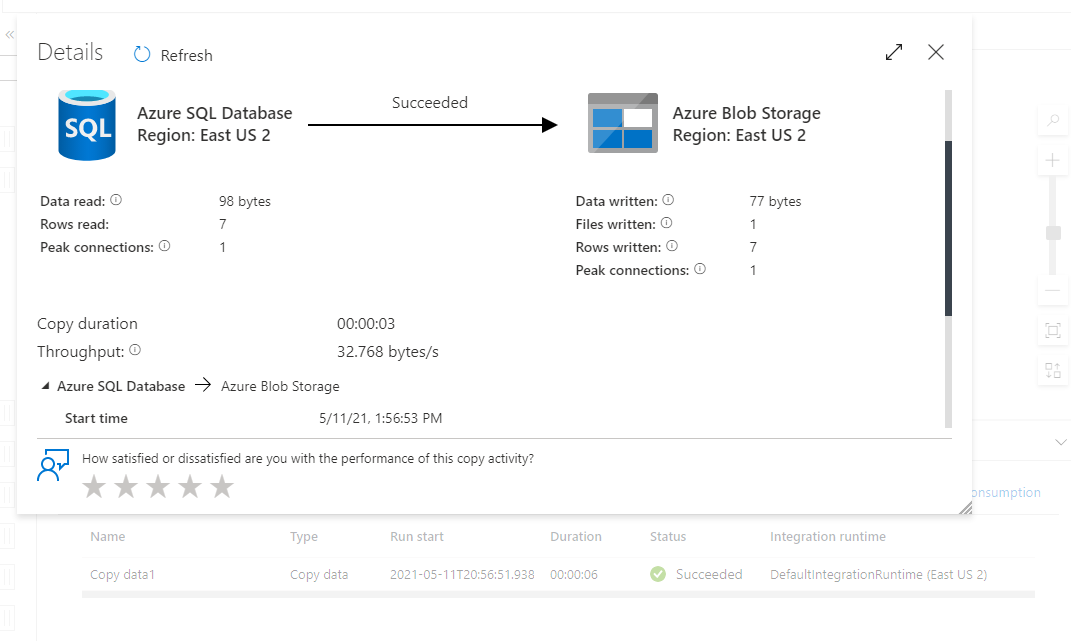
I did pointed the ADF with source as the Proc as shown below and it worked just fine .
Hope this helps .
Thanks
Himanshu
Please do consider to click on "Accept Answer" and "Up-vote" on the post that helps you, as it can be beneficial to other community members
Thank you for your answer,@HimanshuSinha Can you pls try using on prem db to Azure SQL and try inserting multiple rows of data into multiple columns. I get the following error while doing so.!
95678-error1.jpg
InvalidObjectName Showing #(local temporary table)
I was able to resolve this issue by using ODBC Linked Service Instead of SQL Server and using Query option in Copy Activity while moving data from On Prem server to Azure .
Thanks for your help.
Hello @N2120 ,
It was great to know that you were able to get to a resolution . We expect you to keep using this forum and also motivate others to do that same . You can always help other community members by answering to their queries .
Thanks
Himanshu