SQL Server Express - connect from another machine

Jon Jacobs 86 Reputation points
2021-05-11T03:05:15.197+00:00

I installed SQL Server Express v 2012 on one of our servers, whose OS is 2008 Server Standard.
Although the OS is 64 bit, I was only able to install the 32-bit version.
I used Default Instance, which was MSSQLServer. I turned on TCP/IP and that defaulted to port 1433 for all IPs, which is what I wanted anyway.
I stopped and started the instance so the change was made effective.

However, I still cannot access the instance from another computer. What am I missing?

SQL Server | Other
{count} vote

3 answers

Sort by: Most helpful
  1. Olaf Helper 47,581 Reputation points
    2021-05-11T05:51:25.893+00:00

    In Express Edition remote connections are disabled by default, you have to enable them first: Configure the remote access Server Configuration Option

    And if there is a Firewall runing on server and/or client side, you have to setup rules to allow access on Port 1433; see Configure a Windows Firewall for Database Engine Access

    0 comments No comments

  2. CarrinWu-MSFT 6,891 Reputation points
    2021-05-11T06:04:38.6+00:00

    Hi @Jon Jacobs ,

    Welcome to Microsoft Q&A!

    Please check below list:

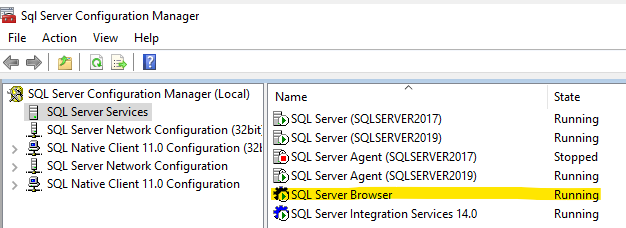
    1. SQL Server Browser service is running
      95521-browser.png
    2. Enable protocols: To connect to SQL Server from another computer, you normally use TCP/IP. If TCP/IP isn't enabled, right-click TCP/IP, and then click Enable.
    3. Testing TCP/IP connectivity: In the command prompt window, type ping <ip address> and then the IP address of the computer that is running SQL Server.

    Please get more information from Troubleshoot connecting to the SQL Server Database Engine

    Best regards,
    Carrin


    If the answer is helpful, please click "Accept Answer" and upvote it.
    Note: Please follow the steps in our documentation to enable e-mail notifications if you want to receive the related email notification for this thread.


  3. Pratik Thummar 21 Reputation points
    2021-05-14T19:17:37.34+00:00

    Also set SQL Browser on Automatic in Services.msc.

    Also Check Firewall..

    Antivirus...

    0 comments No comments

Your answer

Answers can be marked as 'Accepted' by the question author and 'Recommended' by moderators, which helps users know the answer solved the author's problem.