Microsoft 365 and Office | SharePoint | For business | Windows
A group of Microsoft Products and technologies used for sharing and managing content, knowledge, and applications.

This browser is no longer supported.
Upgrade to Microsoft Edge to take advantage of the latest features, security updates, and technical support.
' cx='32' cy='32' r='32' /%3E%3Ctext x='50%25' y='55%25' dominant-baseline='middle' text-anchor='middle' fill='%23FFF' %3ESM%3C/text%3E%3C/svg%3E)
Hello,
i have made a sharepoint list for contract management.
i have three field as follows
1 - start date
2-end date
3-status
i have put a formulae in status to calculate from system date so that it compares same to end date and give me status such as active, expiered etc.. it works however its only hen i made an entry. is there a way to update all records in the list status field for all data.? Please provide me step by step as i am a newbie.

Hi, @Sivabrian Mooken ,
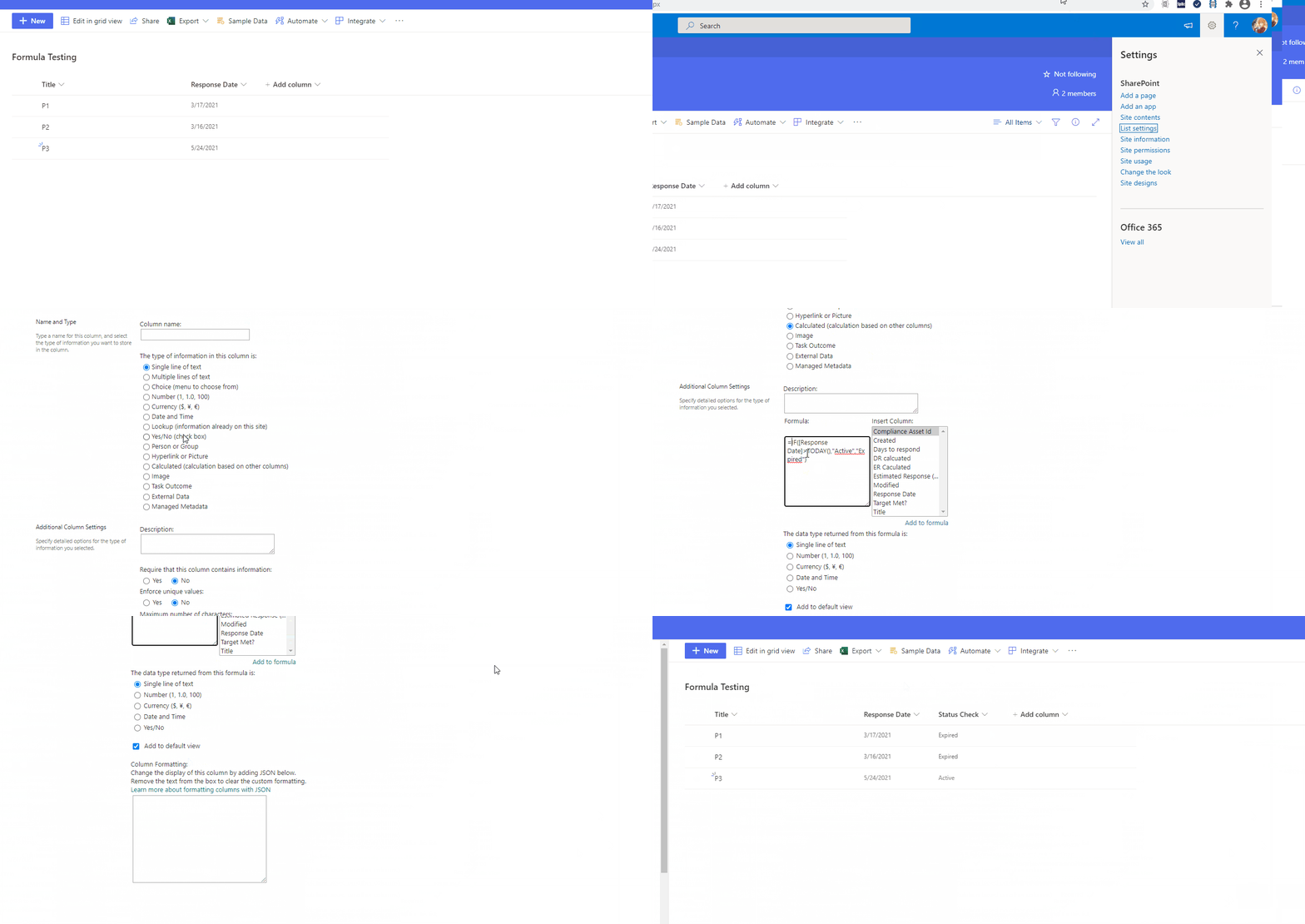
From your description, it seems you are using calculated column for the status check. After you add a calculated column, it shall work for all records in the list. I made a simple demo for you. Have a check on it. If there is anything you don't get or having more information to share, please provide screenshots. It will help us get a better understanding of your situation.
More Information:
Here is a blog talking about creating calculated column in SharePoint. It will help you understand more about the process I made in the demo.
In the demo I made a date column named "Response Date" and compare it with current date. The function Today() can be used in calculated column which returns the system date of that day.
Note: Microsoft is providing this information as a convenience to you. The sites are not controlled by Microsoft. Microsoft cannot make any representations regarding the quality, safety, or suitability of any software or information found there. Please make sure that you completely understand the risk before retrieving any suggestions from the above link.
If an Answer is helpful, please click "Accept Answer" and upvote it.
Note: Please follow the steps in our documentation to enable e-mail notifications if you want to receive the related email notification for this thread.
Hi, @Sivabrian Mooken ,
After a few days, have you tried the solution? Is there any further question about it?