Community Center | Not monitored
Tag not monitored by Microsoft.

This browser is no longer supported.
Upgrade to Microsoft Edge to take advantage of the latest features, security updates, and technical support.
' cx='32' cy='32' r='32' /%3E%3Ctext x='50%25' y='55%25' dominant-baseline='middle' text-anchor='middle' fill='%23FFF' %3EJG%3C/text%3E%3C/svg%3E)
I need help with this, It keeps appearing on my screen all the time. Please Help!
Tag not monitored by Microsoft.

You first need to identify which process is displaying that message. Do you know what program it is? Is there a window title?
Did you install an application with that name? Or do you know what it is? Is there a cingxl.exe running in task manager? Or search for a file/folder that contains that name?
No I didn't, and I don't know what It is.
Answer accepted by question author
Download and run Process Explorer. https://learn.microsoft.com/en-us/sysinternals/downloads/process-explorer
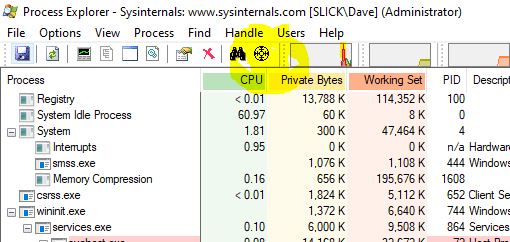
When the message appears run process explorer. Click and hold the round target icon on the menu. Your cursor icon will change to that icon. Move the icon over the cingxl popup and release the mouse button.
Procexp will then highlight the process with a blue line.
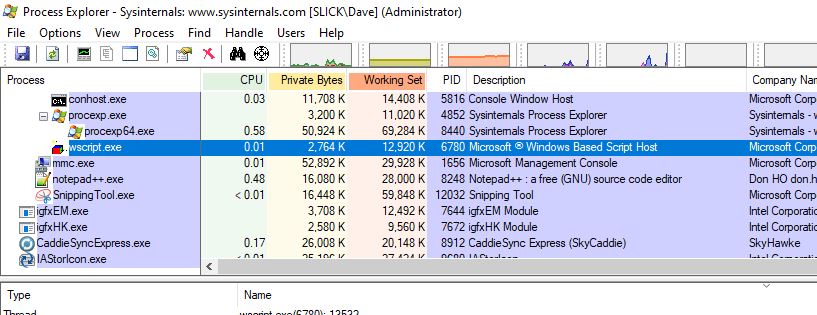
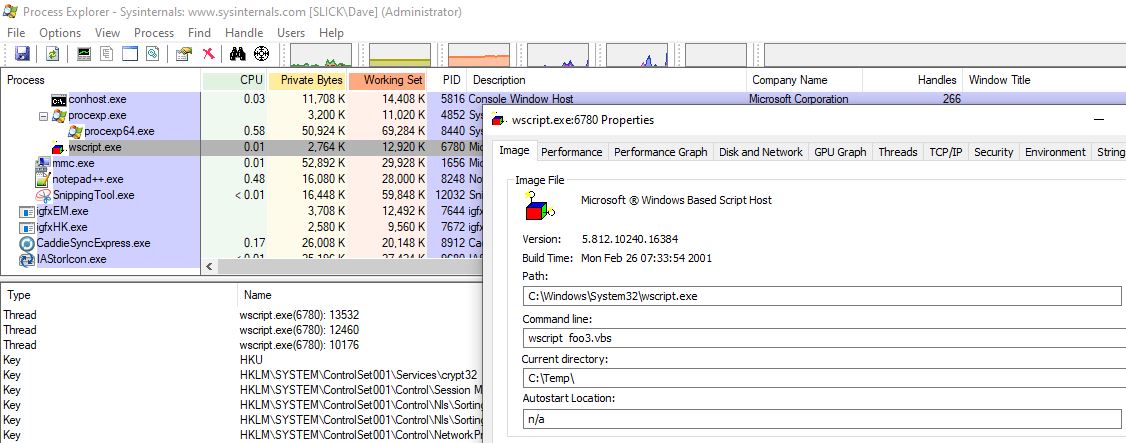
Double click it to get information about the process. Do you recognize the application? What is it?
Thank you for the help, It worked :)