Hi RogerHanna.
Thanks for reporting this issue in Microsoft Community.
In your description, you can't open Windows Defender and you can't sign in to your Microsoft account.I do understand the frustration of not being able to open Windows Defender directly and not being able to sign in to your Microsoft account at the same time.
What is the specific error message reported in your attempt to open Windows Defender?
If you can, please provide us with a screenshot or photo of the error message you are seeing.
This could be an error in the account profile, please refer to the following link to create a new local administrator account
Manage user accounts in Windows - Microsoft Support
Check if Windows Defender does not open in the new local account.
If it still can't be opened, please refer to the following steps to check the system files
- Search for Command Prompt in the taskbar, right-click it, and select Run as administrator mode.
- Enter the following commands one by one, please make sure to execute the next command after the previous one is completed. DISM /Online /Cleanup-Image /ScanHealth DISM /Online /Cleanup-Image /CheckHealth DISM /Online /Cleanup-Image /RestoreHealth SFC /Scannow
- After the scanning is completed, you can check the scanning information to see if the problem has been detected and fixed.
If you still have the problem, please refer to the following link to perform an in-place upgrade of your system. The in-place upgrade will overwrite the system with the system image file to repair the system while preserving your data.
Disclaimer: Let’s try performing an in-place install or in-place upgrade which will refresh your Windows files and operating system without removing files or applications. That being said, we always recommend that if you have important data, you should back it up before making large system changes. If you want to back up your data first, please do so. Once you are done backing up, you can follow the steps in the following guides:
How to run In-place upgrade in Windows 11 - Microsoft Community
Regarding your inability to log in to your Microsoft account, please refer to the following link to recover your account
Help with the Microsoft account recovery form - Microsoft Support
Alternatively, contact the Microsoft Account Security online support staff by following the steps below
Please click on the link below and sign in to your Microsoft account at the top right, or if you are unable to sign in, please create a new Microsoft account and sign in.
https://support.microsoft.com/en-us/contactus
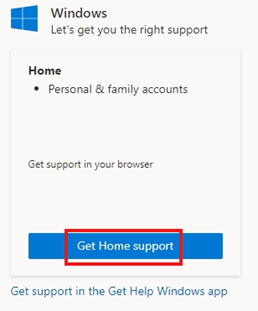
1 Click on this Windows icon

2 Click on “Get Home Support” on the left hand side.
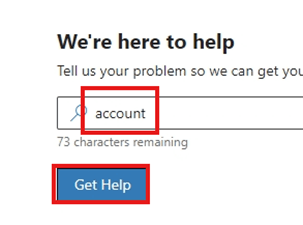
3 Type “account” in the search box and click on “Get Help” at the bottom.
4 Then click on “Contact Support” at the bottom of the screen.

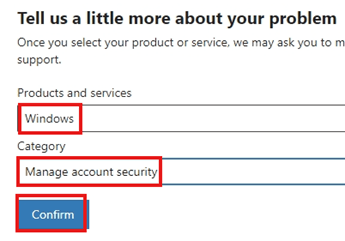
5 Select “Windows” for Products and Services, select “Manage Account Security” for the category, and click the Confirm button.
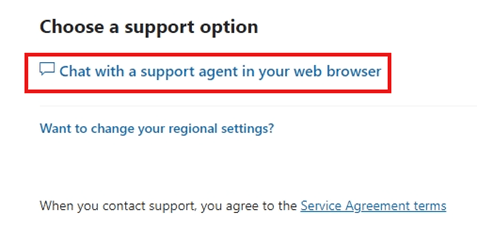
6 Then choose to chat with a support agent in your web browser and after filling in the relevant information, a staff member will contact you.
If you see that the chat is currently unavailable, please try at a time that meets the requirements.
Thank you for your understanding and support.
Best regards,
Zev - MSFT | Microsoft Community Support Specialist
' cx='32' cy='32' r='32' /%3E%3Ctext x='50%25' y='55%25' dominant-baseline='middle' text-anchor='middle' fill='%23FFF' %3EA%3C/text%3E%3C/svg%3E)
