Developer technologies | C#
An object-oriented and type-safe programming language that has its roots in the C family of languages and includes support for component-oriented programming.
This browser is no longer supported.
Upgrade to Microsoft Edge to take advantage of the latest features, security updates, and technical support.
' cx='32' cy='32' r='32' /%3E%3Ctext x='50%25' y='55%25' dominant-baseline='middle' text-anchor='middle' fill='%23FFF' %3EMF%3C/text%3E%3C/svg%3E)
Hello,
I just want to send something and get the answer.
What is not clear to me, I need to install Swagger?
What do I want?
I want to send something JSON object and return the response.
Very much in a file.
Response from server  - JSON content inside the text file.
    if(response.empty())
    {
        j_response["foodData"]["code"] = -1;
        j_response["foodData"]["message"] = response;
        j_response["data"] = "";
    }
I'm looking for a good short instruction, step by step, what need.
httprepl-a-command-line-tool-for-interacting-with-restful-http-services-d803e5751408
My attempts, unfortunately it does not work.
C:\Program Files (x86)\Microsoft Visual Studio\2017\BuildTools>httprepl https://localhost:5001
Welcome to HttpRepl 5.0!
------------------------

Telemetry
---------
The .NET tools collect usage data in order to help us improve your experience. The data is collected by Microsoft and shared with the community. You can opt-out of telemetry by setting the DOTNET_HTTPREPL_TELEMETRY_OPTOUT environment variable to '1' or 'true' using your favorite shell.

Read more about HttpRepl telemetry: https://aka.ms/httprepl-telemetry
Read more about .NET CLI Tools telemetry: https://aka.ms/dotnet-cli-telemetry

(Disconnected)> connect https://localhost:5001
Using a base address of https://localhost:5001/
Unable to find an OpenAPI description
For detailed tool info, see https://aka.ms/http-repl-doc

https://localhost:5001/> pref get
colors.json=Green
colors.json.arrayBrace=BoldCyan
colors.json.comma=BoldYellow
colors.json.name=BoldMagenta
colors.json.nameSeparator=BoldWhite
colors.json.objectBrace=Cyan
colors.protocol=BoldGreen
colors.status=BoldYellow

https://localhost:5001/>  post -h Content-Type=application/json
The default editor must be configured using the command `pref set editor.command.default "{commandLine}"`.

https://localhost:5001/> pref set httpClient.useDefaultCredentials true

https://localhost:5001/> echo on
Request echoing is on

https://localhost:5001/> post
The default editor must be configured using the command `pref set editor.command.default "{commandLine}"`.

https://localhost:5001/> pref set editor.command.default
System.NullReferenceException: Object reference not set to an instance of an object.
   at Microsoft.HttpRepl.Commands.PrefCommand.IsVSCode(String path) in /_/src/Microsoft.HttpRepl/Commands/PrefCommand.cs:line 279
   at Microsoft.HttpRepl.Commands.PrefCommand.SetSetting(IShellState shellState, HttpState programState, DefaultCommandInput`1 commandInput) in /_/src/Microsoft.HttpRepl/Commands/PrefCommand.cs:line 188
   at Microsoft.HttpRepl.Commands.PrefCommand.ExecuteAsync(IShellState shellState, HttpState programState, DefaultCommandInput`1 commandInput, ICoreParseResult parseResult, CancellationToken cancellationToken) in /_/src/Microsoft.HttpRepl/Commands/PrefCommand.cs:line 164
   at Microsoft.Repl.Commanding.CommandWithStructuredInputBase`2.ExecuteAsync(IShellState shellState, TProgramState programState, TParseResult parseResult, CancellationToken cancellationToken) in /_/src/Microsoft.Repl/Commanding/CommandWithStructuredInputBase.cs:line 213
   at Microsoft.HttpRepl.Telemetry.TelemetryCommandWrapper.ExecuteAsync(IShellState shellState, HttpState programState, ICoreParseResult parseResult, CancellationToken cancellationToken) in /_/src/Microsoft.HttpRepl/Telemetry/TelemetryCommandWrapper.cs:line 39
   at Microsoft.Repl.Commanding.DefaultCommandDispatcher`2.ExecuteCommandInternalAsync(IShellState shellState, CancellationToken cancellationToken) in /_/src/Microsoft.Repl/Commanding/DefaultCommandDispatcher.cs:line 154
   at Microsoft.Repl.Commanding.DefaultCommandDispatcher`2.ExecuteCommandAsync(IShellState shellState, CancellationToken cancellationToken) in /_/src/Microsoft.Repl/Commanding/DefaultCommandDispatcher.cs:line 117

https://localhost:5001/> pref set editor.command.default "C:\Temp"

https://localhost:5001/> post
The specified default editor path, "C:\Temp", does not exist.

https://localhost:5001/> pref set editor.command.default "C:\Temp\test.txt"

https://localhost:5001/> post
System.ComponentModel.Win32Exception (193): The specified executable is not a valid application for this OS platform.
   at System.Diagnostics.Process.StartWithCreateProcess(ProcessStartInfo startInfo)
   at System.Diagnostics.Process.Start()
   at System.Diagnostics.Process.Start(ProcessStartInfo startInfo)
   at Microsoft.HttpRepl.Commands.BaseHttpCommand.HandleRequiresBody(DefaultCommandInput`1 commandInput, IShellState shellState, HttpState programState, HttpRequestMessage request, Dictionary`2 requestHeaders) in /_/src/Microsoft.HttpRepl/Commands/BaseHttpCommand.cs:line 286
   at Microsoft.HttpRepl.Commands.BaseHttpCommand.ExecuteAsync(IShellState shellState, HttpState programState, DefaultCommandInput`1 commandInput, ICoreParseResult parseResult, CancellationToken cancellationToken) in /_/src/Microsoft.HttpRepl/Commands/BaseHttpCommand.cs:line 139
   at Microsoft.Repl.Commanding.DefaultCommandDispatcher`2.ExecuteCommandInternalAsync(IShellState shellState, CancellationToken cancellationToken) in /_/src/Microsoft.Repl/Commanding/DefaultCommandDispatcher.cs:line 154
   at Microsoft.Repl.Commanding.DefaultCommandDispatcher`2.ExecuteCommandAsync(IShellState shellState, CancellationToken cancellationToken) in /_/src/Microsoft.Repl/Commanding/DefaultCommandDispatcher.cs:line 117

https://localhost:5001/> dotnet tool -g list
No matching command found
Execute 'help' to see available commands

https://localhost:5001/> dotnet tool install -g Microsoft.dotnet-httprepl
No matching command found
Execute 'help' to see available commands

https://localhost:5001/> exit

C:\Program Files (x86)\Microsoft Visual Studio\2017\BuildTools>

C:\Program Files (x86)\Microsoft Visual Studio\2017\BuildTools>dotnet tool install -g Microsoft.dotnet-httprepl
Das Tool "microsoft.dotnet-httprepl" ist bereits installiert.

C:\Program Files (x86)\Microsoft Visual Studio\2017\BuildTools>httprepl https://localhost:44399/
(Disconnected)> connect https://localhost:44399/
Using a base address of https://localhost:44399/
Unable to find an OpenAPI description
For detailed tool info, see https://aka.ms/http-repl-doc

https://localhost:44399/> dir
No directory structure has been set, so there is nothing to list. Use the "connect" command to set a directory structure based on an OpenAPI description.

https://localhost:44399/> connect
You must specify either a root address or a base address and an OpenAPI description address

https://localhost:44399/> connect https://localhost:44399
Using a base address of https://localhost:44399/
Unable to find an OpenAPI description
For detailed tool info, see https://aka.ms/http-repl-doc

https://localhost:44399/> connect https://localhost:44399 --openapi /swagger/v1/swagger.json
Checking https://localhost:44399/swagger/v1/swagger.json... Es konnte keine Verbindung hergestellt werden, da der Zielcomputer die Verbindung verweigerte. (localhost:44399)

Using a base address of https://localhost:44399/
Unable to find an OpenAPI description
For detailed tool info, see https://aka.ms/http-repl-doc

https://localhost:44399/> ls
No directory structure has been set, so there is nothing to list. Use the "connect" command to set a directory structure based on an OpenAPI description.

https://localhost:44399/> connect   C:\Temp
ArgumentCountOutOfRange -- 2
Usage: connect [rootAddress] [--base baseAddress] [--openapi openApiDescriptionAddress] [--verbose]

Configures the directory structure and base address of the api server based on the arguments and options specified. At least one of [rootAddress], [--base baseAddress] or [--openapi openApiDescriptionAddress] must be specified

[rootAddress] will be used to automatically determine the base address and OpenAPI description address
[--base baseAddress] and [--openapi openApiDescriptionAddress] allow you to explicitly set those addresses and skip auto detection
[--verbose] provides more detail about OpenAPI Description discovery and parsing


https://localhost:44399/> connect https://localhost:44399 --c:\Temp
UnknownOption -- --c:\Temp
Usage: connect [rootAddress] [--base baseAddress] [--openapi openApiDescriptionAddress] [--verbose]

Configures the directory structure and base address of the api server based on the arguments and options specified. At least one of [rootAddress], [--base baseAddress] or [--openapi openApiDescriptionAddress] must be specified

[rootAddress] will be used to automatically determine the base address and OpenAPI description address
[--base baseAddress] and [--openapi openApiDescriptionAddress] allow you to explicitly set those addresses and skip auto detection
[--verbose] provides more detail about OpenAPI Description discovery and parsing


https://localhost:44399/> connect https://localhost:44399 --"c:\Temp\"
UnknownOption -- --"c:\Temp"
Usage: connect [rootAddress] [--base baseAddress] [--openapi openApiDescriptionAddress] [--verbose]

Configures the directory structure and base address of the api server based on the arguments and options specified. At least one of [rootAddress], [--base baseAddress] or [--openapi openApiDescriptionAddress] must be specified

[rootAddress] will be used to automatically determine the base address and OpenAPI description address
[--base baseAddress] and [--openapi openApiDescriptionAddress] allow you to explicitly set those addresses and skip auto detection
[--verbose] provides more detail about OpenAPI Description discovery and parsing


https://localhost:44399/> https://localhost:44376/swagger/index.html
No matching command found
Execute 'help' to see available commands

https://localhost:44399/> cd..
No matching command found
Execute 'help' to see available commands

https://localhost:44399/> disconnect
No matching command found
Execute 'help' to see available commands

https://localhost:44399/> exit

C:\Program Files (x86)\Microsoft Visual Studio\2017\BuildTools>https://localhost:44376/swagger/index.html
Der Befehl "https:" ist entweder falsch geschrieben oder
konnte nicht gefunden werden.

C:\Program Files (x86)\Microsoft Visual Studio\2017\BuildTools>dotnet tool install -g Microsoft.dotnet-httprepl
Das Tool "microsoft.dotnet-httprepl" ist bereits installiert.

C:\Program Files (x86)\Microsoft Visual Studio\2017\BuildTools>connect https://localhost:44376/
Der Befehl "connect" ist entweder falsch geschrieben oder
konnte nicht gefunden werden.

C:\Program Files (x86)\Microsoft Visual Studio\2017\BuildTools>httprepl https://localhost:44376/
(Disconnected)> connect https://localhost:44376/
Using a base address of https://localhost:44376/
Unable to find an OpenAPI description
For detailed tool info, see https://aka.ms/http-repl-doc

https://localhost:44376/> cd
/

https://localhost:44376/> ls
No directory structure has been set, so there is nothing to list. Use the "connect" command to set a directory structure based on an OpenAPI description.

https://localhost:44376/> httprepl https://localhost:44376/ --swagger https://localhost:44376/swagger/v1-foo/swagger.json
No matching command found
Execute 'help' to see available commands

https://localhost:44376/>
C:\Program Files (x86)\Microsoft Visual Studio\2017\BuildTools> httprepl https://localhost:44376/ --swagger https://localhost:44376/swagger/v1-foo/swagger.json
(Disconnected)> connect https://localhost:44376/ --swagger https://localhost:44376/swagger/v1-foo/swagger.json
Checking https://localhost:44376/swagger/v1-foo/swagger.json... Es konnte keine Verbindung hergestellt werden, da der Zielcomputer die Verbindung verweigerte. (localhost:44376)

Using a base address of https://localhost:44376/
Unable to find an OpenAPI description
For detailed tool info, see https://aka.ms/http-repl-doc

https://localhost:44376/> pref set editor.command.default "<path to your editor>"

https://localhost:44376/> dir
No directory structure has been set, so there is nothing to list. Use the "connect" command to set a directory structure based on an OpenAPI description.

https://localhost:44376/>

Swagger is for Restful Web service Technology like ASP.NET Core WebAPI, I have never seen it used on the Restful client-side.
You get a Json response back. Json is just string data so save to a text file as a ,json file type.
Hello,
I just want to send something from the client and check whether it arrives
at the server or not. Not more. I would like to be able to change the
response from the server in order to simulate test cases.
@Rool0507 meant tests, mock. I've never done this before and I need good
guidance. Do you experts have that? Do you know a good tutorial?
I want to use this code. how-to-post-json-to-a-server-using-c
JavaScriptSerializer or
What is better?


 [HttpResponseMessage response = new HttpResponseMessage();
        try
        {
            response = await client.PostAsJsonAsync(url, resultObject);][1]
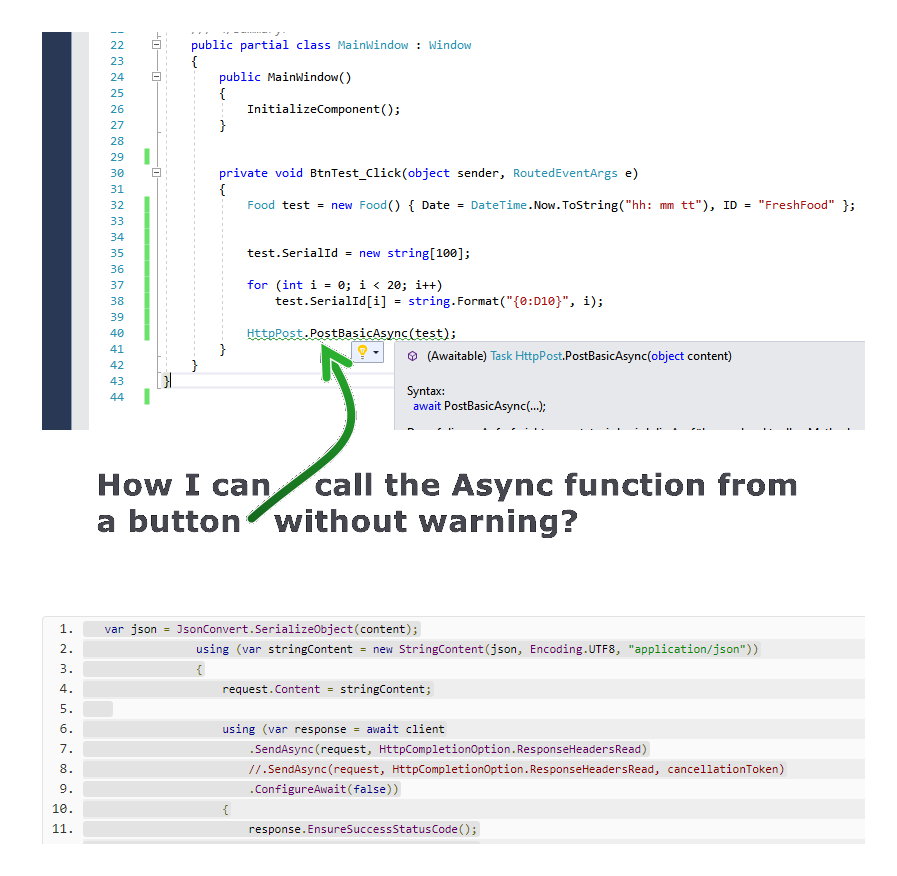
What is the difference? With and without await?
await waits until an answer comes, so also synchronously or do I not see it
correctly?
Or does the await start a new thread?
Myself, I think you are on overkill. in using HTTPClient().
What's the purpose of you using async if this solution is not being used in a multi user environment, like a Web solution needing resources being released as soon as possible, like a database or keeping the client
UI responsive?
UT and mocking....
https://dejanstojanovic.net/aspnet/2020/march/mocking-httpclient-in-unit-tests-with-moq-and-xunit/
You'll know immediately if something made it to the RestAPI service. If it made it, you're going to get an HTTP 200 Ok. If it didn't it make it, it never reached the service, a HTTP 400 will be returned or maybe a HTTP 404 that it made it but the URL was not found on the Web server.
UT and mocking....
https://dejanstojanovic.net/aspnet/2020/march/mocking-httpclient-in-unit-tests-with-moq-and-xunit/
I will have a look. Thanks.
What's the purpose of you using async if this solution is not being used in a multi user environment, like a Web solution needing resources being released as soon as possible, like a database or keeping the client
UI responsive?
This would not be necessary for a client and a server. Am I correct?
With await, resources are released for the user interface. That's the way it is? If so, is a thread started in the background?
I have an application. This must query and analyze the response.
The link should help you see the big picture and what it is all about.
https://learn.microsoft.com/en-us/dotnet/csharp/programming-guide/concepts/async/
Thanks @Duane Arnold I will read it.
' cx='32' cy='32' r='32' /%3E%3Ctext x='50%25' y='55%25' dominant-baseline='middle' text-anchor='middle' fill='%23FFF' %3EDZ%3C/text%3E%3C/svg%3E)
Hi @Markus Freitag ,
What is the specific code you tried and what problems you encountered?
Please explain in detail, so that we can find out the cause based on your specific problem and solve it
Best Regards,
Daniel Zhang
Hi @Daniel Zhang-MSFT ,
I need to write a client that takes data from a server. How can I test the server?
I want to be able to edit the answers from the server so I can create test cases. I do not get a server from the customer. Do you have a sample code for a server?
THANKS!
You either do an interaction test or a unit test. The unit test will involve mocking all test/fake data that I will assume returned Json from a method that is mocked out that is going to make the HTTPClient() call.
How long have you been at this asking the same questions?
How long have you been at this asking the same questions?
Yes similar, the answer was not enough. I `m sorry. I need step-by-step instructions.
Hi @Markus Freitag ,
I suggest you refer to the following documents for better understanding.
Test web APIs with the HttpRepl
How to make an HTTP POST web request
Best Regards,
Daniel Zhang
Hi @Daniel Zhang-MSFT ,
can you please show me how I can create a WPF C # desktop app that sends back adjustable responses as a server?
THANKS.
Hi @Markus Freitag ,
I suggest you repost a question and tag it with windows-wpf for more professional answer.
Best Regards,
Daniel Zhang

What is not clear to me, I need to install Swagger?
No
What do I want?
Wait... What?
I just want to send something and get the answer.
I want to send something JSON object and return the response.
First you need to understand how HTTP request work, I can recommend you this ( https://www.youtube.com/watch?v=t5n07Ybz7yI ). It uses a software called Postman.
Let's say you've done your researches and you know minimally how HTTP request work /are made, headers, params, etc, etc.
here is a simple http request of type get (as you can see), with no headers, params, just a simple one.
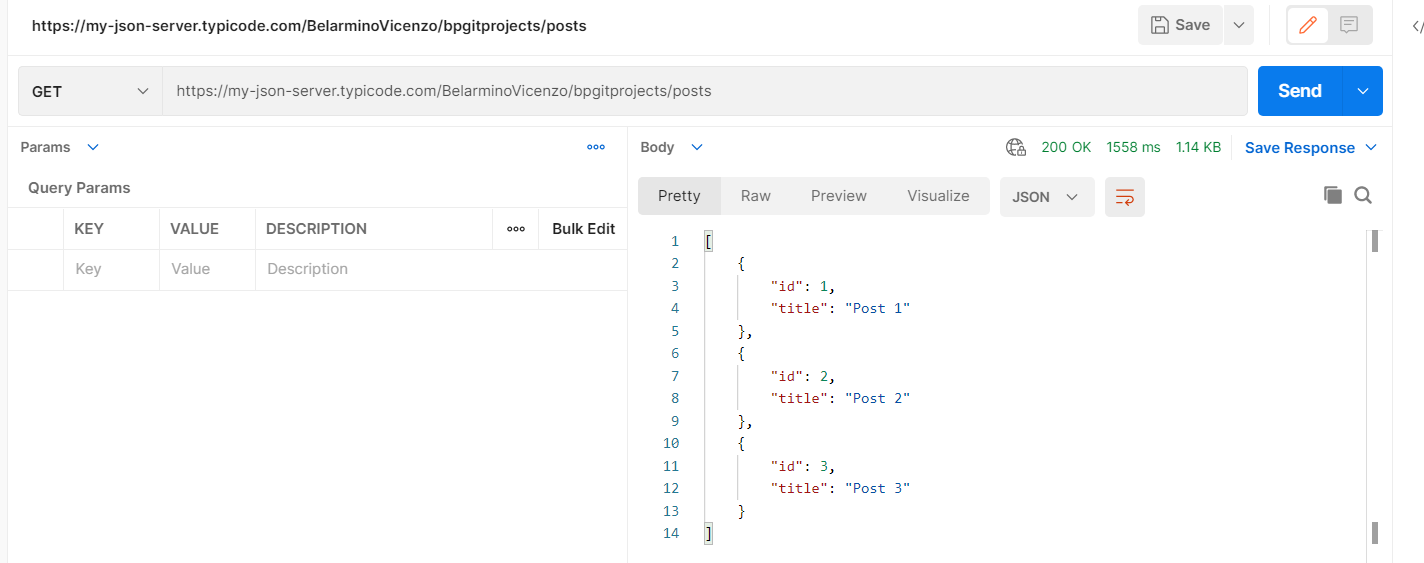
How do to that in C#...Well there's plenty ways to do that.
First you need a client, a client is who will make the a HTTP Request (I will refer only as request).
The request is made to using a url and the request return a response(not always data).
Note: Requests have types (GET,POST,PUT, etc)
The response is the information that the client asked.
Assuming you did (or will do) a little research, you understand (or will understand) what I just typed :)
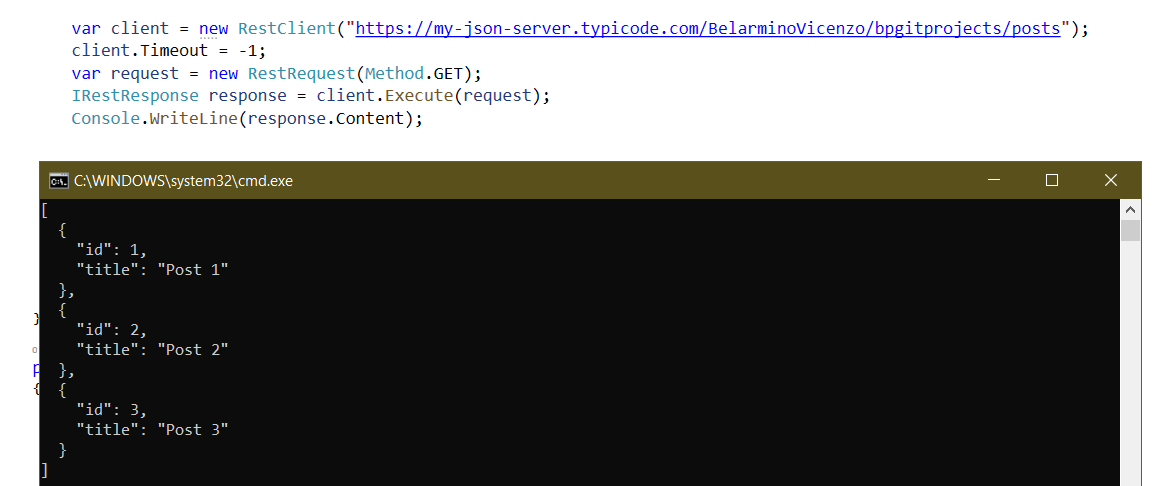
//normal console app

static void Main(string[] args)
        {

            var client = new RestClient("https://my-json-server.typicode.com/BelarminoVicenzo/bpgitprojects/posts");
            client.Timeout = -1;
            var request = new RestRequest(Method.GET);
            IRestResponse response = client.Execute(request);
            Console.WriteLine(response.Content);

            Console.ReadLine();

        }
First you need to understand how HTTP request work, I can recommend you this ( https://www.youtube.com/watch?v=t5n07Ybz7yI ). It uses a software called Postman.
I will check it. Thanks.
I just need step-by-step instructions. Can I adjust the response? I need a POST message then check the response.
The best is with Microsoft library not a third party.
[
  {
    "id": 1,
    "title": "Post 1"
  },
  {
    "id": 2,
    "title": "Post 2"
  },
  {
    "id": 3,
    "title": "Post 3"
  }
]
THANKS!
What is the difference between PostAsync and SendAsync? What is the difference between the HTTP client and the REST interface? Lots of people say REST and mean HTTPClient or WebClient.
Greetings Markus