Microsoft 365 and Office | SharePoint | For business | Windows
A group of Microsoft Products and technologies used for sharing and managing content, knowledge, and applications.

This browser is no longer supported.
Upgrade to Microsoft Edge to take advantage of the latest features, security updates, and technical support.
' cx='32' cy='32' r='32' /%3E%3Ctext x='50%25' y='55%25' dominant-baseline='middle' text-anchor='middle' fill='%23FFF' %3ERH%3C/text%3E%3C/svg%3E)
We have a customer who has 5 SharePoint Document Libraries, all created back in February 2020. I was assisting the customer with trying to go back to a previous version of the file and noticed that Versioning was turned off on 1 of the Document Libraries but was turned on for the other 4 Document Libraries. I then logged onto SharePoint for all other other customers who use it and noticed for another customer who has 3 Document Libraries that Versioning was disabled for 1 of them but turned on for the other 2. For that customer their 3 Document Libraries were created in May 2020.
Now from what I understand, Versioning is enabled by default for SharePoint Document Libraries? And if that is correct, then why was it disabled for just 1 Document Libraries for these 2 customers? The customers did not disabled it and would have had no idea how to do it, and the IT company I work for only has 2 engineers and neither of us disabled it and never knew how to disabled it anyway.
So is there anyway to find out why the Versioning was disabled on these SharePoint Document Libraries, when it is supposed to be on by default? We have since updated our internal documentation to make sure Versioning is enabled on any newly created Document Libraries, but still begs the question as to why it was disabled for the 2 customers in question.
A group of Microsoft Products and technologies used for sharing and managing content, knowledge, and applications.
Answer accepted by question author

Hi, @Robin Horn NZ ,
First, for SharePoint Online, you understanding is right, versioning is enabled by default for SharePoint Document Libraries since an update started in 2018. For libraries created in February 2020 and May 2020, they shall be enabled on versioning from the very beginning. And after this update, end users shall not be able to disable it via UI. There is no option to disable it in list settings.
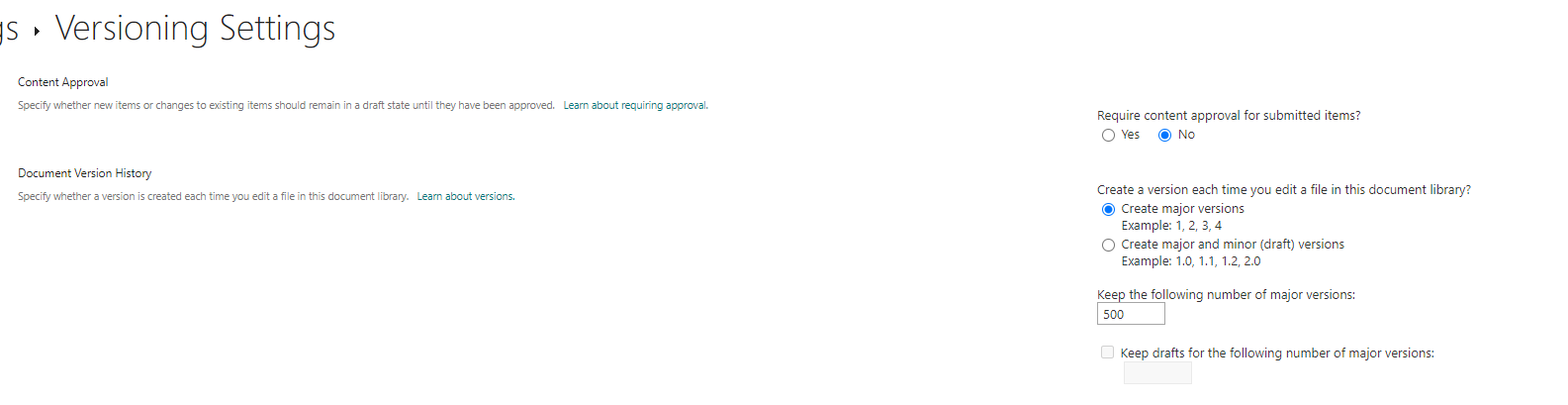
So for now, if we want to disable versioning, either we need to use PowerShell to set it directly. This approach will needs site owner or site admin permission. Or it can be configured via developer API. Audit logs will not provide trace of list settings change, so I will suggest you to direct check all the owner or admin users and ensure there will not be further changes on versioning settings.
If an Answer is helpful, please click "Accept Answer" and upvote it.
Note: Please follow the steps in our documentation to enable e-mail notifications if you want to receive the related email notification for this thread.
' cx='32' cy='32' r='32' /%3E%3Ctext x='50%25' y='55%25' dominant-baseline='middle' text-anchor='middle' fill='%23FFF' %3EKT%3C/text%3E%3C/svg%3E)
I have seen this happen when the document library was created and versioning was "turned off" before the automatic versioning went into effect. It would have had to have been turned off by a site owner or global admin. And it would have had to have been turned off at the library level. This can also happen if the default content type on the library is something other than document. Even if you were to have a time frame of this action most likely it would not show up in logs due to the fact that its a library settings change.