Developer technologies | .NET | Xamarin
A Microsoft framework for building cross-platform mobile apps using .NET and C# with native performance and user interfaces.
This browser is no longer supported.
Upgrade to Microsoft Edge to take advantage of the latest features, security updates, and technical support.
' cx='32' cy='32' r='32' /%3E%3Ctext x='50%25' y='55%25' dominant-baseline='middle' text-anchor='middle' fill='%23FFF' %3EST%3C/text%3E%3C/svg%3E)
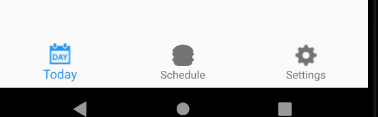
I made a tabbed page,and want to use custom tab icon,but the icon is not showing actual image,its changes the overlay.
Here is my tabs

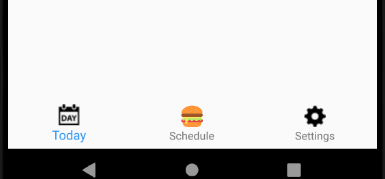
I want to like this middle icon

how to do it using tabbed page in xamarin forms
' cx='32' cy='32' r='32' /%3E%3Ctext x='50%25' y='55%25' dominant-baseline='middle' text-anchor='middle' fill='%23FFF' %3EA%3C/text%3E%3C/svg%3E)
Hello,
Welcome to our Microsoft Q&A platform!
Please add following custom renderer for tabbedpage.
   using Android.App;
   using Android.Content;
   using Android.OS;
   using Android.Runtime;
   using Android.Views;
   using Android.Widget;
   using Google.Android.Material.BottomNavigation;
   using System;
   using System.Collections.Generic;
   using System.Linq;
   using System.Text;
   using TabbedPageWithNavigationPage.Droid;
   using Xamarin.Forms;
   using Xamarin.Forms.Platform.Android;
   using Xamarin.Forms.Platform.Android.AppCompat;

   [assembly: ExportRenderer(typeof(TabbedPage), typeof(MyTabbedPageRenderer))]
   namespace TabbedPageWithNavigationPage.Droid
   {
       class MyTabbedPageRenderer : TabbedPageRenderer
       {
           public MyTabbedPageRenderer(Context context) : base(context)
           {

           }

           protected override void OnElementChanged(ElementChangedEventArgs<TabbedPage> e)
           {
               base.OnElementChanged(e);

               if (e.OldElement == null && e.NewElement != null)
               {
                   for (int i = 0; i <= this.ViewGroup.ChildCount - 1; i++)
                   {
                       var childView = this.ViewGroup.GetChildAt(i);
                       if (childView is ViewGroup viewGroup)
                       {
                           for (int j = 0; j <= viewGroup.ChildCount - 1; j++)
                           {
                               var childRelativeLayoutView = viewGroup.GetChildAt(j);
                               if (childRelativeLayoutView is BottomNavigationView)
                               {
                                   ((BottomNavigationView)childRelativeLayoutView).ItemIconTintList = null;
                               }
                           }
                       }
                   }
               }
           }
       }
   }
Before
After
Best Regards,
Leon Lu
If the response is helpful, please click "Accept Answer" and upvote it.
Note: Please follow the steps in our documentation to enable e-mail notifications if you want to receive the related email notification for this thread.
Hello, Its fantastic and working but middle icon showing very small,how to set the size of that perticular icon? and what is the renderer code for ios?

In this thread, we are mainly discussing about this issue(use a custom icon in tab page xamarin forms) as indicated by the first post. And it is solved. Then for your new question it would be best if you try to open up a new thread for it. In this way, it will make answer searching in the forum easier and be beneficial to other community members as well.