Azure Data Factory
An Azure service for ingesting, preparing, and transforming data at scale.
This browser is no longer supported.
Upgrade to Microsoft Edge to take advantage of the latest features, security updates, and technical support.
' cx='32' cy='32' r='32' /%3E%3Ctext x='50%25' y='55%25' dominant-baseline='middle' text-anchor='middle' fill='%23FFF' %3EJ%3C/text%3E%3C/svg%3E)
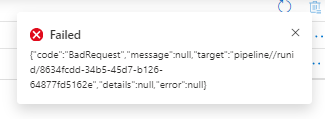
When trying to debug my pipeline I get an error without further information regarding what went wrong:
error: Bad request Message: null
run Id : 8634fcdd-34b5-45d7-b126-64877fd5162e
I would much appreciate any help.
' cx='32' cy='32' r='32' /%3E%3Ctext x='50%25' y='55%25' dominant-baseline='middle' text-anchor='middle' fill='%23FFF' %3EKM%3C/text%3E%3C/svg%3E)
Hi @javier ,
Thanks for using Microsoft Q&A forum and posting your query.
I agree that error message wasn't helpful. I am unable to reproduce the error too. Could you please provide few additional details about your pipeline and flow? What have your configured - Sources, sink, any parameters or variables? Appreciate if you can share the pipeline JSON code along with some screenshots to get better understanding.
Could you please check again to see if you are still experiencing the issue consistently or is it a transient one?
We look forward to your response.
Thank you
Hi @javier ,
I did discussed about this issue with internal team and confirmed that these errors are usually user errors like missing space somewhere of header payload is corrupt. As it is web header error, you can do Network trace troubleshooting on JSON payload that is throwing error error. You can step over to chrome dev tools and use the network tab to see if you can capture the request, a POST to management.azure.com with the 400 BadRequest.
In case if you are still blocked and need assistance, please do share the JSON payload of your pipeline which would help us to troubleshoot the issue.
Additional info: Here is a SO thread related to similar issue related to user configuration: https://stackoverflow.com/questions/53754827/adf-v2-failure-when-using-bool-variable
Do let us know how it goes.
----------
Please don’t forget to Accept Answer and Up-Vote wherever the information provided helps you, this can be beneficial to other community members.
Hi @javier ,
We still have not heard back from you. Just wanted to check if you still need assistance on this issue? - Thanks