Share via

logging in

Anonymous
2024-08-09T13:09:08+00:00

Hello,

When I'm logging in to some MS products, even though it's my same machine, home network, everything, it does the 2 step process of a code every single time, so I have to have my phone out now. I have my texts synced with my machine precisely to not have to have it out, but MS forces you to have to get your actual phone out. I couldn't find the right category, but I think this falls under MS Windows, not 365. So I can move the question to somewhere else too if I know where.

Is there a way - when I'm at home, on my own machine, to get a break from this constant nuisance? It's multiple times a day, b/c it's not like I stay logged on or anything.

Thank you.

***moved from Microsoft 365 and Office / OneDrive / For home / Windows***

Windows for home | Windows 11 | Accounts, profiles, and login

Locked Question. This question was migrated from the Microsoft Support Community. You can vote on whether it's helpful, but you can't add comments or replies or follow the question.

0 comments No comments

3 answers

Sort by: Most helpful
  1. Anonymous
    2024-08-12T05:14:09+00:00

    Hello, Polymath4

    No problem, please click the link below and log in with your Microsoft account.

    Additional security options (live.com)

    Then find the button in the screenshot below to turn the double verification feature off.

    We are very concerned about your question and look forward to your reply. Thank you for your understanding and cooperation!

    Best Regards,

    Rota|Microsoft Community Support Specialist

    Was this answer helpful?

    0 comments No comments
  2. Anonymous
    2024-08-10T17:59:59+00:00

    Hello,

    Thank you for moving the thread. I clicked on the link, but it only told me how to use the process. I want to stop it. Can you give me a link so I can stop it?

    I would greatly, greatly appreciate it.

    Thank you!

    Was this answer helpful?

    0 comments No comments
  3. Anonymous
    2024-08-10T09:24:26+00:00

    Hello,Polymath4

    Thank you for posting in the Microsoft community.

    Thank you for your detailed description, your thread has been moved to the correct board, and I see that you are experiencing frequent need to enter codes from your phone because you have turned on double verification for your Microsoft account.

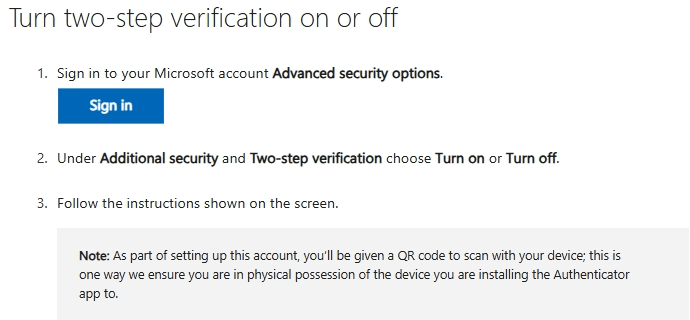
    If you are considering turning off double verification for easier login, you can refer to the following.

    How to use two-step verification with your Microsoft account - Microsoft Support
    Image

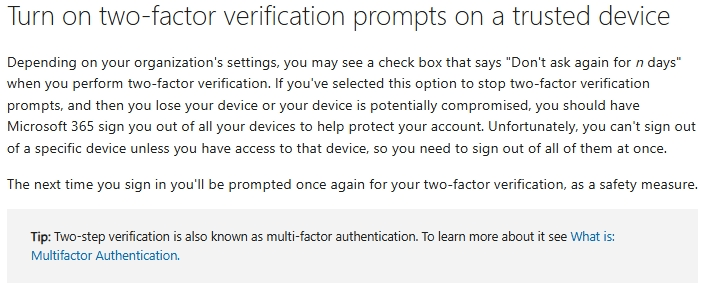
    Generally speaking, you can choose to temporarily turn off the two-factor authentication prompt box for trusted devices, but if you need to log in to your Microsoft account on multiple devices or channels or there may be problems with your account status, the prompt may still pop up repeatedly. You can refer to the following picture for the method of temporarily turning off the two-factor authentication prompt box for trusted devices.
    Image

    After you refer to the above steps, you can share some information in this thread and I will determine the possible problems based on your situation and provide further assistance. Thank you for your understanding and cooperation!

    Best Regards,

    Rota|Microsoft Community Support Specialist

    Was this answer helpful?

    0 comments No comments
