Azure Machine Learning
An Azure machine learning service for building and deploying models.
This browser is no longer supported.
Upgrade to Microsoft Edge to take advantage of the latest features, security updates, and technical support.
' cx='32' cy='32' r='32' /%3E%3Ctext x='50%25' y='55%25' dominant-baseline='middle' text-anchor='middle' fill='%23FFF' %3ESV%3C/text%3E%3C/svg%3E)
Hi,
I am using Azure Machine Learning – Designer (drag-n-drop) – to train an ML model. While doing so, I require to execute some Python code & hence decided to use the Execute Python Script module available.
While writing the script, I added print statements because it would allow for easier debugging. However, I have had no luck in finding a file where the print statements are stored.
I have tried the following solution. On failure of the script, this method (opening 70_driver_log.txt and searching for messages) only shows me the error returned by the Python Interpreter, but it doesn't show me any print statements at all. For example:
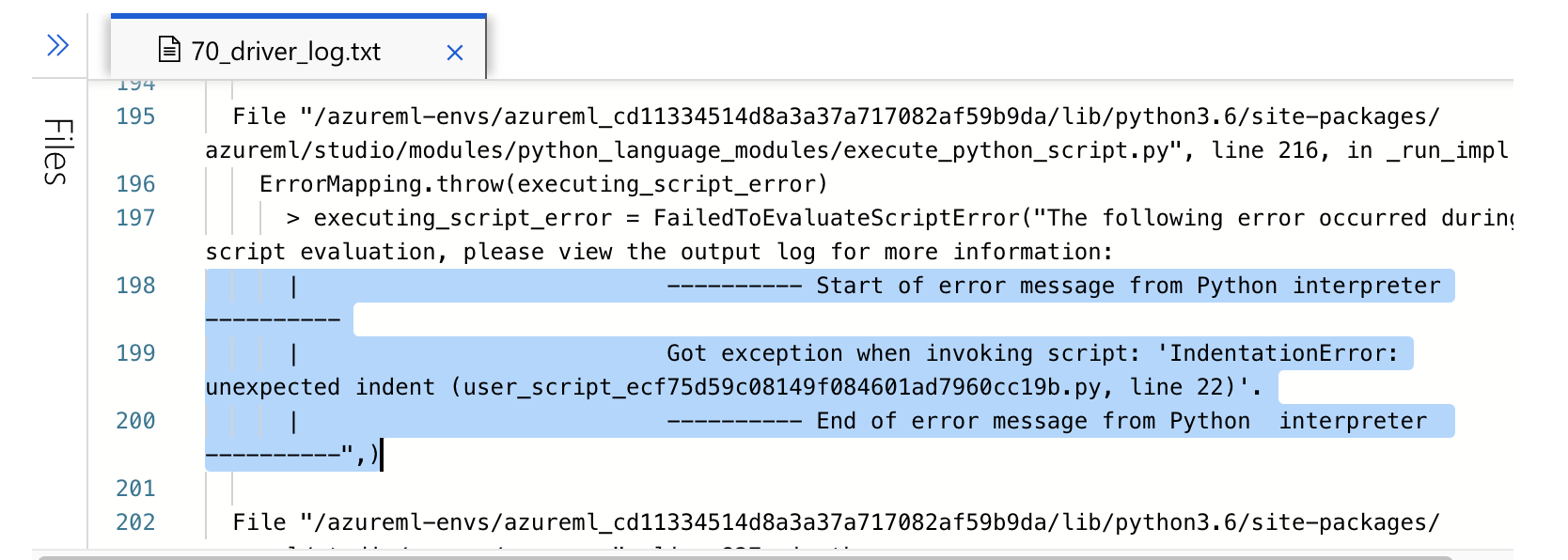
Similarly, on success, no print statements are displayed.
Additionally, logs > azureml > stdoutlogs .txt is completely empty.
What clue am I missing? Any help is appreciated!
An Azure machine learning service for building and deploying models.
' cx='32' cy='32' r='32' /%3E%3Ctext x='50%25' y='55%25' dominant-baseline='middle' text-anchor='middle' fill='%23FFF' %3EY9%3C/text%3E%3C/svg%3E)
Hello,
According to document, the results of any computations by the embedded Python code must be provided as pandas.DataFrame, which is automatically converted to the Azure Machine Learning dataset format, so that you can then use the results with other modules in the pipeline.
The module returns two datasets:
Results Dataset 1, defined by the first returned pandas data frame in a Python script.
Result Dataset 2, defined by the second returned pandas data frame in a Python script.
So I don't think it will be in the output part as you expect.
I am trying on my side to see if we can get the print result from Designer.
Regards,
Yutong