
Just in case anybody stumbles across this, always double check the permissions on the UNC folder where the database is stored!
This browser is no longer supported.
Upgrade to Microsoft Edge to take advantage of the latest features, security updates, and technical support.
' cx='32' cy='32' r='32' /%3E%3Ctext x='50%25' y='55%25' dominant-baseline='middle' text-anchor='middle' fill='%23FFF' %3EGM%3C/text%3E%3C/svg%3E)
I'm using PowerShell to connect to a MS Access database stored on a UNC to run a macro. This is the code I'm using...
$MsAccess = New-Object -ComObject Access.Application
$MsAccess.OpenCurrentDatabase('\*************************\db.accdb', $False, 'password')
$MsAccess.Visible = $true
$MsAccess.Application.DoCmd.RunMacro("Macro1")
$MsAccess.CloseCurrentDatabase()
$MsAccess.Quit()
The password I'm supplying is correct as it works when I manually open the database. When I run this code I'm still being prompted to supply the password for the database...
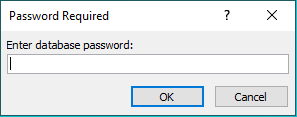
Using the same code works for other password protected databases but just not on this one.
Any help is greatly appreciated.
Just in case anybody stumbles across this, always double check the permissions on the UNC folder where the database is stored!