Hello,Ross Highley
Thank you for posting in the Microsoft community.
I understand that after you delete your organization account, you still seem to receive domain control and are asked to change your PIN after a period of time.
According to your description, it seems that your system has not completely exited the domain control, because the domain controller control and the system are closely related, and the correct process is required to safely exit the domain. For example, the domain administrator configures the domain exit policy and pushes it to your device, or the IT administrator logs off your account domain, then removes and reconfigures the identity. If you have not performed the above steps, you may not be able to completely exit the domain control. You can try to execute the following command, which contains some common group policy locations. If your previous group policy has configured other paths in the system, you may need to confirm with the organization's IT administrator whether there are other configuration paths.
Enter "CMD" in the search bar at the bottom, right-click and "Run as Administrator", then enter the following command and follow the steps.
reg delete "HKCU\Software\Microsoft\Windows\CurrentVersion\Policies" /f

reg delete "HKCU\Software\Microsoft\WindowsSelfHost" /f

reg delete "HKCU\Software\Policies" /f

reg delete "HKLM\Software\Microsoft\Policies" /f

reg delete "HKLM\Software\Microsoft\Windows\CurrentVersion\Policies" /f

reg delete "HKLM\Software\Microsoft\WindowsCurrentVersion\WindowsStore\WindowsUpdate" /f

reg delete "HKLM\Software\Microsoft\WindowsSelfHost" /f

reg delete "HKLM\Software\Policies" /f

reg delete "HKLM\Software\WOW6432Node\Microsoft\Policies" /f

reg delete "HKLM\Software\WOW6432Node\Microsoft\Windows\CurrentVersion\Policies" /f

reg delete "HKLM\Software\WOW6432Node\Microsoft\Windows\CurrentVersion\WindowsStore\WindowsUpdate" /f

RD /S /Q "%WinDir%\System32\GroupPolicyUsers"
(Press Enter)
RD /S /Q "%WinDir%\System32\GroupPolicy"
(Press Enter)
gpupdate /force
(Press Enter)
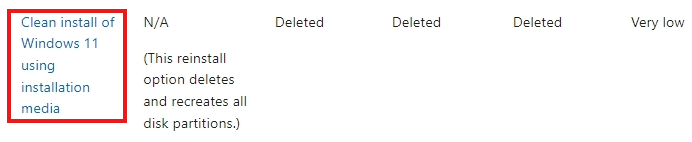
However, the above solutions are not always effective and are relatively complicated. If you have performed the above steps but the problem still exists, the most convenient way is to back up the required data and then reinstall the system, which can help you completely exit domain control.
After you refer to the above steps, you can share some information in this thread and I will answer your questions further. Thank you for your understanding and cooperation!
Best Regards,
Rota|Microsoft Community Support Specialist
' cx='32' cy='32' r='32' /%3E%3Ctext x='50%25' y='55%25' dominant-baseline='middle' text-anchor='middle' fill='%23FFF' %3EA%3C/text%3E%3C/svg%3E)
