SQL Server | Other
Additional SQL Server features and topics not covered by specific categories
This browser is no longer supported.
Upgrade to Microsoft Edge to take advantage of the latest features, security updates, and technical support.
' cx='32' cy='32' r='32' /%3E%3Ctext x='50%25' y='55%25' dominant-baseline='middle' text-anchor='middle' fill='%23FFF' %3EPV%3C/text%3E%3C/svg%3E)
Hi. I am trying to use the BCP tool in a process ( .NET console application)
There are times, when the data is getting passed, there are times the BCP is not passing any data. How to find if there is any error while the BCP is executing. I have tried the below code, but not been able to capture any error.
using (var process = new Process())
{
process.StartInfo.UseShellExecute = false;
process.StartInfo.CreateNoWindow = true;
process.StartInfo.RedirectStandardError = true;
process.StartInfo.RedirectStandardOutput = true;
process.StartInfo.FileName = "BCP";
            process.StartInfo.Arguments = "\"" + Query + " \" queryout " + "\"" + fileName.Trim() + "\"" + " -T -S " + servername + " -d " + dbinstance + " -b 1000 -c -C 65001 -t~";

               process.Start();
            process.BeginOutputReadLine();
            process.WaitForExit();
            string stderr = process.StandardError.ReadToEnd();
            console.writeline(stderr);

        }
How to capture the error ? Is the above method correct ? Thanks
Additional SQL Server features and topics not covered by specific categories
An object-oriented and type-safe programming language that has its roots in the C family of languages and includes support for component-oriented programming.

Consider this approach:
. . .
process.Start( );
process.WaitForExit( );
int c = process.ExitCode;
if( c == 0 )
{
   Console.WriteLine( "Success" );
   . . .
}
else
{
   Console.WriteLine( "Error" );
   . . .
}
If you want to intercept and analyse the output text, including errors, then remove BeginOutputReadLine and use ‘string text = process.StandardOutput.ReadToEnd( )’.
' cx='32' cy='32' r='32' /%3E%3Ctext x='50%25' y='55%25' dominant-baseline='middle' text-anchor='middle' fill='%23FFF' %3ETY%3C/text%3E%3C/svg%3E)
In theory, if your argument is okay, the following code should get the correct result.
    static void Main(string[] args)
    {
        using (Process process = new Process())
        {
            ProcessStartInfo startInfo = new ProcessStartInfo();
            startInfo.UseShellExecute = false;
            startInfo.RedirectStandardOutput = true;
            startInfo.RedirectStandardError = true;
            startInfo.FileName = "CMD.exe";
            startInfo.Arguments = "/c bcp -v";
            process.StartInfo = startInfo;
            process.Start();

            string outputString = process.StandardOutput.ReadToEnd();
            string errorString = process.StandardError.ReadToEnd();

            Console.WriteLine(outputString );
            Console.WriteLine(errorString );
            Console.WriteLine();
        }

        Console.WriteLine("Press any key to continue......");
        Console.ReadLine();
    }
If the response is helpful, please click "Accept Answer" and upvote it.
Note: Please follow the steps in our documentation to enable e-mail notifications if you want to receive the related email notification for this thread.
Hi.
when I tried the above code, I am getting an error as :
'Cannot mix synchronous and asynchronous operation on process stream.'
@Padmanabhan, Venkatesh
I modified the code, and now I call the bcp command in cmd.
If there is no error, errorString is an empty string, otherwise, outputString is an empty string.
In this line:
startInfo.Arguments = "/c bcp -v"
How do i pass my arguments ? is it after -v ?
@Padmanabhan, Venkatesh
Try to replace -v with your argument, bcp -v is a command of bcp to get the bcp version.
Tried this, but giving error:
startInfo.FileName = "CMD.exe";
string args = "\"" + Query + " \" queryout " + "\"" + fileName.Trim() + "\"" + " -T -S " + servername + " -d " + dbinstance + " -b 500 -c -C 65001 -t~";
            startInfo.Arguments = "/c bcp " + args ;
            process.StartInfo = startInfo;
@Padmanabhan, Venkatesh
Could you please show me the error message?
I successfully executed the command with these codes:
                string arguments = @" ""select* from scoretable"" queryout d:\2.txt -T -S (localdb)\MSSQLLocalDB -d Test -b 500 -c -C 65001 -t~";
                startInfo.Arguments = "/c bcp "+arguments;
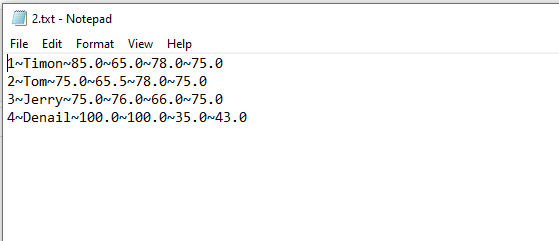
I guess there may be an error during command splicing. Please add a breakpoint and check startInfo.Arguments.
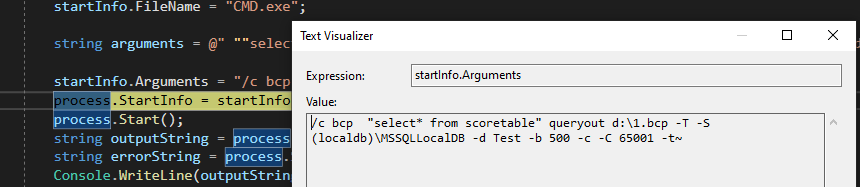
Copy it to cmd and execute it to see if the same error occurs.

Tried this, but giving error:
And that error message is top-secret material? Or are you disinterested in getting help, that you could not muster the energy to share it?