If there is no link to Control Panel on the Start Menu (see Bill Smithers post above), just click the Start button, type Control Panel in the Search box, and press Enter.
**************************************************************************************
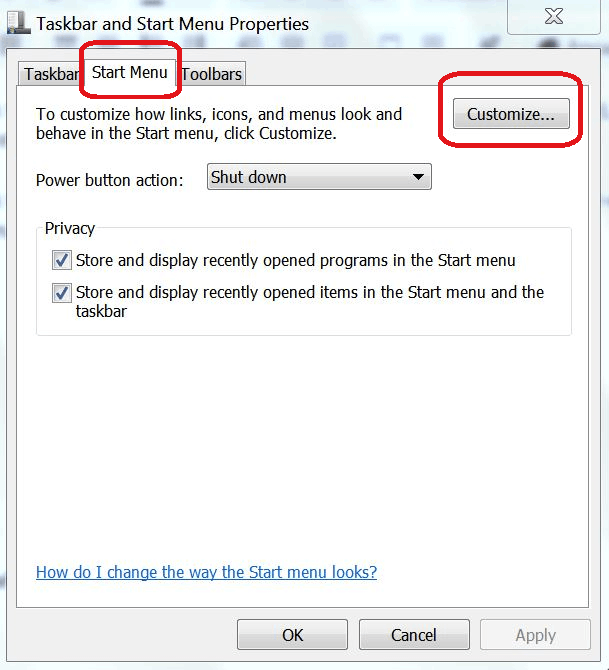
If there is no link to Control Panel on the Start Menu and you would like such a link to be there, right-click on the Start button, select "Properties," and then click the "Customize" button on the "Start Menu" tab:
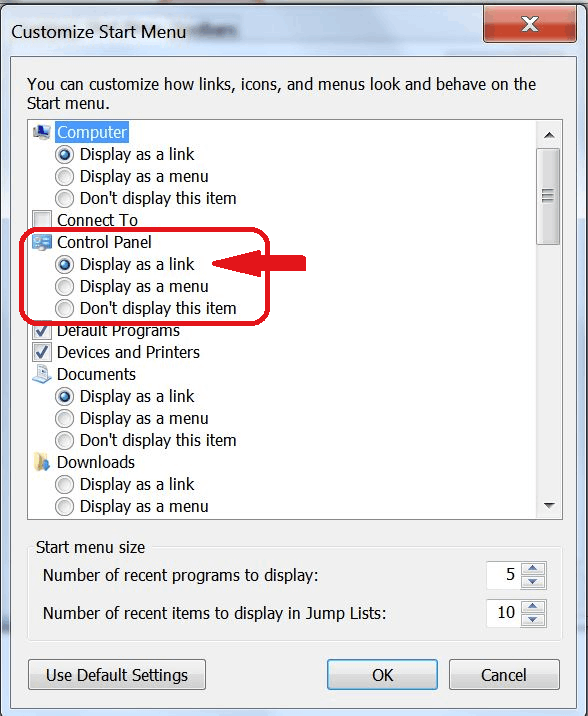
When the "Customize Start Menu" applet opens, make sure that under "Control Panel," the radio button next to "Display as a link" is selected, then click OK. (Or just click the "Use Default Settings" button.)
' cx='32' cy='32' r='32' /%3E%3Ctext x='50%25' y='55%25' dominant-baseline='middle' text-anchor='middle' fill='%23FFF' %3EA%3C/text%3E%3C/svg%3E)

:max_bytes(150000):strip_icc():format(webp)/002_how-to-open-control-panel-2625782-5c4f4c3146e0fb0001f220af.jpg)
' cx='32' cy='32' r='32' /%3E%3Ctext x='50%25' y='55%25' dominant-baseline='middle' text-anchor='middle' fill='%23FFF' %3EL%3C/text%3E%3C/svg%3E)