hi all.
i have a strange problem with my new task sequence for Windows 10 22H2.
SAME task sequence with Windows 10 20H2 work fine without problem....
i try to explicate my scenario / TS
i have one simple task sequence with:
windows PE mode
format e partition disk
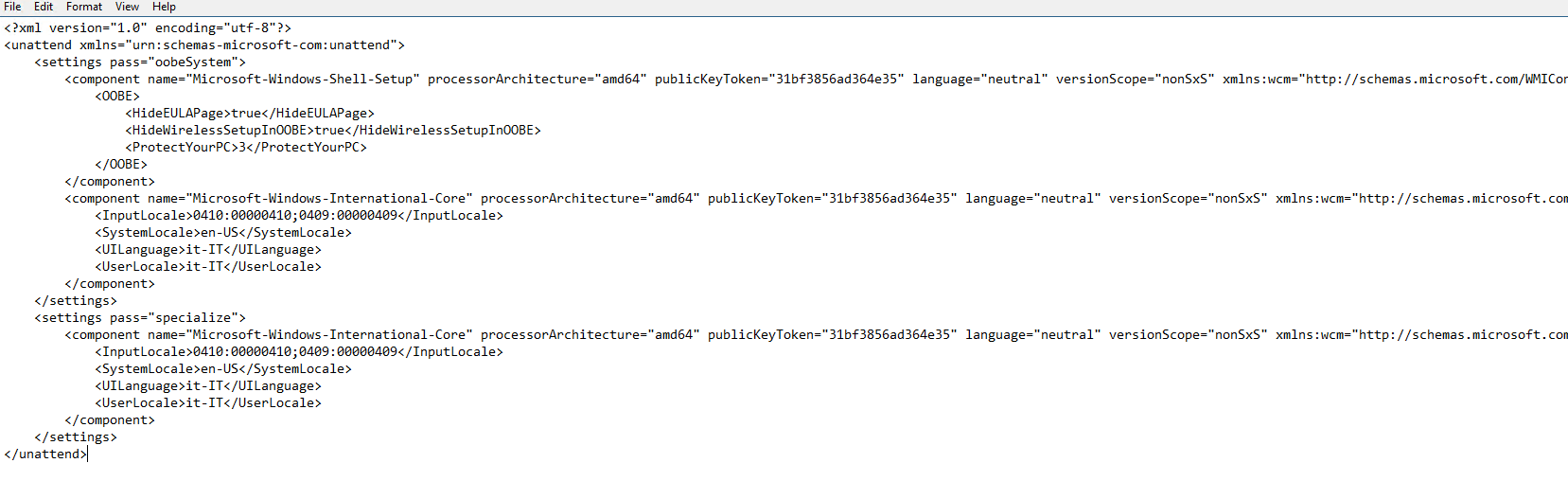
install OS - with answer file.xml (W10 22H2) i can attach .xml file.
install language pack and FOD (installed during winpe process) file from original DVD (SW\_DVD9\_NTRL\_Win\_10\_2004\_32\_64\_ARM64\_MultiLang\_LangPackAll\_LIP\_X22-21307.ISO)      Same DVD for Windows 10 20H2  --> 21H2 etc...
Dism /Image:C:\ /Add-Package /PackagePath:"Microsoft-Windows-Client-Language-Pack_x64_it-it.cab"
Dism /Image:C:\ /Add-Package /PackagePath:"Microsoft-Windows-LanguageFeatures-Basic-it-it-Package~31bf3856ad364e35~amd64~~.cab"
Dism /Image:C:\ /Add-Package /PackagePath:"Microsoft-Windows-LanguageFeatures-Handwriting-it-it-Package~31bf3856ad364e35~amd64~~.cab"
Dism /Image:C:\ /Add-Package /PackagePath:"Microsoft-Windows-LanguageFeatures-OCR-it-it-Package~31bf3856ad364e35~amd64~~.cab"
Dism /Image:C:\ /Add-Package /PackagePath:"Microsoft-Windows-LanguageFeatures-Speech-it-it-Package~31bf3856ad364e35~amd64~~.cab"
Dism /Image:C:\ /Add-Package /PackagePath:"Microsoft-Windows-LanguageFeatures-TextToSpeech-it-it-Package~31bf3856ad364e35~amd64~~.cab"
apply network settings (join on my domain)
apply device driver: (simple device: virtual machine hyperV)
setup windows and configuration manager and then reboot
switch in FULLOS step
enable net framework (extract file from Windows 22H2 - maybe same framework for 20H2/21H2) normal package - install from .ps1
package
microsoft-windows-netfx3-ondemand-package~31bf3856ad364e35~amd64~~.cab
.PS1
$currentLocation = Split-Path -Parent $MyInvocation.MyCommand.Path;
Enable-WindowsOptionalFeature -Online -FeatureName NetFx3 -Source $currentLocation -LimitAccess -All
Standby null (cmd.exe /c powercfg -x -standby-timeout-ac 0)
Install application...  in this case Visual C++
etc etc....
problem:
when the task sequence reaches the install application step the task sequence times out, stops at the first Visual C++ step, but the same problem also happens with any other software. (acrobat, notepad++, etc, etc... )if I delete the unattended.xml file from the task sequence then the task sequence continues to the end without problems.
same task sequence with Windows 10 20H2 work without problem
anyone with the same problem?
any help is appreciated
grazie !!!
content of file .xml
' cx='32' cy='32' r='32' /%3E%3Ctext x='50%25' y='55%25' dominant-baseline='middle' text-anchor='middle' fill='%23FFF' %3EA%3C/text%3E%3C/svg%3E)
