Microsoft 365 and Office | SharePoint Server | For business
A family of Microsoft on-premises document management and storage systems.

This browser is no longer supported.
Upgrade to Microsoft Edge to take advantage of the latest features, security updates, and technical support.
' cx='32' cy='32' r='32' /%3E%3Ctext x='50%25' y='55%25' dominant-baseline='middle' text-anchor='middle' fill='%23FFF' %3EIR%3C/text%3E%3C/svg%3E)
Hi ,
I received SharePoint link from client. When i opening i am getting below error. Do i need to ask client to check MDM policy?
"Your organization doesn't allow you to download, print, or sync using this device. To use these actions, use a device that's joined to a domain or marked compliant by Intune. For help, contact your IT department"

Go to the Access control page of the new SharePoint admin center, and sign in with an account that has admin permissions for your organization.
Select Unmanaged devices(those not hybrid AD joined or compliant in Intune) to check if your tenant has selected Allow limited, web-only access on unmanaged devices:
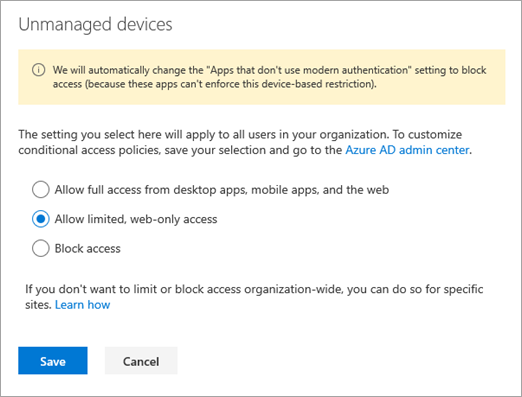
If you select this option, users on unmanaged devices will have browser-only access with no ability to download, print, or sync files.

More information for your reference:
If an Answer is helpful, please click "Accept Answer" and upvote it.
Note: Please follow the steps in our documentation to enable e-mail notifications if you want to receive the related email notification for this thread.
Do you have any progress on this issue?
Please remember to update this thread if you need further assistance.
I’m checking how the things are going on about this issue. Whether the post helps you?
You can accept the post as answer if it helps.
Thank you for your understanding and support.