Developer technologies | C#
An object-oriented and type-safe programming language that has its roots in the C family of languages and includes support for component-oriented programming.
This browser is no longer supported.
Upgrade to Microsoft Edge to take advantage of the latest features, security updates, and technical support.
' cx='32' cy='32' r='32' /%3E%3Ctext x='50%25' y='55%25' dominant-baseline='middle' text-anchor='middle' fill='%23FFF' %3EEA%3C/text%3E%3C/svg%3E)
I created a constructor in attribute that gets parameters. In debug it does not reach the constructor and I also see that it does not receive the value I pass. It is not clear to me what I am missing and how the constructor is being skipped at all
ForExample:
public FOO() {}
    public FOO(bool refresh)
    {
        refreshD = refresh;
    }

    public override void OnGetValue(LocationInterceptionArgs args)
    {
        if (refreshD)
        {
           ...
        }

    }
the CalledProperty:
[FOO(refresh:true)]
public ...
An object-oriented and type-safe programming language that has its roots in the C family of languages and includes support for component-oriented programming.
' cx='32' cy='32' r='32' /%3E%3Ctext x='50%25' y='55%25' dominant-baseline='middle' text-anchor='middle' fill='%23FFF' %3ETY%3C/text%3E%3C/svg%3E)
@Esther Aronowsky
May I know if you have got any chance to check my answer? If my answer does not meet your expectations or have any other questions, please feel free to ask.
According to the documentation:
It's important to note that these Attribute objects are instantiated lazily. That is, they won't be instantiated until you use GetCustomAttribute or GetCustomAttributes. They are also instantiated each time. Calling GetCustomAttributes twice in a row will return two different instances of ObsoleteAttribute.
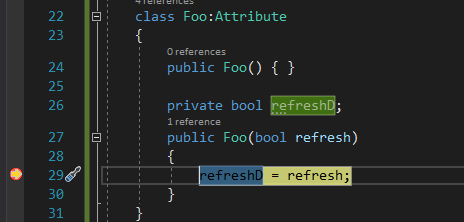
I tested it with the following code:
    class Program
    {
        [Foo(refresh:true)]
        public string Name { get; set; }
        static void Main(string[] args)
        {
            Program program = new Program() { Name = "Timon"};
            Attribute attribute = program.GetType().GetProperty("Name").GetCustomAttribute(typeof(Foo));
            Console.WriteLine();
        }
    }
    class Foo:Attribute
    {
        public Foo() { }

        private bool refreshD;
        public Foo(bool refresh)
        {
            refreshD = refresh;
        }
    }
It successfully entered the Attribute.
If the response is helpful, please click "Accept Answer" and upvote it.
Note: Please follow the steps in our documentation to enable e-mail notifications if you want to receive the related email notification for this thread.