Windows Pro 11
My environment variables do not work when entering them manually for example:
C:\swigwin-4.2.0\swig.exe
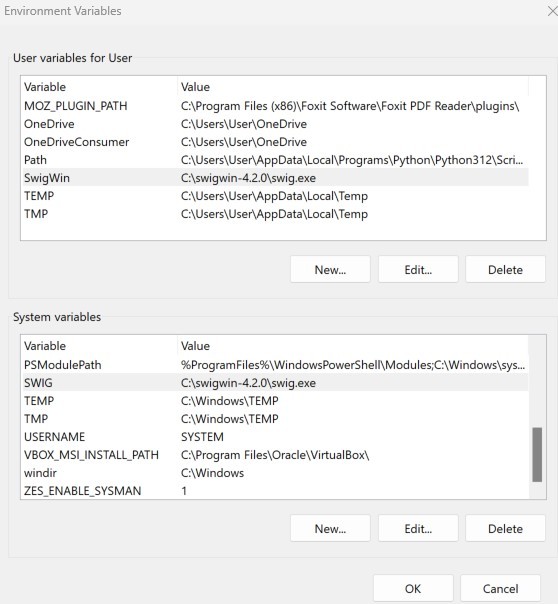
If I entered my environment variables like so (in the system menu):
User variable for User:
Variable Value
SwigWing C:\swigwin-4.2.0\swig.exe
or as System variables:
Variable Value
SwigWing C:\swigwin-4.2.0\swig.exe
This is the message from my terminal:
C:\Users\User\Desktop>swig -help
'swig' is not recognized as an internal or external command,
operable program or batch file.
Now if I entered the path like so:
C:\Users\User\Desktop>C:\swigwin-4.2.0\swig -help
Supported Target Language Options
 -csharp         - Generate C# wrappers

 -d              - Generate D wrappers

 -go             - Generate Go wrappers

 -guile          - Generate Guile wrappers

 -java           - Generate Java wrappers

 -javascript     - Generate Javascript wrappers

 -lua            - Generate Lua wrappers
it works
I tried different variable names and paths, but if I entered them manually they do not not work.
However, if some program creates its own environmental variables the variables work.
what am I doing wrong?
' cx='32' cy='32' r='32' /%3E%3Ctext x='50%25' y='55%25' dominant-baseline='middle' text-anchor='middle' fill='%23FFF' %3EA%3C/text%3E%3C/svg%3E)

