Azure SQL Database
An Azure relational database service.
This browser is no longer supported.
Upgrade to Microsoft Edge to take advantage of the latest features, security updates, and technical support.
' cx='32' cy='32' r='32' /%3E%3Ctext x='50%25' y='55%25' dominant-baseline='middle' text-anchor='middle' fill='%23FFF' %3EDZ%3C/text%3E%3C/svg%3E)
I am fairly new in the database management world and I just received an email from Microsoft Azure [Update you network configuration to allow for SQL Database gateways]
the mail is like 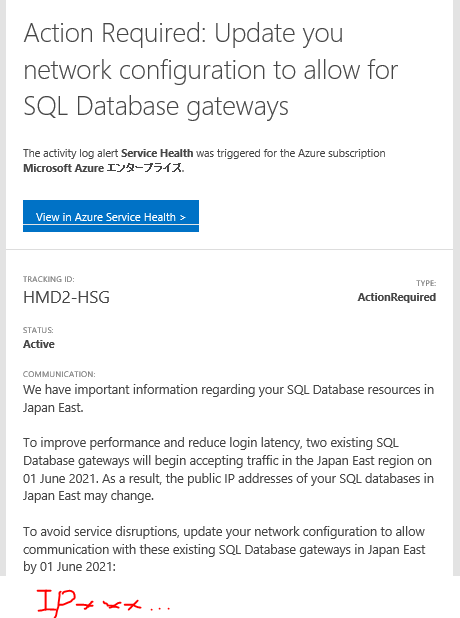
and what should i do for it
I use the AzureSQL for connect ,quary ,insert and so on
Best DING
' cx='32' cy='32' r='32' /%3E%3Ctext x='50%25' y='55%25' dominant-baseline='middle' text-anchor='middle' fill='%23FFF' %3EAS%3C/text%3E%3C/svg%3E)
Hi @Ding, Zhenhua (Contractors) , following up on this thread if you have any other queries. If the answer provided by @Alberto Morillo helped, you can mark it as 'Accept Answer'

Please go to your Azure SQL Database Firewall settings:

After that use the IP addresses to add entries on your Azure SQL firewall as shown on below image
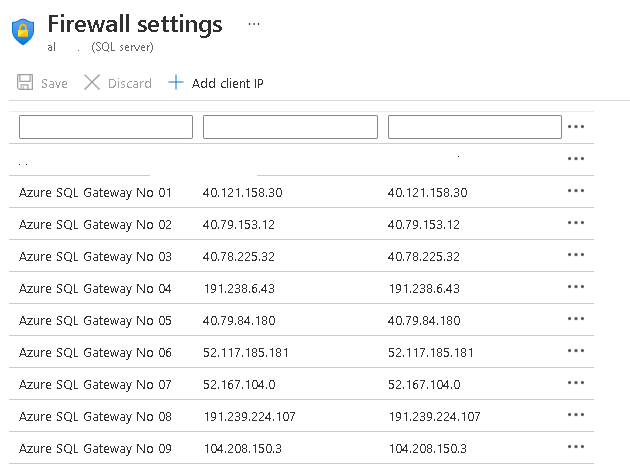
Hope this helps.
hi
AlbertoMorillo
thank you for Answer,
and i have a other questions for it
i delete all firewall ip and my webapp can access the sql yet
why? could you tell me the reason for it
Best
DING
Probably is because of below setting:

That setting allows all Azure services to access your database.
this setting is selected No in my Azuresql
after delete all fire ips,
it is necessary to wait sometime to let the setting worked?
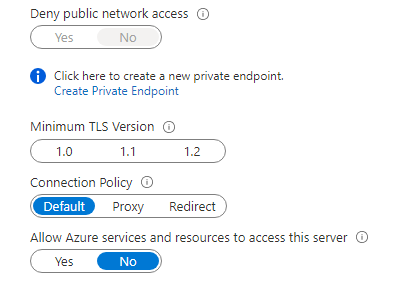
BEST,
DING
Firewall settings take effect almost inmediately (1-2 seconds delay) If you Web App can still accese SQL Azure make sure you have configured a private link or a service endpoint or token authentication.
thank you very much