Last week a small error in Win11 were really annoying me:
This problem have been exist for decades, i can't really remember since which version of Windows , perhaps XP or 2000.
perhaps since the USB storage has begun to become popular, whenever users want to safely remove their plugged on usb storage by clicking the right-bottom usb icon.
it often appears this message :
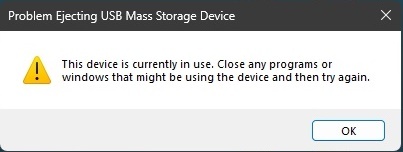
Windows users would have to close ANY(mystery) programs that might still access on the USB storage. the problem is this is 50:50 chance.
Sometime it work smoothly but sometime you would never know what are still accessing it that prevent the users to clear it out.
Sure users could just forcely unplugged the usb and always it will be fine.
however in extreme rare situation. the files user has just copied in moment ago will disappear from usb (been experience this before).
Just make sure what you have copied been inside the usb before travel miles away from your office.
But until 2023 on MS Windows 11 , Microsoft has yet try to solve this problem by showing users which the programs are currently accessing and preventing users to successfully do the Safe Remove, although in most time Windows Explorer app would the culprit. many times it won't even work after you have closed down everything either from front desktop or by using task managers program list.
between WinXP to Win11 is huge gap, i would said the team never really doing their job well.
Windows could has show the REAL app lists that currently using the device that would be helpful for users to close down any apps correctly
rather just telling the useless error message for decade.
perhaps if anyone could provide useful tips to check on which programs should remove during stagnant time ?
' cx='32' cy='32' r='32' /%3E%3Ctext x='50%25' y='55%25' dominant-baseline='middle' text-anchor='middle' fill='%23FFF' %3EA%3C/text%3E%3C/svg%3E)

