Share via

Windows problems

Anonymous
2023-08-27T10:56:55+00:00

Hello.

I have been having problems using windows for about 1 week. My problems are more than one and they are all different from each other.

Let me explain briefly :)

-First of all, I was getting frequent program crashes and blue screen errors while playing games. Thinking that there was a problem with my computer, namely windows, I deleted windows and reinstalled (formatted). this took about a few hours. Towards the end, 1 update never loads on windows and it gives an error (I sent you this as a photo) and I can't complete the update. I used windows update tool, tried different methods and it didn't work.

-For the last 2 days I've been getting a lot of blue screens (even if the computer is doing nothing.) The blue screen error names are (IRLQ not less or equal, system service exception, bad pool caller, memory management, kmode exception not handled, system thread exception not handled, faulty hardware corrupted ) are the blue screen errors I've seen in 3 days. And I'm not exaggerating. I buy 5-8 pieces a day on average. The problem is that I thought it was a hardware problem at first and I checked all my parts. RAM,Videocard,Cpu,Psu,Coollers. and there is no problem. I have used the same parts one by one on a different computer and there is no problem. I am aware that this problem is quite big, but I need your help. And I want to say that I never get the blue screen errors I get twice, I never get an error just once. I am taking.

-I can't do anything. Opera crashes when I open opera. Discord also does not work properly, there is a black screen and I have to restart the computer.

-There was no problem with the formatting and I paid a different company to format it. The result did not change. They also do not know exactly what caused the problem and cannot help me.

If you can help me you will make me very happy.

have a nice day
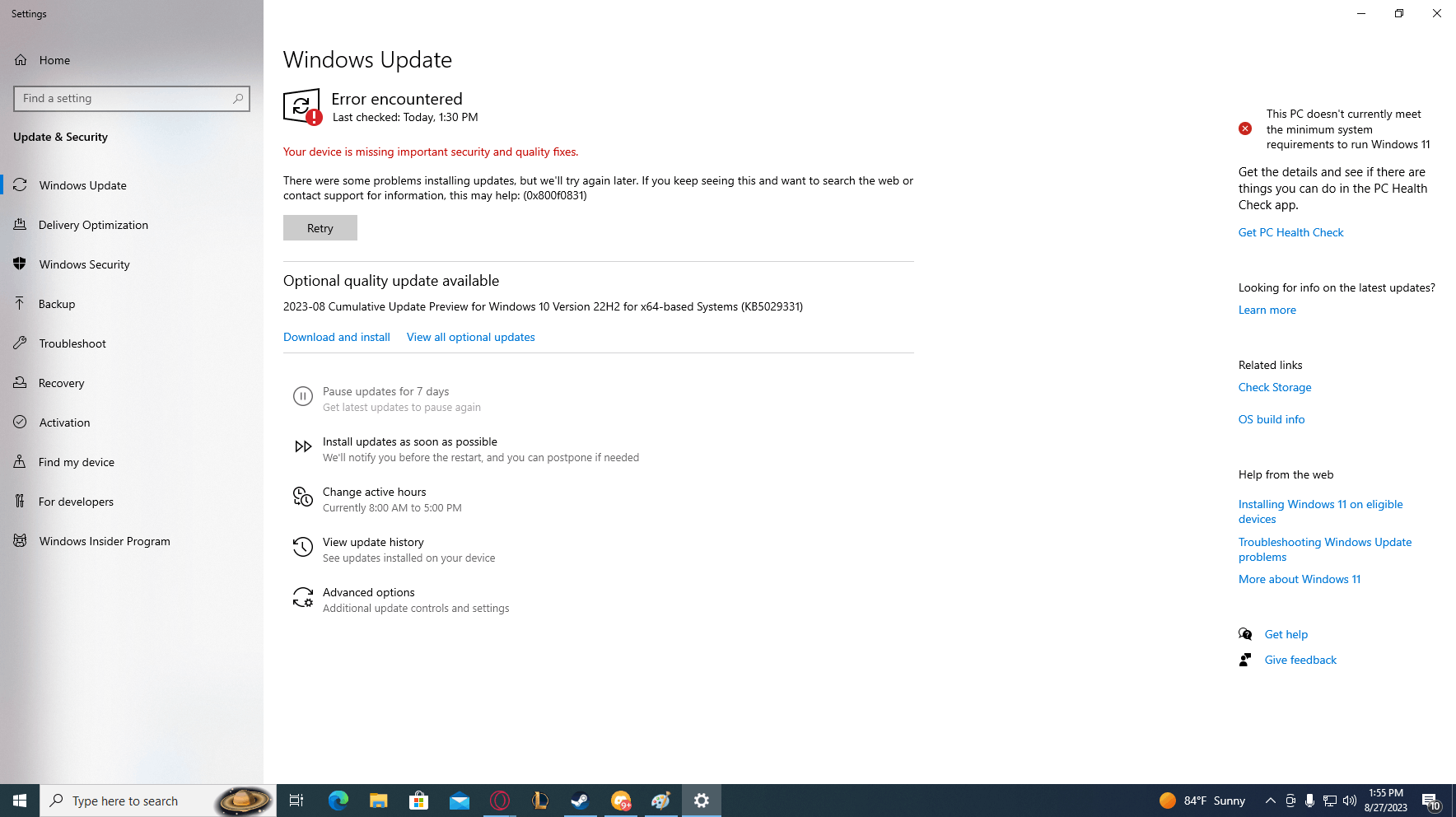
-I don't think so many problems will be just a windows update problem.

Windows for home | Windows 10 | Performance and system failures

Locked Question. This question was migrated from the Microsoft Support Community. You can vote on whether it's helpful, but you can't add comments or replies or follow the question.

0 comments No comments

4 answers

Sort by: Most helpful
  1. Anonymous
    2023-08-30T19:03:26+00:00

    Hello. Although I repeated the memtest many times, I could not succeed and I am getting an error. There is no problem with the ram. I used it on a different computer for 2 days and I did not get any errors. We can be certain about this. On bios, the latest version of the bios was released in F5 2012 I am using the updated version of the driver 2021, that is, the latest and the error still continues, giving different

    •kernel security check failure windows

    •driver_irql_not_less_or_equal

    •memory management

    Among such errors are games resetting themselves and some programs remaining as a black screen.

    Was this answer helpful?

    0 comments No comments
  2. DaveM121 891.1K Reputation points Independent Advisor
    2023-08-27T12:24:06+00:00

    Your minidump files just indicate memory (RAM) corruption no specific driver is listed

    1

    The best option is to download the widely available free utility MemTest86, then run a full 4 pass scan with that to test your RAM for physical errors

    2

    I notice you BIOS date on the H61M-S2-B3 is 2012, is you motherboard listed as compatible with Windows 10 and is there no BIOS updates available for your motherboard?

    Was this answer helpful?

    0 comments No comments
  3. Anonymous
    2023-08-27T12:18:52+00:00

    hello, there were 6 files in total, but I could send 5 of them. The 6th file gives such an error (as seen in the photo I sent)

    5 Files >https://www.mediafire.com/file/wk1j5tfy14wqkv9/dump-files.rar/file

    Was this answer helpful?

    0 comments No comments
  4. DaveM121 891.1K Reputation points Independent Advisor
    2023-08-27T11:29:17+00:00

    Hi, I am Dave, I will help you with this.

    Please check to see if your PC is producing any minidump files, I will check those to see if they provide any insight into a potential cause of the system crashes.

    Open Windows File Explorer.

    Navigate to C:\Windows\Minidump

    Copy any minidump files onto your Desktop, then zip those up.

    Upload the zip file to the Cloud (OneDrive, DropBox... etc.), then choose to share those and get a share link.

    Then post the link here to the zip file, so we can take a look for you.

    Was this answer helpful?

    0 comments No comments
