Microsoft 365 and Office | Access | Development
The creation and customization of database applications using Microsoft Access

This browser is no longer supported.
Upgrade to Microsoft Edge to take advantage of the latest features, security updates, and technical support.
' cx='32' cy='32' r='32' /%3E%3Ctext x='50%25' y='55%25' dominant-baseline='middle' text-anchor='middle' fill='%23FFF' %3ERF%3C/text%3E%3C/svg%3E)
Hello,
I have two tables tblA and tblB that contain a common field called WO. WO is not unique and can have multiple repeats occurrences in each table. In tblB there is also a field (QTY) that I would like to sum based on equal WO values in tblA and tblB. What I was attempting was to generate a Query for tblA that "groups" the WO values. I then thought I would run a 2nd Query using the first Query and tblB (related by the WO value).
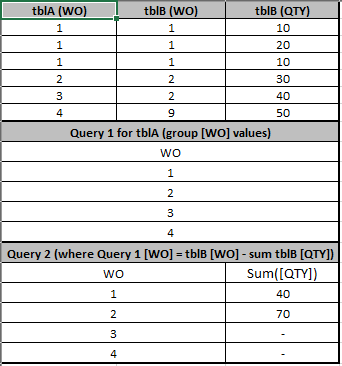
tblA - WO values tblB (WO) tblB (QTY)
1 1 10
1 1 20
1 1 10
2 2 30
3 2 40
4 9 50
Query 1
WO
1
2
3
4
Query 2
WO QTY
1 40
2 70
3 -
4 -
Is this the appropriate method? I am not receiving QTY values in the 2nd Query.
Thanks

Hi. Not sure I understand. How could 1 2 40 and 4 9 50 be matching WOs?
Thanks for the response. Formatting of example was unclear so hope the following helps...
' cx='32' cy='32' r='32' /%3E%3Ctext x='50%25' y='55%25' dominant-baseline='middle' text-anchor='middle' fill='%23FFF' %3ENR%3C/text%3E%3C/svg%3E)
Do you need sql query for this or I can't right understand?
I'm not sure how to accomplish (sql, etc.).
Essentially I want to sum all QTY's from tblB where the tblB WO = tblA WO. tblA WO's are NOT unique.
Can you also show us the final result you expect to get? Thanks.
As I attempted to show above (in the table), the query/report result would identify the following...
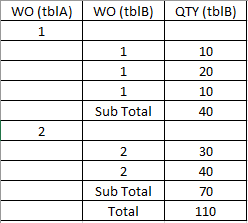
Because the WO field in tblA is not unique, I was trying to run a query on a query. The 1st query would group the tblA WO fields. The 2nd query would list the tblB records with the WO field equal to the 1st query WO group.
Hi. Thanks for the additional information. So, are you saying you don't need to see WOAs 3 & 4 in the result since they don't have a matching QTY in WOB? How about WOB 9, you don't want it listed in the result either?
Sorry, yes I would like to see so that I understand there are no related records.
So, that sounds like you actually want to see both. For example:
A, B, Sum
1, 1, 40
2, 2, 70
3,  ,  0
4,  ,  0
 , 9, 50
Is that correct?
Yes thats correct
Alright, I think I fully understand now. If you're using SQL Server, you can use a FULL OUTER JOIN to get that result. But, if you're using Access, then you'll have to use a UNION query.
For example:
SELECT T1.WO AS A, T2.WO AS B, Sum(T2.QTY) AS Total
FROM (SELECT DISTINCT TableA.WO FROM TableA) AS T1
LEFT JOIN TableB AS T2
ON T1.WO=T2.WO
GROUP BY T1.WO, T2.WO
UNION
SELECT Null, T3.WO, Sum(T3.QTY)
FROM TableB AS T3
WHERE T3.WO NOT IN (SELECT DISTINCT TableA.WO FROM TableA)
GROUP BY T3.WO
ORDER BY 1, 2
(untested)
Hope that helps...