SQL Server Reporting Services
A SQL Server technology that supports the creation, management, and delivery of both traditional, paper-oriented reports and interactive, web-based reports.
This browser is no longer supported.
Upgrade to Microsoft Edge to take advantage of the latest features, security updates, and technical support.
' cx='32' cy='32' r='32' /%3E%3Ctext x='50%25' y='55%25' dominant-baseline='middle' text-anchor='middle' fill='%23FFF' %3EC%3C/text%3E%3C/svg%3E)
I have a report that im trying to replace/update the connection string for.
The report has the following DataSource:
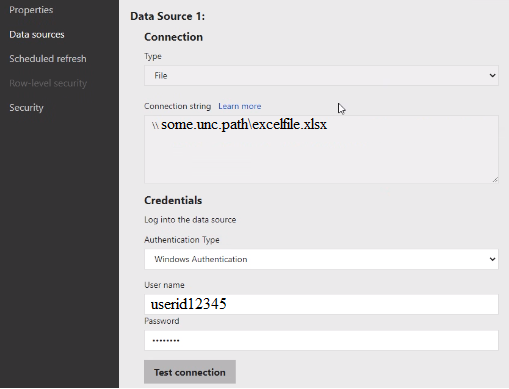
As you can see, there is a File type connection string, with some UNC path/excel file as the value.
We are trying to update the connection string with other excel files.
Ive tried 2 approaches, with REST
Write-Output "Fetching data sources"
$call = getDataSources $baseURL $reportPath
        Write-Output "Original Connection String:"
        Write-Output $call.ConnectionString

        $call.ConnectionString = $strs
        $call.IsConnectionStringOverridden = $true
        $call.DataModelDataSource.Username = $username
        $call.DataModelDataSource.Secret = $password
        #$_.DataModelDataSource.AuthType = "Impersonate"
        Write-Output "New Connection String:"
        Write-Output $call.ConnectionString
        Write-Output `n
try {
    $payload = @()
    $payload += $call

    $json = ConvertTo-Json -InputObject @($payload) -Depth 100
    $resp = Invoke-RestMethod -method PATCH -UseDefaultCredentials -uri "$baseURL/api/v2.0/PowerBIReports(path='$reportPath')/DataSources" -Body $json
    $json
    Write-Host $resp.content
} catch {
    Write-Host $call.Exception.Response.content
}
and with the ReportingServicesTools module function: Get/Set yet none are updating the connection string!
Import-Module ReportingServicesTools
$Session = New-RsRestSession -ReportPortalUri $ReportPortalUri
$DataSources = Get-RSRestItemDataSource -RsItem "$ReportPath" -WebSession $Session
$ds = $DataSources[0]
$ds.DataModelDataSource.Username = $User
$ds.DataModelDataSource.Secret = $Password
$ds.ConnectionString = "\\some.unc.path\excelfile1234.xlsx"
Set-RSRestItemDataSource -RsItem "$ReportPath" -RsItemType PowerBIReport -DataSources $DataSources -WebSession $session
the username and passwords get updated, but the connection string is not.
Is there a reason why its not updating the connection string?
@Joyzhao-MSFT nvm i found out why!!
Its because the report is import type, not direct query, which means we cant use API to change connection string :(

It sounds a good news to find the key to the issue.
If you have any questions,please feel free to let me know.
Hi @Cataster ,
Please make sure your connection string is correct.
\some.unc.path\excelfile.xlsx"
Is it successful to test the data source in the web portal?
Regards,
Joy
@Joyzhao-MSFT yes tested it on my desktop and it's fine on my end
