Microsoft 365 and Office | SharePoint Server | Development
The process of building custom solutions for SharePoint Server.

This browser is no longer supported.
Upgrade to Microsoft Edge to take advantage of the latest features, security updates, and technical support.
' cx='32' cy='32' r='32' /%3E%3Ctext x='50%25' y='55%25' dominant-baseline='middle' text-anchor='middle' fill='%23FFF' %3EBD%3C/text%3E%3C/svg%3E)
Prior to my corp upgrading to Office 365 I had an Excel VBA macro that successfully would open and modify an Excel file off a SharePoint server.
Since the upgrade this file is flagged read only when opened.
I wish to be able to update the file with zero user interaction.
I've attempted various solutions offered on the web to no avail.
I've considered utilizing the API FindWindow function to drill down to the edit button and programmatically push it.
Unfortunately SharePoint seems to append the Window caption with the last modified date of the file.
THANKS for any recommendations
' cx='32' cy='32' r='32' /%3E%3Ctext x='50%25' y='55%25' dominant-baseline='middle' text-anchor='middle' fill='%23FFF' %3EMM%3C/text%3E%3C/svg%3E)
Please try to use the filepath like the below: https://tenant.sharepoint.com/sites/test/Shared%20Documents/file.xlsx. Read this post for details: https://stackoverflow.com/questions/51029214/opening-excel-file-from-sharepoint-as-read-write
Besides, you could try to use ActiveWorkbook.LockServerFile in your code to enable edit: https://stackoverflow.com/questions/45163549/excel-2016-sharepoint-file-still-opens-as-readonly/45171431#45171431
If an Answer is helpful, please click "Accept Answer" and upvote it.
Note: Please follow the steps in our documentation to enable e-mail notifications if you want to receive the related email notification for this thread.
TY
Michael .. I do not note any switches in the link to the file I am attempting to open.
I've previously attempted .LockServerFile both in the code opening the file and in the Workbook.open method of the file being opened, to no effect.
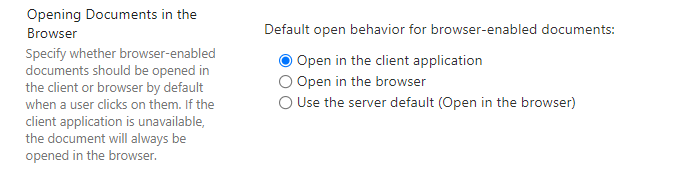
In SharePoint library settings -> Advanced settings, You could try to change to Open Documents in Client Applications by Default.