Share via

Why does Microsoft keep mutting Firefox?

Anonymous
2023-08-30T20:05:10+00:00

Why does it appear that every time Microsoft installs an update it mutes Firefox? There have been several times that I go into Firefox and onto Youtube and there is no sound. I look for answers and most don't work, till you find the correct sound menu where it lets you turn off the sound for specific programs without affecting other programs. When I find that menu it appears the sound is turned off for Firefox. As I said this has happened several times to the point where if I don't have sound in Firefox it takes 30 seconds to fix it after checking the simple that I don't have the computer muted and the volume up I find the correct sound menu and fix it. I just realized last night Microsoft installed an update and today Firefox has no sound, the last time Firefox updated was more than two weeks ago. Then thinking back I realized I think that is the missing piece, the Microsoft updates and Firefox losses sound. My mom has encountered this on her computer as well. Why does Microsoft do this and is there a way to stop it? I am not going to use Edge, Internet Explorer was trash and so they rebranded it and claimed they improved it but my experience it is still the same.

Windows for home | Windows 10 | Settings

Locked Question. This question was migrated from the Microsoft Support Community. You can vote on whether it's helpful, but you can't add comments or replies or follow the question.

0 comments No comments

2 answers

Sort by: Most helpful
  1. Anonymous
    2023-09-19T17:36:17+00:00

    Uninstall the update? Which one because this has happened with the last five updates or so. Hide the update? The one was a "cumulative update for Windows 10 ..... Systems". It has also done this with the "Feature update to Windows 10" and the "cumulative update for the .NET framework .... for Windows 10". It is not that it happened with one update to one program it happened with every update from Windows some for the entire system for the past several months. So even if it "should not" happen it does repeatedly and seemingly constantly.

    Was this answer helpful?

    6 people found this answer helpful.
    0 comments No comments
  2. Anonymous
    2023-08-31T02:37:11+00:00

    Hello Cody Dietrich1.

    Welcome to Microsoft Community.

    Regarding to your information I assume that your Firefox will be muted automatically after the Windows update.

    Windows should not have any settings or features that automatically mute a specific software.

    Based on your description, it seems that this occurred after an update. It is possible that there is a conflict between the update patch and Firefox,

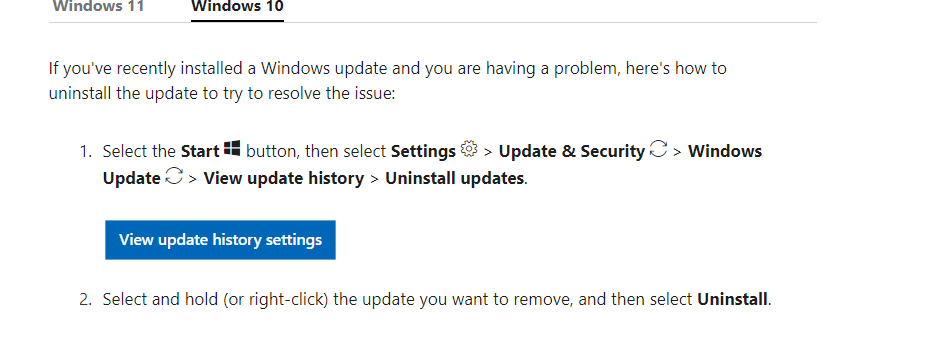
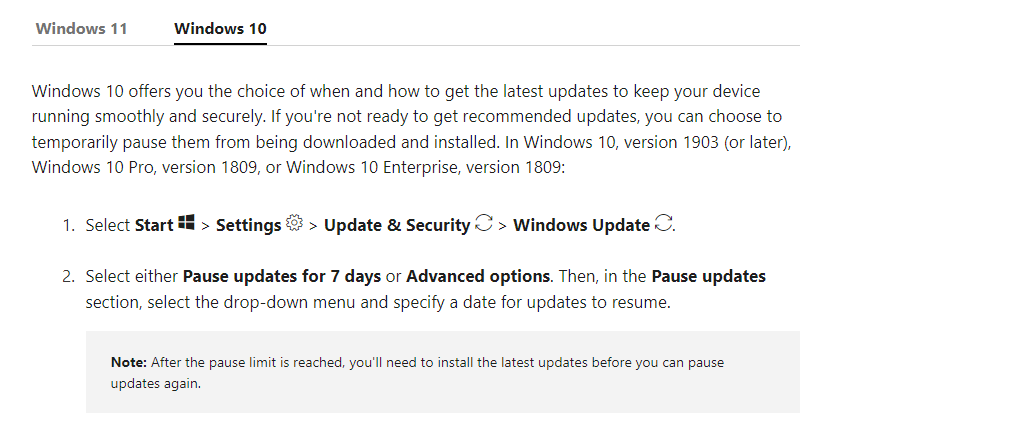
    causing the software to be muted. I suggest trying to uninstall the Windows update and then attempting to hide the update for this software or

    temporarily pausing updates in the Update settings to see if the issue still occurs.

    You can follow this link to uninstall the latest update.

    How to uninstall a Windows update - Microsoft Support
    Image

    Follow this link you can download the tool from Microsoft to hide the update patch.

    http://download.microsoft.com/download/F/2/2/F22D5FDB-59CD-4275-8C95-1BE17BF70B21/wushowhide.diagcab

    If this tool can't work please follow this link to stop the update.

    Manage updates in Windows - Microsoft Support
    Image

    If there is anything not clear, please do not hesitate to let me know.

    Best Regards,

    Tommy-MSFT | Microsoft Community Support Specialist

    Was this answer helpful?

    0 comments No comments
