 Hello there.
I have had this nagging issue that's been ongoing for months now and I can't seem to find a reason why it's happening. It happens pretty much all the time and I can almost reproduce it on demand by either letting my PC sit idle on the desktop for a few minutes, or locking the computer and waiting for the monitors to go into sleep mode.
I noticed this issue because I can hear my fan speeds ramp up whenever it's happening, and my CPU temps also rise. My CPU usually idles at around 30-32 Celsius which is normal, but whenever this "system" process starts eating my CPU it will go up to 40 and just hover there consistently. It may not sound like too big of a deal but I know something isn't right and it's bothering me because it hasn't always been an issue. This computer has had Windows re-installed multiple times and it is still a problem every single time. This last time around it didn't start doing it until maybe a few months after re-installing Windows again. I thought maybe it was just some weird Windows bug, but just within the past week or so, of course, it came right back and won't go away. I have tried everything I can think of to try and find out what the issue is, but I am starting to run out of ideas.
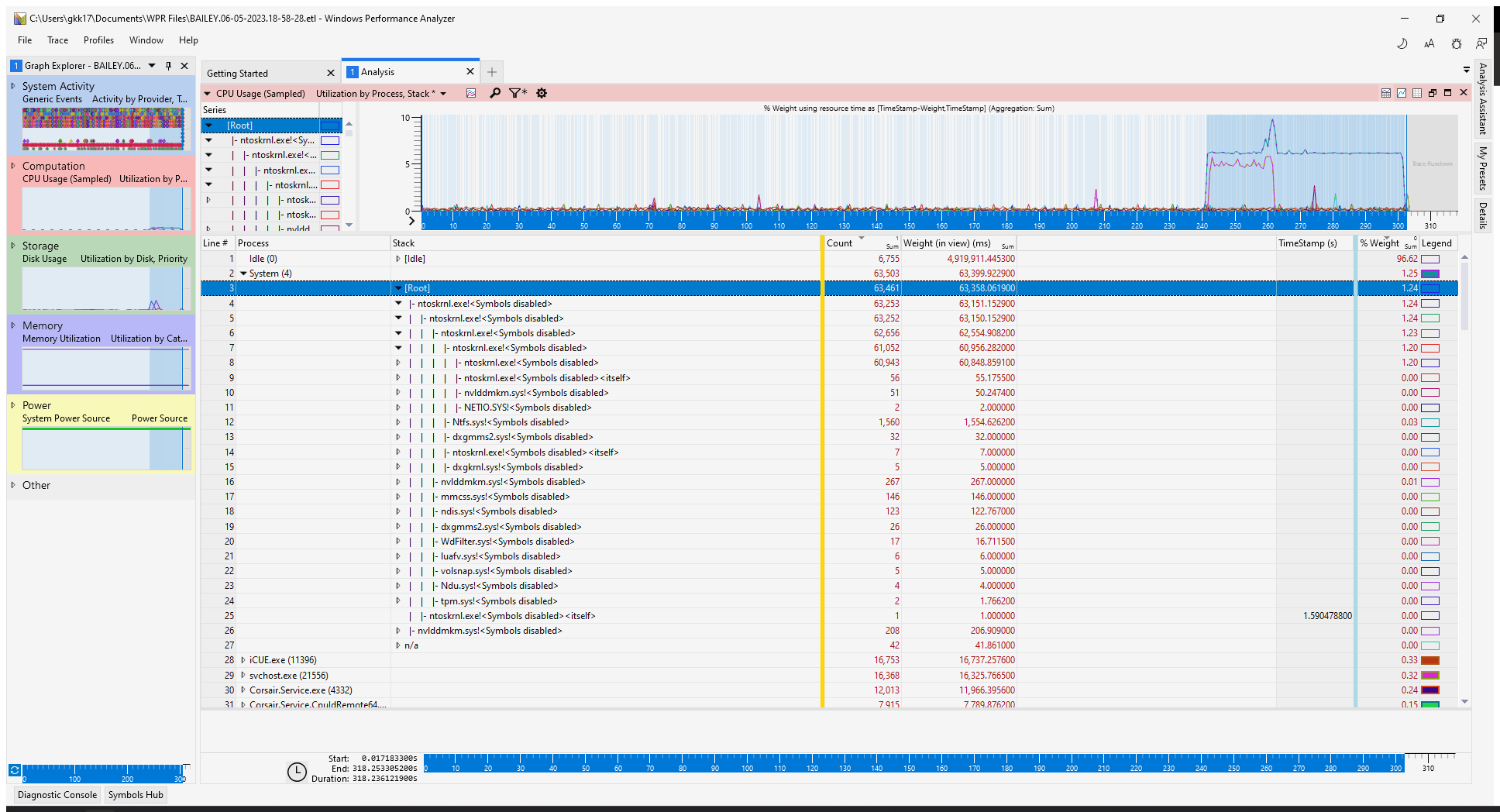
So, I managed to catch this System process in the act and I used Windows Performance Analyzer to try and figure out exactly what is going on with it, thinking maybe I could see all the threads within the "System" process whenever this is happening. That didn't get me too far, but I also don't really understand what I'm looking at - maybe someone else would be able to figure it out that is a lot more familiar with it than I am. From all I can see, every time I expand the root of the system process it just looks like the same thing over and over again, which is that "ntoskrnl.exe." I know there are other things listed in this picture, but based on the count column it seems like those things aren't the problem, but then again I don't really know my way around the Performance Analyzer.
So I see that "ntoskrnl.exe" was causing this to happen. But I am not sure why. If there was some other driver conflict or something else that was causing it to spike. Task manager doesn't really show too much, and neither did process explorer from what I found. I am hoping someone here has had the same issues that I have and can relate to it.
I have attached a picture of this "System" process being caught in the act, and I have expanded the root of the system process a little bit, but I just don't really know what any of this means. In the picture you can see that the System process starts doing its thing at about the 240 second mark until I stop recording at about the 300 second mark.
Has anyone ever seen anything like this happen before? I am stumped and don't know what to look for or try next.
Here's some information about my system:
Windows 11 Professional
Motherboard: MSI MPG series Z590 Gaming Carbon WiFi
128GB of RAM (yes I know that is a lot of RAM)
1TB Samsung 970 EVO (Windows drive)
870 EVO 2TB 2.5" SSD
SanDisk 2TB 2.5" SSD
Please let me know if you need more information. I would be happy to supply all I know.
Thanks a lot.
' cx='32' cy='32' r='32' /%3E%3Ctext x='50%25' y='55%25' dominant-baseline='middle' text-anchor='middle' fill='%23FFF' %3EA%3C/text%3E%3C/svg%3E)
