
As an observation
Win 8.1 went out of support 10 Jan 2023 and as of that date no updates of any type from MS
This browser is no longer supported.
Upgrade to Microsoft Edge to take advantage of the latest features, security updates, and technical support.
' cx='32' cy='32' r='32' /%3E%3Ctext x='50%25' y='55%25' dominant-baseline='middle' text-anchor='middle' fill='%23FFF' %3EA%3C/text%3E%3C/svg%3E)
I cannot install Microsoft .NET Framework 4.6.1 when I'm trying to install iSlide
https://imgur.com/jag55Dq
LOG :
[2023-07-31 07:53:59] start to initialize ui resources [2023-07-31 07:53:59] done [2023-07-31 07:53:59] start to initialize skin file [2023-07-31 07:53:59] done [2023-07-31 07:54:18] kill iSlide processes [2023-07-31 07:54:18] try to kill iSlideTools.RegAsm.exe [2023-07-31 07:54:18] result: 0, No Instance(s) Available. [2023-07-31 07:54:18] try to kill iSlideTools.Toolbox.exe [2023-07-31 07:54:18] result: 0, No Instance(s) Available. [2023-07-31 07:54:18] try to kill iSlideTools.Client.WebBrowser.exe [2023-07-31 07:54:18] result: 0, No Instance(s) Available. [2023-07-31 07:54:18] try to kill iSlideTools.Client.Server.exe [2023-07-31 07:54:18] result: 0, No Instance(s) Available. [2023-07-31 07:54:18] try to kill iSlideTools.App.exe [2023-07-31 07:54:19] result: 0, No Instance(s) Available. [2023-07-31 07:54:19] detecting processes [2023-07-31 07:54:19] try to find powerpnt.exe [2023-07-31 07:54:19] try to find wps.exe [2023-07-31 07:54:19] try to find wpp.exe [2023-07-31 07:54:19] detecting old version [2023-07-31 07:54:19] find related products for {CD2327BB-F480-41CC-A092-D49BDEB96CEB} [2023-07-31 07:54:19] get Microsoft .NET Framework 4.6.1 status from registry [2023-07-31 07:54:19] result: 378675 [2023-07-31 07:54:19] Microsoft .NET Framework 4.6.1 is not installed [2023-07-31 07:54:19] try to download remote file for NDP461-KB3102436-x86-x64-AllOS-ENU.exe. [2023-07-31 07:54:19] start to download https://share.islide.cc/prerequisites/NDP461-KB3102436-x86-x64-AllOS-ENU.exe [2023-07-31 07:54:19] check target file [2023-07-31 07:54:19] start to download into C:\Users\VS9X64~1\AppData\Local\Temp\iSlide\iSlide Tools\NDP461-KB3102436-x86-x64-AllOS-ENU.exe.tmp [2023-07-31 07:54:44] rename temp download file to target file [2023-07-31 07:54:44] start to check file hash: C:\Users\VS9X64~1\AppData\Local\Temp\iSlide\iSlide Tools\NDP461-KB3102436-x86-x64-AllOS-ENU.exe [2023-07-31 07:54:44] file hash result: valid [2023-07-31 07:54:44] download done [2023-07-31 07:56:31] failed: 5100, [2023-07-31 07:58:10] failed: 5100,
Locked Question. This question was migrated from the Microsoft Support Community. You can vote on whether it's helpful, but you can't add comments or replies or follow the question.
As an observation
Win 8.1 went out of support 10 Jan 2023 and as of that date no updates of any type from MS
Welcome : in addition to the above answer..
May I ask this question,.?
What's the current .Net Framework version
installed on your computer
Windows install new : .Net Framework versions
in its monthly updates . in the case of Wins 8.1
the latest - .Net Framework ver. Must have
been installed on. Jan-10 - 2023
which was the last, monthly
rollup updates
*a word of advice :* You can stay, with whatever version
of the .Net Framework. you have. The computer will work ok
-- the Microsoft monthly updates. offers to install the right
.Net Frameworks ver, That each windows operating system needs
%%%%%%%%@@@@@@@@%%%%%%&&&&&&&@@
-- How Windows users ; Verify, which .Net Framework version
is installed in their computers : Some guidelines posted
After open the "File Explorer" screen : Type this path
    C:\Windows\Microsoft.NET\Framework
in the - File explorer >> Search bar and press - Enter
Then follow the rest of steps down below
    --------------------------------

Method 4: Check .NET Framework Version in File Manager..
You can also check the .NET framework version directly
from the Windows file explorer
Follow the below stpes

Open the file explorer or press the “CTRL + e” shortcut keys.
Browse the following path: C:\Windows\Microsoft.NET\Framework

Then open the folder showing like: v4.0.30319
Right-click on any of the “.dll” files and select the
Properties option : Select the Details tab.

You can find the version under “Product version” property.
           See the below screenshot:
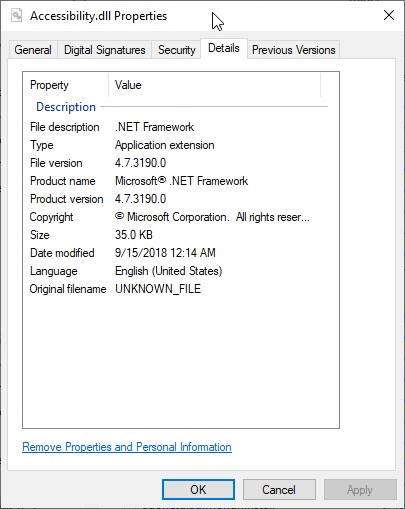
check the .NET Framework version using Files on Windows
The above screenshot shows - a PC with .NET Framework 4.7 installed
Are you trying to - Download - the .Net Framework : From the
correct website try again using this - Microsoft site
Link : Download Microsoft .NET Framework 4.6.1 (Web Installer)
from Official Microsoft Download Center