Microsoft 365 and Office | SharePoint | For business | Windows
A group of Microsoft Products and technologies used for sharing and managing content, knowledge, and applications.

This browser is no longer supported.
Upgrade to Microsoft Edge to take advantage of the latest features, security updates, and technical support.
' cx='32' cy='32' r='32' /%3E%3Ctext x='50%25' y='55%25' dominant-baseline='middle' text-anchor='middle' fill='%23FFF' %3EGD%3C/text%3E%3C/svg%3E)
Hi Experts,
I am trying to implement the Microsoft365DSC to extract Sharepoint settings. I have set up an Office E3 trial account and have provided some users with tenant admin rights. I have also installed and imported the Microsoft 365 DSC module.
When I run the Export-M365DSCConfiguration command, the UI prompts in which if I select the AD settings, and upon providing credentials, the UI works as expected but when I try to select the SharePoint Online settings and export it, the module gets stuck on "Extracting [Setting Name]" as shown in the image given below:
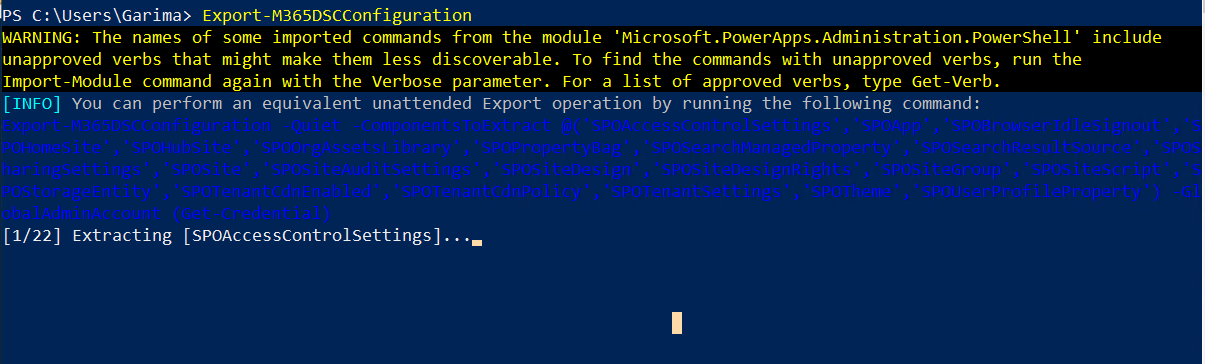
This does not give any error also.
Can anyone give any idea as to why this is happening?
Thanks.
A group of Microsoft Products and technologies used for sharing and managing content, knowledge, and applications.
' cx='32' cy='32' r='32' /%3E%3Ctext x='50%25' y='55%25' dominant-baseline='middle' text-anchor='middle' fill='%23FFF' %3ECM%3C/text%3E%3C/svg%3E)
Thank you for your question.
We are currently looking into this issue and will give you an update as soon as possible.
Thank you for your understanding and support.
Answer accepted by question author
Through the UI, the export was not working. So, I used the "Export-M365DSCConfiguration –Quiet" command along with the component values to extract and made some changes in the way the credentials were being passed.
It worked fine for me then.
Thanks for the suggestion.
Congratulations on solving this issue and thanks for sharing your solution.
Hi @Garima Das
Per my test, there was a warning: “We are aware of issues trying to export Exchange Online, Security Compliance, SharePoint Online and OneDrive for Business components using the Graphical User Interface (freezes the export). We are actively working on a solution. As a workaround, use the unattended commands using the –Quiet switch to perform the export.”

You could try to use “Export-M365DSCConfiguration –Quiet” as a workaround.
If an Answer is helpful, please click "Accept Answer" and upvote it.
Note: Please follow the steps in our documentation to enable e-mail notifications if you want to receive the related email notification for this thread.
