Developer technologies | C#
An object-oriented and type-safe programming language that has its roots in the C family of languages and includes support for component-oriented programming.
This browser is no longer supported.
Upgrade to Microsoft Edge to take advantage of the latest features, security updates, and technical support.
' cx='32' cy='32' r='32' /%3E%3Ctext x='50%25' y='55%25' dominant-baseline='middle' text-anchor='middle' fill='%23FFF' %3EQL%3C/text%3E%3C/svg%3E)
Hi,
I have a Azure Ad auth sample app download from
https://learn.microsoft.com/en-us/azure/active-directory/develop/quickstart-v2-aspnet-webapp
It required the Microsoft.CodeDom.Providers.DotNetCompilerPlatform.3.6.0
but I cannot get it install/uninstall/update, none of it works,
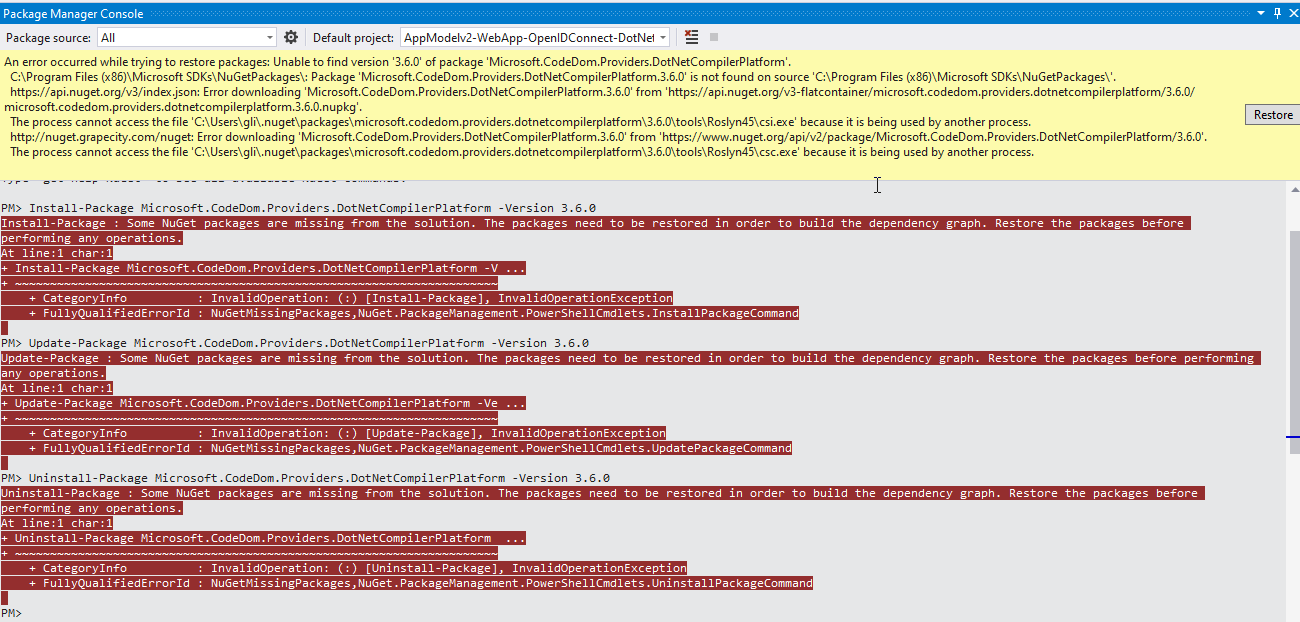
When I do the install/uninstall/update , it failed with message said some nuget missing need restore,
and when I click "Restore" it said the Microsoft.CodeDom.Providers.DotNetCompilerPlatform.3.6.0 failed,
it is dead loop.
I tried to clear all nuget local cache, restart the pc. I still did the same.
any help please!
' cx='32' cy='32' r='32' /%3E%3Ctext x='50%25' y='55%25' dominant-baseline='middle' text-anchor='middle' fill='%23FFF' %3EDZ%3C/text%3E%3C/svg%3E)
Hi @Qiuguo Li ,
First try to right click your solution > choose 'Restore NuGet Package.
Or right-click your project > Manage NuGet Packages... > Browse(tab) > Search Microsoft.CodeDom.Providers.DotNetCompilerPlatform
You can install or update or uninstall it.
Best Regards,
Daniel Zhang
Hi Daniel,
Thanks, I tried the 2 options and results are same as my screenshot
1, right click and "Restore Nuget" get the result same as resotre as I listed, it said the CSC.exe is used by another process. and when I go to the folder , the csc.exe is 0 byte
2, use the nuget package, install/uninstall/update , all result as some pakcage missing, please restore first,
Dead loop
That is the step I get error, I get the error right after I click the "Restore package" as the instruction, it could be my environment issue,
I am testing in windows 10 , vs 2019 enterprice latest edition.
Hi @Qiuguo Li ,
I also got an error when restore NuGet packages. After I moved the project to the C drive, it ran well.
Best Regards,
Daniel Zhang
Hi QiuguoLi-6442,
I download the Visual Studio 2019 solution and made a test by following the steps in the document you provided.
And the first thing you need pay attention to is that you need to unzip the archive or clone the repository into a directory near the root of the drive to avoid errors caused by path length limitations on Windows.
And then right-click the solution "AppModelv2-WebApp-OpenIDConnect-DotNet" ->select Restore NuGet packages.
At first I encountered an error here, so I suggest you change the project location.
The result is as follows:

Then run Update-Package Microsoft.CodeDom.Providers.DotNetCompilerPlatform -r in View > Other Windows > Package Manager Console.
The result:

I run the in project in visiual studio 2017.
Best Regards,
Daniel Zhang
If the response is helpful, please click "Accept Answer" and upvote it.
Note: Please follow the steps in our documentation to enable e-mail notifications if you want to receive the related email notification for this thread.
Did a clean install with VS 2019 only and it works, could be because I have VS2017 & VS2019 installed together.