Azure Functions
An Azure service that provides an event-driven serverless compute platform.
This browser is no longer supported.
Upgrade to Microsoft Edge to take advantage of the latest features, security updates, and technical support.
' cx='32' cy='32' r='32' /%3E%3Ctext x='50%25' y='55%25' dominant-baseline='middle' text-anchor='middle' fill='%23FFF' %3EJ%3C/text%3E%3C/svg%3E)
I'm testing out creating my first Azure Function in ADF and stuck on the body JSON format.
I'm using the output from a filter:
{"name":"@{activity('FilterFilesXML').output}"}
My filter output is:
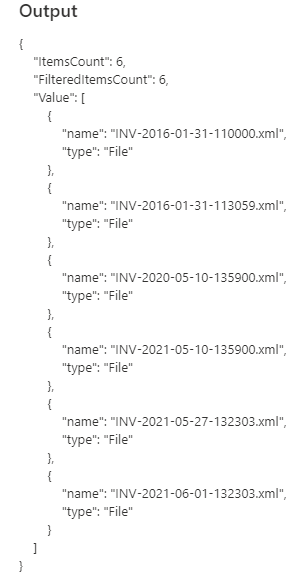
and the input for function is showing this:

I'm getting an Error code: 3608
Cause: The Azure function details in the activity definition may be incorrect.
Recommendation: Fix the Azure function details and try again.
So must be my format but can't see were it is wrong, ideas?
Thanks
' cx='32' cy='32' r='32' /%3E%3Ctext x='50%25' y='55%25' dominant-baseline='middle' text-anchor='middle' fill='%23FFF' %3EKM%3C/text%3E%3C/svg%3E)
Hi @Jay ,
Thanks for reaching out. Could you please make sure all the Function activity settings are configured accordingly including the linked service?
Also I would recommend please try with body {"name":"@{activity('FilterFilesXML').output.Value}"} and see if that helps?
Here is a similar implementation (Azure Function activity) described by a community volunteer. Please have a look at it to see if that helps - Azure Data Factory - Copy the latest file with DATE PART to Folder using AZURE FUNCTIONS
Do let us know how it goes.
Thank you
Thanks KranthiPakala
I have created a function based on the video link.
J
I don't seem to have a button to accept answer even though logged in
Hi @Jay , Thanks for confirming and glad to know that it was helpful to resolve your issue. I have converted my comment to answer. You should be able to see an option to accept answer. :)
Have a good day!