Developer technologies | C#
An object-oriented and type-safe programming language that has its roots in the C family of languages and includes support for component-oriented programming.
This browser is no longer supported.
Upgrade to Microsoft Edge to take advantage of the latest features, security updates, and technical support.
' cx='32' cy='32' r='32' /%3E%3Ctext x='50%25' y='55%25' dominant-baseline='middle' text-anchor='middle' fill='%23FFF' %3EAN%3C/text%3E%3C/svg%3E)
Hello
I am having troubles with datagridview when I want to have data partialy loaded and load next/previous data by scrolling (putting scrollbar with mouse to limit positions also).
This topic is much discussed, but mostly suggested answer "adding dataGridView1.PerformLayout()" does not works for me (https://social.microsoft.com/Forums/en-US/0b091621-34a5-45e4-a37c-c7e18a767a26/datagridview-scroll-error-minimum-and-maximum-values?forum=Offtopic https://social.msdn.microsoft.com/Forums/en-US/2dc39584-d833-4989-bb70-9b616a9daf4b/datagridview-throws-exception-when-navigating-with-arrow-keys?forum=csharpgeneral).
Due to this, I have created simple test form only with datagridview, code:
    using System;
using System.Linq;
using System.Windows.Forms;
namespace DataGridViewTester
{
    public delegate void DeleteTableDelegate(DataGridView table);
    public delegate void FillRowsDelegate(DataGridView table, int rowsToAdd);
    public partial class Form1 : Form
    {
        VScrollBar vScrollbar;
        int index = 0;
        public Form1()
        {
            InitializeComponent();
            vScrollbar = dataGridView1.Controls.OfType<VScrollBar>().First();

            vScrollbar.ValueChanged += new EventHandler(this.scrollbarValue_Changed);
            AppendRange(dataGridView1, 100);

        }

        public void ClearTableContents(DataGridView table)
        {
             //For calling from different threads
             if (table.InvokeRequired)
             {
                 var d = new DeleteTableDelegate(ClearTableContents);
                 table.Invoke(d, new object[] { table });
                 return;
             }

            try
            {
                table?.Rows.Clear();
            }
            catch (InvalidOperationException ex) {
                Console.WriteLine(ex);
            }

            table?.PerformLayout();
        }

        public void AppendRange(DataGridView table, int rowsToAdd)
        {
            if (table.InvokeRequired)
            {
                var d = new FillRowsDelegate(AppendRange);
                table.Invoke(d, new object[] { table, rowsToAdd });
                return;
            }
            Console.WriteLine(rowsToAdd);
            DataGridViewRow[] dataGridViewRows = new DataGridViewRow[(rowsToAdd < 0 ? -rowsToAdd : rowsToAdd)];
            index = (rowsToAdd >= 0) ? (index ) : (index - 2*rowsToAdd);
            for (int i = 0; i < dataGridViewRows.Length; i++)
            {
                dataGridViewRows[i] = new DataGridViewRow();
                dataGridViewRows[i].CreateCells(dataGridView1, new object[] { index + i, dataGridViewRows[i].GetHashCode() });
            }
            index = (rowsToAdd >= 0) ? (index+ rowsToAdd) : (index);

            table?.Rows.AddRange(dataGridViewRows);
            table?.PerformLayout();
        }

        private void scrollbarValue_Changed(Object sender, EventArgs e)
        {
            if (vScrollbar.Visible)
            {
                if (vScrollbar.Value + (vScrollbar.LargeChange - 1) >= vScrollbar.Maximum)
                {
                    System.Console.WriteLine("Get NEXT results " + vScrollbar.Maximum + ">=" + vScrollbar.Value + ">=" + vScrollbar.Minimum + " Large change -1 = " + (vScrollbar.LargeChange - 1));

                    try
                    {
                        ClearTableContents(dataGridView1);
                        Console.WriteLine("CLEARED " + vScrollbar.Maximum + ">=" + vScrollbar.Value + ">=" + vScrollbar.Minimum + " Large change -1 = " + (vScrollbar.LargeChange - 1));
                        AppendRange(dataGridView1, 1); //Append it to Grid
                        Console.WriteLine("APENDED " + vScrollbar.Maximum + ">=" + vScrollbar.Value + ">=" + vScrollbar.Minimum + " Large change -1 = " + (vScrollbar.LargeChange - 1));

                    }
                    catch (System.ArgumentOutOfRangeException ex)
                    {
                        Console.WriteLine(ex);
                    }

                    System.Console.WriteLine(vScrollbar.Maximum + ">=" + vScrollbar.Value + ">=" + vScrollbar.Minimum + " Large change -1 = " + (vScrollbar.LargeChange - 1));
                }
                else if (vScrollbar.Value <= vScrollbar.Minimum)
                {
                    System.Console.WriteLine("Get PREVIOUS results " + vScrollbar.Maximum + ">=" + vScrollbar.Value + ">=" + vScrollbar.Minimum + " Large change -1 = " + (vScrollbar.LargeChange - 1));


                    try
                    {
                        ClearTableContents(dataGridView1);
                        Console.WriteLine("CLEARED " + vScrollbar.Maximum + ">=" + vScrollbar.Value + ">=" + vScrollbar.Minimum + " Large change -1 = " + (vScrollbar.LargeChange - 1));
                        AppendRange(dataGridView1, -1); //Append it to Grid
                        Console.WriteLine("APENDED " + vScrollbar.Maximum + ">=" + vScrollbar.Value + ">=" + vScrollbar.Minimum + " Large change -1 = " + (vScrollbar.LargeChange - 1));
                        dataGridView1?.PerformLayout();
                    }
                    catch (System.ArgumentOutOfRangeException ex)
                    {
                        Console.WriteLine(ex);
                    }


                    System.Console.WriteLine(vScrollbar.Maximum + ">=" + vScrollbar.Value + ">=" + vScrollbar.Minimum + " Large change -1 = " + (vScrollbar.LargeChange - 1));
                }
            }
        }

    }
}
Thank you for your answers
EDIT: This behaviour is caused holding scrollbar by mouse. If this paging is mapped to PageDown and PageUp buttons, there are no errors.
' cx='32' cy='32' r='32' /%3E%3Ctext x='50%25' y='55%25' dominant-baseline='middle' text-anchor='middle' fill='%23FFF' %3EDZ%3C/text%3E%3C/svg%3E)
Hi @Aleš N ,
I tested your code and there is no error that you said value should be between'minimum' and'maximum'.
So please provide your related code to reproduce the situation.
Best Regards,
Daniel Zhang
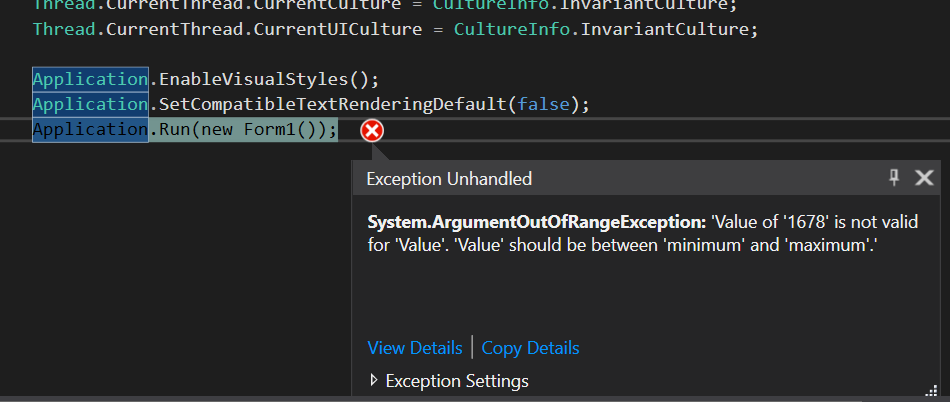
@Daniel Zhang-MSFT No. If you start app and fastly move scrollbar to lower bound, it generates error "value should be between'minimum' and'maximum'" and sometimes one other. If you fastly move scrollbar to upper bound, it generates error "index should be non-zero and lower then max". Please see the attachments.

Hi AleN-3800,
The problem lies in vScrollbar.Value.
And I change your following codes:
if (vScrollbar.Value + (vScrollbar.LargeChange - 1) >= vScrollbar.Maximum)
else if (vScrollbar.Value <= vScrollbar.Minimum)
to
 if (vScrollbar.Value  >= vScrollbar.Maximum)
 else if (vScrollbar.Value <vScrollbar.Minimum)
Then it will not appear error.
Best Regards,
Daniel Zhang
If the response is helpful, please click "Accept Answer" and upvote it.
Note: Please follow the steps in our documentation to enable e-mail notifications if you want to receive the related email notification for this thread.
Hi @Daniel Zhang-MSFT ,
yes, the error will not appear after this, but this does not solve problem. Both conditions will never pass -> new results will be never shown for this conditions:
  if (vScrollbar.Value  >= vScrollbar.Maximum)
  else if (vScrollbar.Value <vScrollbar.Minimum)
I wanted clear table and show new results if user scroll to limit positions.
The lower limit is = (vScrollbar.Value + (vScrollbar.LargeChange - 1) >= vScrollbar.Maximum) //From some reason (MS doc) you need to increment this
The upper limit is = else if (vScrollbar.Value <= vScrollbar.Minimum) //Zero is upper limit scrollbar value
Ales
Hi @Aleš N ,
I guess it may also be related to invoke method. You can try to use BackgroundWorker instead of invoke.
Best Regards,
Daniel Zhang
Hi @Daniel Zhang-MSFT ,
thank you for answer. I think, there is problem in this case with updating scrollbar.Value, when mouse is still holding the scrollbar. I have solved this by using Page up, Page down buttons instead of measuring scrollbar position.
Ales