Custom Keyboard Layout under Windows 10

Anonymous
2020-11-13T21:18:12+00:00

Hi Folks,

I just had some minutes this evening and so I thought lets do something I have on my List since a couple of days. I just bought a really nice 60% keyboard but its missing the lesser/bigger-than key. This can not be this big a deal right? Wow, how can I be that wrong. It turned out to be the biggest hustle since a long time for such a simple thing.

Thats what I did.

  1. Install the Official Microsoft Keyboard Layout Creator 1.4. Here its where everything started. Of course this can not simply be installed without any special knowledge. You have to know that there is a bug in the application which makes it useless if you install it under the default directory (Program Files x86). You need to know that you have to install it inside a directory which has no empty spaces in its name. Alright, so far so good - Done - worked. That must be it.
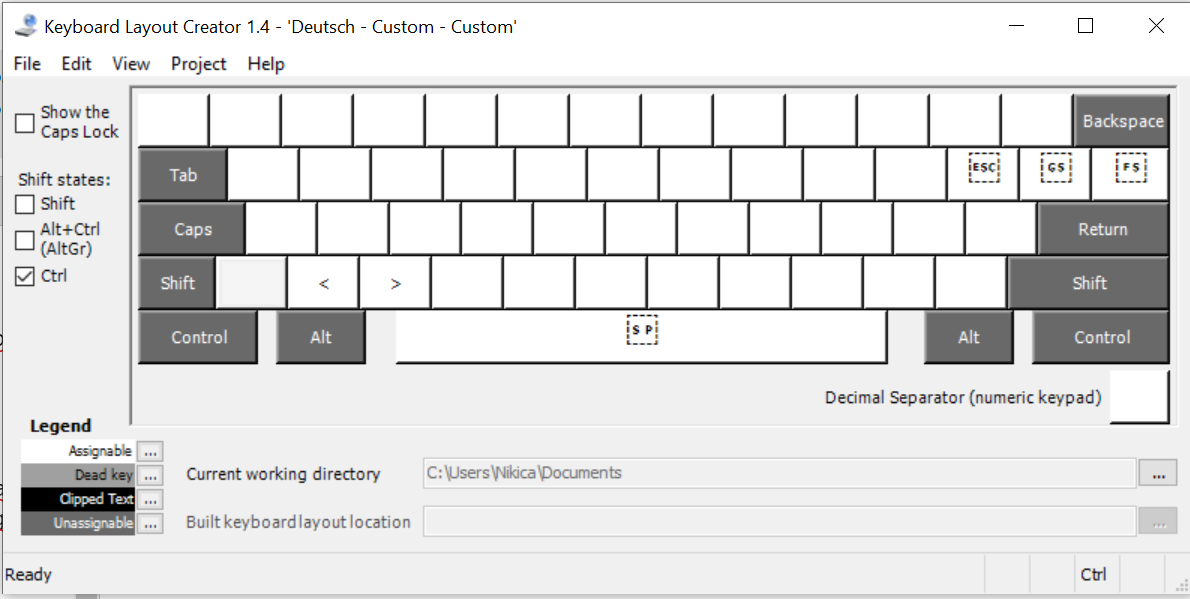
  2. No of course not. First I created my desired keyboard layout. Open the MSKLC > load my current Layout (German) > add my two keys > validate via application > everything fine > Klick "Test Keyboard Layout" > A text editing windows opens I can type in > my STRG+Y and STRG-X creates the lesser and greater than character > GREAT > "Build DLL and Setup Package" > DONE. I get a directory with installation files for the different processor types. I choose the general setup file and it install my layout sucessfully.
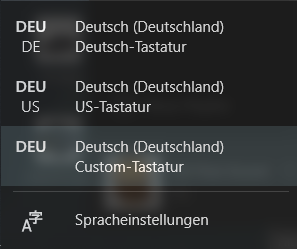
  1. I restart my pc and also find my new profile under the selection in the taskbar:
And now guess what. It does not work. It just does not work. What is this? How can such a important and simple and old requirement for the OS still not be working? I am so mad how much time I already spent in reinstalling, retrying etc just to get this thing working and still does not. How can it be that I have to return this Keyboard and can not be able to use it as a Software developer because I have no chance to create my own on Layout with official Microsoft tools?

Please tell me there is, again, a hidden trick, a thing I dont know, which causes this. I really want to keep this device and just want this simple thing to be working. I would be incredibly thankful to you guys.

Let me know if I can handle out you any information about the installation flow etc which can be usefull.

Thank you so much in advance.

Windows for home | Windows 10 | Devices and drivers

Locked Question. This question was migrated from the Microsoft Support Community. You can vote on whether it's helpful, but you can't add comments or replies or follow the question.

0 comments No comments
{count} votes
Answer accepted by question author
  1. Anonymous
    2020-11-13T21:43:15+00:00

    There is a bug in the application which makes it useless if you install it under the default directory (Program Files x86). You need to know that you have to install it inside a directory which has no empty spaces in its name.

    -> My MKLC is installed in the default folder "Program Files x86" and has been for years. It works perfectly.

    It just does not work.

    -> If you will upload the three .msi files to some cloud storage then I'll test them for you.

    4 people found this answer helpful.
    0 comments No comments

5 additional answers

Sort by: Most helpful
  1. Anonymous
    2020-11-13T22:33:27+00:00

    Hello sm0thy, how are you ?

    My name is Lílian, I am an independent consultant. I'm very happy to help.

    Please, I need information to help you better.

    Do you want to change the keyboard layout?

    1 person found this answer helpful.
    0 comments No comments
  2. Anonymous
    2020-11-14T00:23:28+00:00

    Hi LilianBrust,

    Thank you very much for your reply. 

    Yes, I want to change th keyboard layout as shown in my screenshot of the MSKLC software. But it does simply not work as expected. And what drives me crazy the most is that it worked for some minutes, than randomly stopped and I couldnt reproduce this behavior.

    Greetings

    0 comments No comments
  3. Anonymous
    2020-11-14T00:25:02+00:00

    Hi Frederik Long,

    thank you very much for your reply.

    Please take this drive-link which contains the by MKLC created files:

    https://drive.google.com/file/d/1FtYL4hT9TaZ5Lnxug0NNXh9RA-QJAKxz/view?usp=sharing

    Greetings

    0 comments No comments
  4. Anonymous
    2020-11-14T00:54:33+00:00

    There is a bug in the application which makes it useless if you install it under the default directory (Program Files x86). You need to know that you have to install it inside a directory which has no empty spaces in its name.

    -> My MKLC is installed in the default folder "Program Files x86" and has been for years. It works perfectly.

    It just does not work.

    -> If you will upload the three .msi files to some cloud storage then I'll test them for you.

    Hey Frederik,

    Let me share this additional finding I just made with you:

    The two new character I added work in some inputs and some not. E.G. in the Browser URL input it does not. If I try at the windows search, it works. Visual Studio Code works not.

    Microsoft Office its even more funny in the Mail-Text: Just "lesser-than" works. 

    What the heck is this?

    Greetings

    0 comments No comments
