Community Center | Not monitored
Tag not monitored by Microsoft.

This browser is no longer supported.
Upgrade to Microsoft Edge to take advantage of the latest features, security updates, and technical support.
' cx='32' cy='32' r='32' /%3E%3Ctext x='50%25' y='55%25' dominant-baseline='middle' text-anchor='middle' fill='%23FFF' %3ET%3C/text%3E%3C/svg%3E)
Hello All!
I have a question that i am hoping someone here may be able to help. I am kind of new with Power Automate and have been trying to figure this one out for quite some time without success.
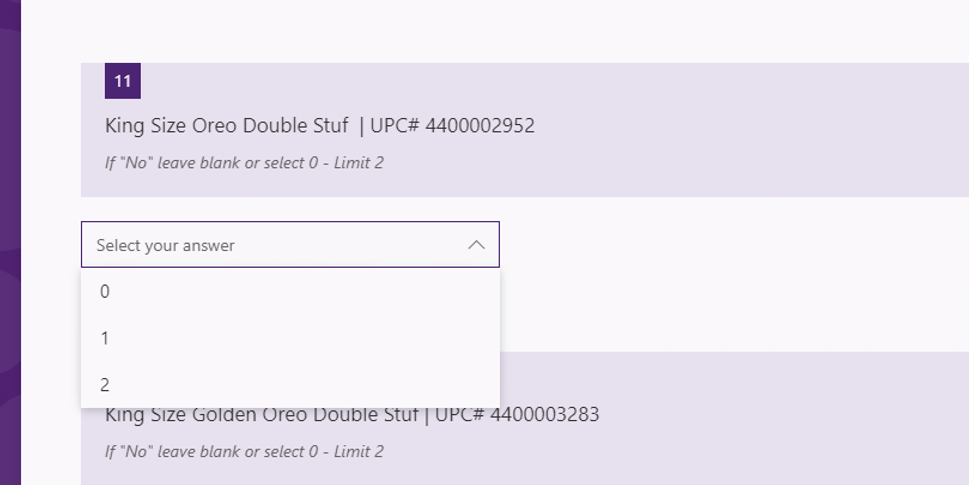
I have a form that i have multiple questions, each question gives a choice to the responder in number. Each question is related to a product and theres a drop down that allows them to select 0,1,2,3. some items goes up to 12, some limit at 2 and some are 3.
Example:
How many Oreo Cookie Single Serve?
(dropdown)
1
2
3
How many Sour Patch Kids?
(dropdown)
1
2
3
4
5
6
7
8
I have several Items that i divided into categories in the forms (Cookie, Candy, Gum, etc), each question has the item name in the question and the answer is a number (qty). 101827-question1.png
I am trying to bring to excel that data showing each of these items in a different row (not columns), example: (
NAME EMAIL ADDRESS CITY ITEM QTY
John Smith john.smith@sharp .com 123 Street st Town Oreo Cookie Single Serve 2
John Smith john.smith@sharp .com 123 Street st Town Sour Patch Kids 6
Pretty much each positive answer (they selected any number) would be on its own row with qty and item while 101827-question1.pngrepeating the responder's information. !
!
' cx='32' cy='32' r='32' /%3E%3Ctext x='50%25' y='55%25' dominant-baseline='middle' text-anchor='middle' fill='%23FFF' %3EA%3C/text%3E%3C/svg%3E)
Power automate is not currently supported here on QnA. The product group actively monitors questions in dedicated forums here.
https://powerusers.microsoft.com/t5/Microsoft-Power-Automate/ct-p/MPACommunity
--please don't forget to upvote and Accept as answer if the reply is helpful--
Thank You Unfortunatelly i do not have access to that forum. i will research elsewhere.
thank you
Sounds good, you're welcome. All you need to do is register.
--please don't forget to upvote and Accept as answer if the reply is helpful--
My company did not give access to that site. i will try a personal account Thank You!
Sounds good then.
--please don't forget to upvote and Accept as answer if the reply is helpful--