Share via

Windows 10 installation issue

Anonymous
2020-11-21T18:32:05+00:00

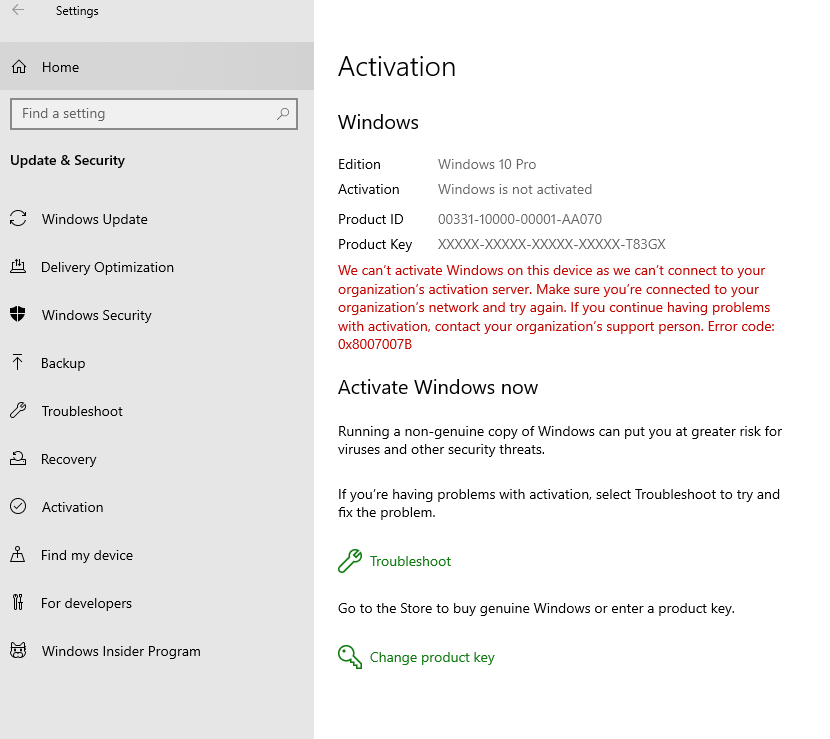
Hi, Previously my PC was installed with unauthorized version of windows 10. System usually throws a message to activate windows. And that windows is a Windows 10 Pro edition. Some organization's windows 10 version was installed in my system previously with product id : 00331-10000-00001-AA070 with some product key ending with T83GX. System gives a error message as below:

"We can't activate Windows on this device as we can't connect to your organization's activation server. Make sure you're connected to your organization's network and try again. If you continue to have problems with activation, contact your organization's support person. Error code: 0x8007007B."

I believe authorized windows 10 version was not installed in my system.

To over come this today I have purchased Window 10 Home edition and installed it. But still I am getting message in my Windows Settings screen at the bottom stating that Windows isn't activated. Activate Windows now. How to get this activated? I am also not able to personalize settings like background color etc.,

Please help and guide me.

Screen shot below for your reference:
Windows for home | Windows 10 | Licensing and activation

Locked Question. This question was migrated from the Microsoft Support Community. You can vote on whether it's helpful, but you can't add comments or replies or follow the question.

0 comments No comments

6 answers

Sort by: Most helpful
  1. DaveM121 891.1K Reputation points Independent Advisor
    2020-11-21T18:36:56+00:00

    Hi Thirumalaiappan

    I am Dave, an Independent Advisor, I will help you with this . . .

    From your screenshot, you still have Windows 10 Pro installed on your PC, if you have purchased a Windows 10 Home licence, then you must backup your files and install the Home version from a bootable Windows 10 USB, and that will activate with your purchased licence . . .

    Was this answer helpful?

    2 people found this answer helpful.
    0 comments No comments
  2. DaveM121 891.1K Reputation points Independent Advisor
    2020-11-22T08:10:41+00:00

    Hi Thirumalaiappan

    Yes,you do need to re-install, if you haveaHome licence, thatis theonly way .. .

    Was this answer helpful?

    0 comments No comments
  3. Anonymous
    2020-11-22T01:15:00+00:00

    Hi Dave,

    Sorry I have not done that. Do I need to reinstall again? Or allowing whatever I installed will any way affect me further?

    Was this answer helpful?

    0 comments No comments
  4. DaveM121 891.1K Reputation points Independent Advisor
    2020-11-21T18:50:26+00:00

    Hi Thirumalaiappan

    Did you clean install from a bootable Windows 10 USB, because that is the only way to go from the Pro to Home version . . .

    Was this answer helpful?

    0 comments No comments
  5. Anonymous
    2020-11-21T18:47:49+00:00

    Hi Dave,

    Thank you very much for your response. I purchased Windows 10 Home edition through online and received only a link. After backing up my files, in a different directory, I clicked the install link and installed Windows. Though I got the product key through email, but it was installed through digital key I believe. It didn't ask for any product keys.

    Thank you.

    Was this answer helpful?

    0 comments No comments
