Share via

Cannot boot from fresh install SSD

Anonymous
2021-01-03T08:59:40+00:00

I bought SSD Samsung 860 evo recently and I want to use it to store the OS instead of my old HDD

(I try using the application out there to migrate OS but there's sector problem so I decide to fresh install)

I did just like the forum said, first I create bootable device which is USB and go to BIOS, I clean the SSD and install windows 10 without any error

But the problem is when I try to boot from SSD, it show the black screen with cursor and then cut to the bootable device. If I'm not wrong, it's because it cannot find windows right?

This is the list I have done already.

  • the SSD is already in GPT but the HDD is in MBR and I'm not sure is that a problem
  • I'm using Asrock h310m-hdv as a main board and I just update the BIOS like today, the BIOS have no option for AHCI but from what I search, the default is already AHCI
  • I set the BIOS to UEFI
  • when I install windows, I have only SSD connect to the system
  • secure boot, fast boot is turn off
  • I try switch cable for SSD and HDD and also change port, the result is HDD still working but not for SDD.

Other Info

  • in the BIOS there's no windows boot manager in the options, it have only the SSD, HDD and bootable device. But I'm not sure is this normal or something because I see in other forum that it's normal to have boot from windows boot manager when dealing with UEFI.
  • I'm pretty sure SSD is not broken because I used it as storage before

More info

This is the file system of SSD after I install windows (HDD is C:/ and SSD is D:/)
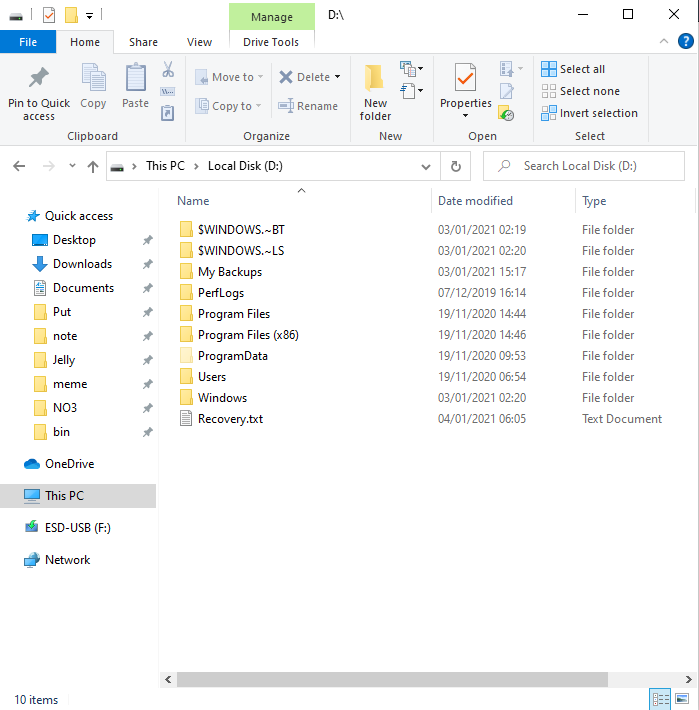
and this is respond for command 'bcdedit'

Windows Boot Manager


identifier              {bootmgr}

device                  partition=C:

description             Windows Boot Manager

locale                  en-us

inherit                 {globalsettings}

default                 {default}

resumeobject            {78f0c8b7-4c41-11eb-81ec-ec4f121edda8}

displayorder            {default}

                        {78f0c8b6-4c41-11eb-81ec-ec4f121edda8}

toolsdisplayorder       {memdiag}

timeout                 30

Windows Boot Loader


identifier              {default}

device                  partition=C:

path                    \Windows\system32\winload.exe

description             Windows 10

locale                  en-us

inherit                 {bootloadersettings}

allowedinmemorysettings 0x15000075

osdevice                partition=C:

systemroot              \Windows

resumeobject            {78f0c8b7-4c41-11eb-81ec-ec4f121edda8}

nx                      OptIn

bootmenupolicy          Standard

Windows Boot Loader


identifier              {78f0c8b6-4c41-11eb-81ec-ec4f121edda8}

device                  partition=D:

path                    \Windows\system32\winload.exe

description             Windows 10

locale                  en-us

inherit                 {bootloadersettings}

allowedinmemorysettings 0x15000075

osdevice                partition=D:

systemroot              \Windows

resumeobject            {78f0c8b5-4c41-11eb-81ec-ec4f121edda8}

nx                      OptIn

bootmenupolicy          Standard

Thanks in advance.

Windows for home | Windows 10 | Performance and system failures

Locked Question. This question was migrated from the Microsoft Support Community. You can vote on whether it's helpful, but you can't add comments or replies or follow the question.

0 comments No comments

22 answers

Sort by: Most helpful
  1. Anonymous
    2021-01-03T21:16:06+00:00

    Hi,

    That looks correct, but you still need to select your one time boot device from Boot Options..

    What you are showing is not the correct screens..

    You need to hit something like F11 to get to that menu.. At least that is what my Asrock machine uses..

    You might also try connecting your SSD to the SATA3_0 or SATA3_01 port..

    Was this answer helpful?

    0 comments No comments
  2. Anonymous
    2021-01-03T16:36:29+00:00

    I try boot from SSD wth this set up.

    and the result is

    I try using recovery tools but it's not working

    Was this answer helpful?

    0 comments No comments
  3. Anonymous
    2021-01-03T14:45:52+00:00

    Hi,

    WindowsBootmanager will only appear if it is detected by your Bios..

    It should even be showing in the Menu where you select your UEFI: usb name...

    I can only suggest that you set the SSD as the 1sdt Boot Device in Bios and see if the WindowsBootManager appears.. You may need to select the SSD as the first HDD as well.. Sometimes there is more than one setting..

    I would remove the "Bootable Device" you mention from the boot list and access with the Boot Menu at startup when needed..

    You may want to double check your UEFI\CSM\Legacy Bios settings..

    You might want to create another flash drive with the installation media.. If it is not correct, the installation may not be done as a UEFI regardless of the Bios settings.. A lot of Bios's determine their UEFI\Legacy setting upon the was the boot device is configured..

    Was this answer helpful?

    0 comments No comments
  4. Anonymous
    2021-01-03T13:04:02+00:00

    Hi,

    Thanks for fast reply

    My answer is as follow

    • I did remove other drive during installation, there's only my SSD connected
    • I also did remove my bootable device but everything still the same
    • there's no windows boot manager for boot options, there's only my SSD, HDD, bootable device when I connected it.
    • when I boot I use bootable device which name is 'UEFI: usb name', so I think it's UEFI version
    • I clear SSD many times, about 10 but it all end up the same problem

    So I think the problem is about windows boot manager because it didn't show anywhere, but what can I do about it?

    Was this answer helpful?

    0 comments No comments
  5. Anonymous
    2021-01-03T12:48:33+00:00

    Hi,

    You might want to remove any other drives when doing  an installation.. Having additional drives attached can cause a variety of possible boot problems..

    The "Bootable Device" used to install Windows should be removed during the first restart..

    You are correct that WindowsBootManager should be the boot device for UEFI Bios.. If it is not there, there is a problem..

    You might try hitting Boot Options at the manufacturer's screen and see if the WindowsBootManager is there..

    This usually requires something like F9, F11, F12, Esc, to access..

    You might try another installation and make sure you select your flash drive as the UEFI version using Boot Options.. You should see it twice..

    Do a Custom Install and delete everything on the SSD and select the Unallocated space for the installation..

    Was this answer helpful?

    0 comments No comments
