Share via

Windows Security & Updates broken (Second time)

Anonymous
2020-12-10T06:05:57+00:00

So I'm having some issues with Windows at the moment, the weird thing is that I had these exact same issues in July, and the only way I could fix them was to completely reinstall windows, now a few months later I am facing the exact same issues once again. Very strange.

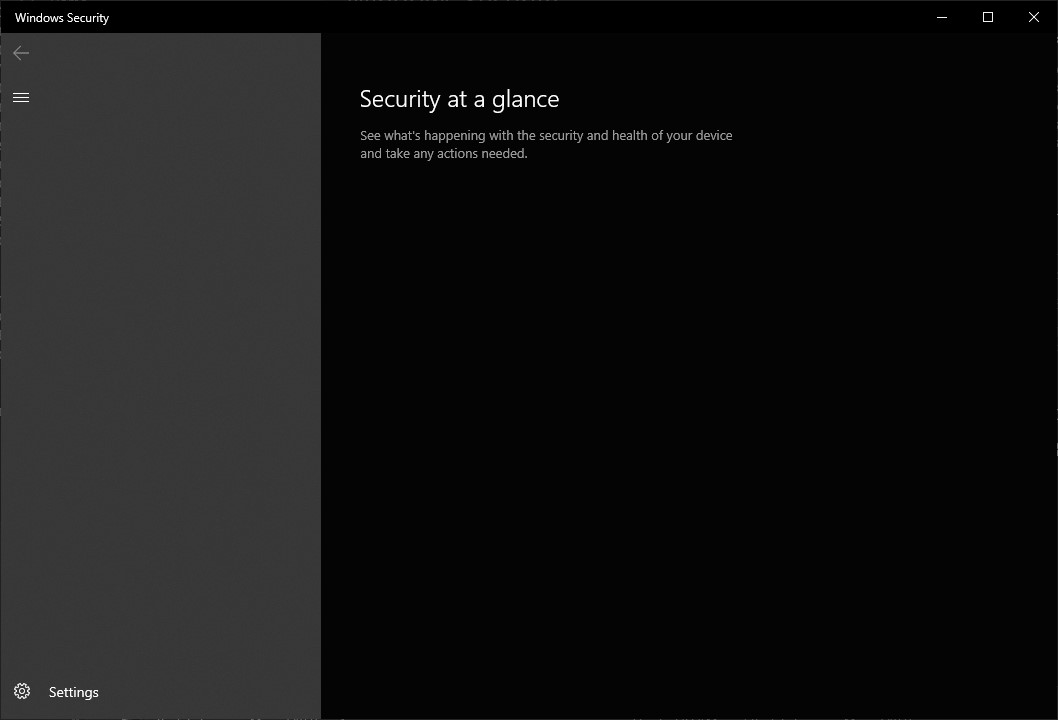
The issue is that windows defender appears to be completely broken, the security window appears as empty and never loads.

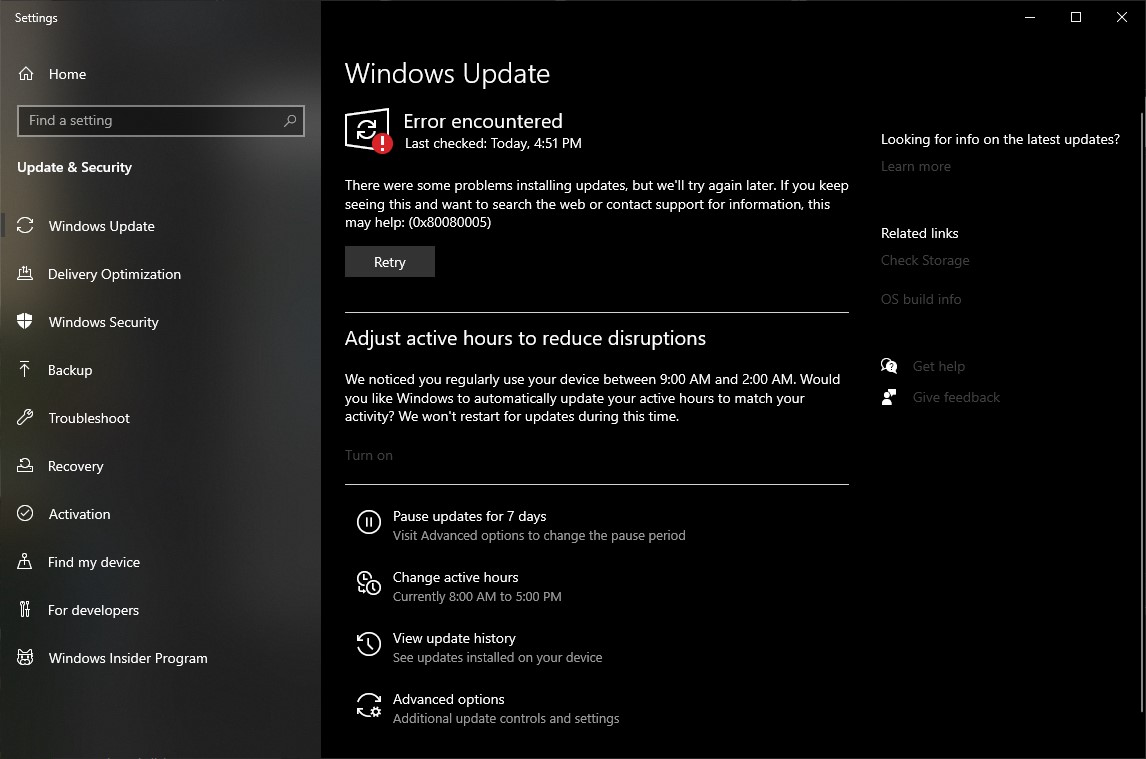
And the other issue is that the updates window is broken and cannot check for updates.

I had these exact same issues in July, couldn't fix them then, did a complete reinstall, not long later I have the exact same issues again, and once again they cannot be fixed.

So because this issue is recurring across installs I figured it must be something wrong with my hard drive, maybe it has some bad sectors and Windows is suffering because of that, but I just finished the lengthy chkdsk routine and it has come back clean! So I have no idea what the issue could be, must be something wrong with windows...

Chkdsk logs: https://pastebin.com/2jLYvVyW

Yes I've tried everything online, sfc, DISM, WinRE, nothing works. 

The only thing I haven't tried is updating, because it doesnt work, and restarting the service, because the services tool doesnt allow me to:
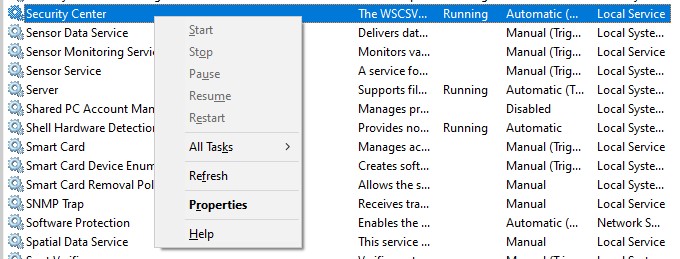
I am willing to provide whatever you ask, anything at all, to help find the cause of this issue, even if it doesnt lead to a fix, and I have to reinstall once again, I just want it to not happen again.

According to the update window I am on OS Build 19041.630 and version 2004. Let me know if any other information will be useful.

Pictures of the errors:
Windows for home | Windows 10 | Performance and system failures

Locked Question. This question was migrated from the Microsoft Support Community. You can vote on whether it's helpful, but you can't add comments or replies or follow the question.

0 comments No comments

8 answers

Sort by: Most helpful
  1. Anonymous
    2020-12-10T06:41:24+00:00

    Joel, I gave you every possible step to proceed to fix your install. I only started with the Clean Install because I wanted you to compare it so you'd know if you'd done the kind of Clean install that assures you never have these problems again. Then I went on to sequence the repairs for you to try, and said I was standing by to help you here.

    In reply you only referred to the Clean install as though that was the only thing I suggested! You ignore all other steps which directly addressed the fixes needed, and instead rated my post unhelpful. Why?

    Was this answer helpful?

    0 comments No comments
  2. Anonymous
    2020-12-10T06:31:14+00:00

    Hi Greg, from reading the guide that you link to it seems that it just explains how to perform a fresh reinstall of windows, which as I stated in my orginal post was how I originally had to fix this issue, and it has now come back.

    Also in June when this issue first occured I did try the repair/upgrade media and after about an hour it just gave up with an error and said it could not help.

    I fear that reinstalling is probably the only way to fix this issue once again, but what I'm really looking for here in this post is some official Microsoft support that I can send some logs to or something and they can tell me what went wrong, or that they can fix that and I won't have this issue again. Because I really don't want to reinstall windows every 5-6 months.

    Was this answer helpful?

    0 comments No comments
  3. Anonymous
    2020-12-10T06:22:45+00:00

    Hi Joel. I'm Greg, an eleven years awarded MVP, Volunteer Moderator, and Independent Advisor here to help you until this is resolved.

    Did you do the gold standard Clean Install in this link: http://answers.microsoft.com/en-us/windows/wiki... The reason I ask this is that no one who has adopted the install in the above link has ever come back to report further problems I've seen.

    Since the steps to repair the Store and Updates are longs lists, I'd save time and run a Repair Install which reinstalls WIndows while saving your files and apps in place, brings it up to the latest version by the most stable method, takes about an hour, resolves most problems:

    1. Install the Media Creation Tool from this link: http://windows.microsoft.com/en-us/windows-10/m...
    2. Choose Download Tool Now.
    3. Install the tool, open it and choose Upgrade this PC Now.
    4. If any problems follow these steps for overcoming Version Upgrade problems: http://answers.microsoft.com/en-us/windows/wiki...

    If you'd prefer to try to fix the Store and Updates, let me know and I'll give you the steps that I have given here daily for five years to thousands of people to fix them.

    I hope this helps. Based on what you report back I can answer any questions and may have other steps to perform. If you'll wait to rate whether my post was helpful, I will keep working with you until it's resolved.

    ______________________________________________

    Standard Disclaimer: There are links to non-Microsoft websites. The pages appear to be providing accurate, safe information. Watch out for ads on the sites that may advertise products frequently classified as a PUP (Potentially Unwanted Products). Thoroughly research any product advertised on the sites before you decide to download and install it.

    Was this answer helpful?

    0 comments No comments
  4. Anonymous
    2020-12-10T06:14:01+00:00

    Any 3rd party anti virus, security, cleanup programs EVER installed on the computer?

    Nope never, I actually swear by Windows Defender and often tell people it's the only security program they need.

    And as a software developer I know it's unwise to run so-called "cleanup utilities" that often mess with windows' registry.

    So to answer your question: no :)

    Was this answer helpful?

    0 comments No comments
  5. Anonymous
    2020-12-10T06:09:06+00:00

    Any 3rd party anti virus, security, cleanup programs EVER installed on the computer?

    Was this answer helpful?

    0 comments No comments