Developer technologies | .NET | Xamarin
A Microsoft framework for building cross-platform mobile apps using .NET and C# with native performance and user interfaces.
This browser is no longer supported.
Upgrade to Microsoft Edge to take advantage of the latest features, security updates, and technical support.
' cx='32' cy='32' r='32' /%3E%3Ctext x='50%25' y='55%25' dominant-baseline='middle' text-anchor='middle' fill='%23FFF' %3EE%3C/text%3E%3C/svg%3E)
Hi,
Is it possible somehow with Xamarin Forms to add views to WebView's ScrollView? In our old iOS native app we were able to do this via WebView.ScrollView.Add() method,
but not sure how to achieve this in forms?
Reason for this is that I've some content above WebView (building email compose screen, so From/To/Cc/Bcc/Subject etc.) and I want this content to scroll together with the WebView. If I wrap everything with ScrollView e.g. something like this
<ScrollView>
    <StackLauout>
        <TextEdit Label="Subject"/>
        <ctrl:HybridWebView x:Name="webView">
            <WebView.Source>
                <HtmlWebViewSource Html="{Binding Html}"/>
            </WebView.Source>
        </ctrl:HybridWebView>
    </StackLayout>
</ScrollView>
But the problem is that WebView has ScrollView so it fights with ScrollView wrapper and you get strange behaviour.
Good example of what I'm trying to achieve would be Gmail/Outlook apps when composing new email.
I've also observed interesting things how it works in Gmail and Outlook. In Gmail app when you type some text when composing email you can see that all the fields above (From, To, Subject etc.) are in the same scrollView as editor itself, as vertical scrollbar goes all the way up. So looks like Google devs added all the fields above WebView into WebView.ScrollView.
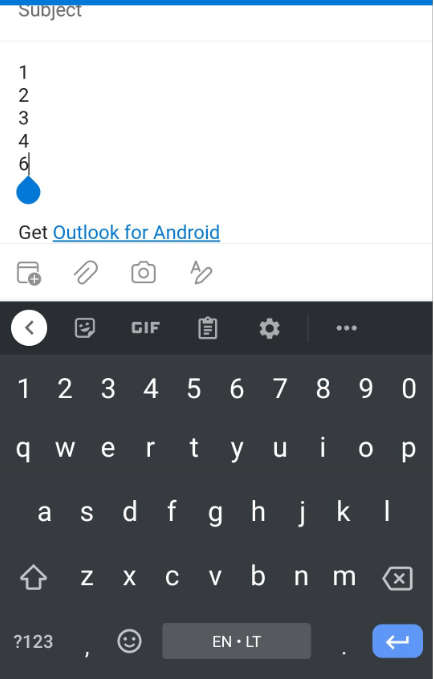
Outlook app behaves differently as scrollbar is only visible in editor itself, but somehow they scroll whole thing when required, no idea how they did this. Perhaps changing TranslationY on fields above?
' cx='32' cy='32' r='32' /%3E%3Ctext x='50%25' y='55%25' dominant-baseline='middle' text-anchor='middle' fill='%23FFF' %3EKW%3C/text%3E%3C/svg%3E)
Hi EJ-5254,
Welcome to our Microsoft Q&A platform!
If "strange behaviour" means that the scroll bar of the WebView cannot be used, you can try to solve this problem by adding a Renderer to WebView.
You can create the renderer For Android as follows.
[assembly: ExportRenderer(typeof(WebView), typeof(MyWebViewRenderer))]
namespace scrollview.Droid
{
    public class MyWebViewRenderer : WebViewRenderer
    {
        protected override void OnElementChanged(ElementChangedEventArgs<WebView> e)
        {
            base.OnElementChanged(e);
            if (e.OldElement != null)
            {
                Control.Touch -= Control_Touch;
            }
            if (e.NewElement != null)
            {
                Control.Touch += Control_Touch;
            }
        }

        void Control_Touch(object sender, Android.Views.View.TouchEventArgs e)
        {
            switch (e.Event.Action)
            {
                case MotionEventActions.Down:
                    Control.Parent.RequestDisallowInterceptTouchEvent(true);
                    break;
                case MotionEventActions.Up:
                    Control.Parent.RequestDisallowInterceptTouchEvent(false);
                    break;
            }
            Control.OnTouchEvent(e.Event);
        }
    }
On iOS, the webview's scrollbar work fine without any renderer.
Update:
To enable to scroll the Editor in scrollview, you can create a listener and a custom renderer for it as follows. And here is the reference link.
[assembly: ExportRenderer(typeof(Editor), typeof(CustomEditorRenderer))]
namespace scrollview.Droid
{
    class CustomEditorRenderer : EditorRenderer
    {
        protected override void OnElementChanged(ElementChangedEventArgs<Editor> e)
        {
            base.OnElementChanged(e);
            if (e.OldElement == null)
            {
                var nativeEditText = (global::Android.Widget.EditText)Control;

                nativeEditText.OverScrollMode = OverScrollMode.Always;
                nativeEditText.ScrollBarStyle = ScrollbarStyles.InsideInset;
                nativeEditText.SetOnTouchListener(new CustomTouchListener());

                Control.VerticalScrollBarEnabled = true;
                Control.MovementMethod = ScrollingMovementMethod.Instance;
                Control.ScrollBarStyle = Android.Views.ScrollbarStyles.InsideInset;
                Android.Content.Res.TypedArray a = Control.Context.Theme.ObtainStyledAttributes(new int[0]);
                InitializeScrollbars(a);
                a.Recycle();
            }
        }
    }

    public class CustomTouchListener : Java.Lang.Object, Android.Views.View.IOnTouchListener
    {
        public bool OnTouch(Android.Views.View v, MotionEvent e)
        {
            v.Parent?.RequestDisallowInterceptTouchEvent(true);
            if ((e.Action & MotionEventActions.Up) != 0 && (e.ActionMasked & MotionEventActions.Up) != 0)
            {
                v.Parent?.RequestDisallowInterceptTouchEvent(false);
            }
            return false;
        }
    }
}
Regards,
Kyle
If the response is helpful, please click "Accept Answer" and upvote it.
Note: Please follow the steps in our documentation to enable e-mail notifications if you want to receive the related email notification for this thread.
Hi Kyle,
I've tried this code before, WebView now can scroll, but it won't scroll TextEdit in my example. I need to scroll everything inside ScrollView.
Thank you, but I don't use Editor, I need this to work with WebView?
As an example this is how it looks in Outlook app:

Now when I start entering text it moves everything up if it can't fit:
How can I achieve this?