Why invalid directory error for Desktop, when it is a valid directory?

Anonymous
2021-01-12T04:10:03+00:00

When I try to open a file that I put on the Desktop, I get an error saying the directory is invalid:
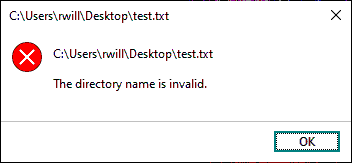
Here's the story:

I don't want onedrive, so I unlinked to my microsoft account, then uninstalled onedrive, then changed the location of Desktop from onedrive (which it still was pointed to even after uninstall), to a new user folder in my profile called Desktop.

Now, when I try to open any file on the desktop, it says Invalid directory and won't open them.

I can create files there, but can't open them. Also, I can open folders on the Desktop just fine.

Anyone know what going on?

Did I hose things up really bad by wanting all vestiges of OneDrive gone? I still have to live with the inane situation where I have Desktop in three places in file explorer, all pointing to my User profile folder. Yes, I am very particular about some really insignificant things, but hey that's me.

Windows for home | Windows 10 | Files, folders, and storage

Locked Question. This question was migrated from the Microsoft Support Community. You can vote on whether it's helpful, but you can't add comments or replies or follow the question.

0 comments No comments
{count} votes
Answer accepted by question author
  1. Anonymous
    2021-01-12T06:09:56+00:00

    Hi, I'm Robinson, an Independent Advisor and a Windows user like you.

    Check if doesn't any corrupt file on the windows.

    1-Press Start>Windows System> Command Prompt right-click run as admin and type these commands.

    DISM.exe /Online /Cleanup-image /Restorehealth [Enter]

    sfc /scannow [Enter]

    2 people found this answer helpful.
    0 comments No comments

1 additional answer

Sort by: Most helpful
  1. Anonymous
    2021-01-12T23:06:25+00:00

    Thanks Robinson. I think the SFC fixed it, but not sure.

    After SFC had no immediate effect, I tried some other things like a disk check, removing read only from all files under user profile, and finally,

    restore default location for Desktop (which by the way left it under my user profile anyway). None of those worked, but then a little voice in my head said "reboot dummy". So I did, and voila, problem gone.

    So lets just say SFC fixed it. Don't need to try DISM at this point. If anyone wants to chime in with other info, they can. Its fixed so I am not worried about it now.

    Funny thing though:  Prior to the SFC I had deleted the OneDrive folder since it was uninstalled anyway. SFC put it back under my user profile. I guess Microsoft REALLY wants Windows 10 computers to have OneDrive.

    So thanks again.

    0 comments No comments
